

You turned on Databricks autoscaling to stop paying for workers you aren't using. But when a job finishes, the cluster doesn't shrink right away. It keeps its workers for a set window first, which is 40 seconds on job compute and 150 seconds on all-purpose compute.
The setting that controls it, spark.databricks.aggressiveWindowDownS, is only documented for making that wait longer. If you want workers gone sooner, you resize the cluster yourself. Cutting idle compute is one of the five habits that move a Databricks bill, and autoscaling is one layer of the full cost optimization framework.
TL;DR
- Databricks has three features called autoscaling, one for classic clusters, one for Lakeflow pipelines, and one for Lakebase. This article covers the first, which runs on job and all-purpose clusters.
- A job cluster scales up on pending tasks against available task slots, so CPU graphs alone won't tell you when it will grow.
- It scales down after 40 seconds of underutilization on job compute and 150 seconds on all-purpose compute.
- The timer setting,
spark.databricks.aggressiveWindowDownS, is documented only for slowing scale-down. - To change the worker count on a running cluster, use
databricks clusters resize.databricks clusters editrestarts the cluster.
Which "Databricks autoscaling" are you even asking about?
Databricks uses the name autoscaling for three separate features, each on a different kind of compute. Before you tune anything, check which one you have.
The three kinds of Databricks autoscaling
- Classic compute autoscaling runs on job and all-purpose clusters. It moves the worker count between a minimum and a maximum you set, based on pending tasks and available task slots.
- Enhanced autoscaling runs on Lakeflow pipelines and scales on task slot utilization and task queue size.
- Lakebase autoscaling resizes a Postgres compute inside a range of Compute Units (CU) that you set, based on CPU load, memory usage, and working set size. It also has a separate scale to zero feature that suspends an idle compute.
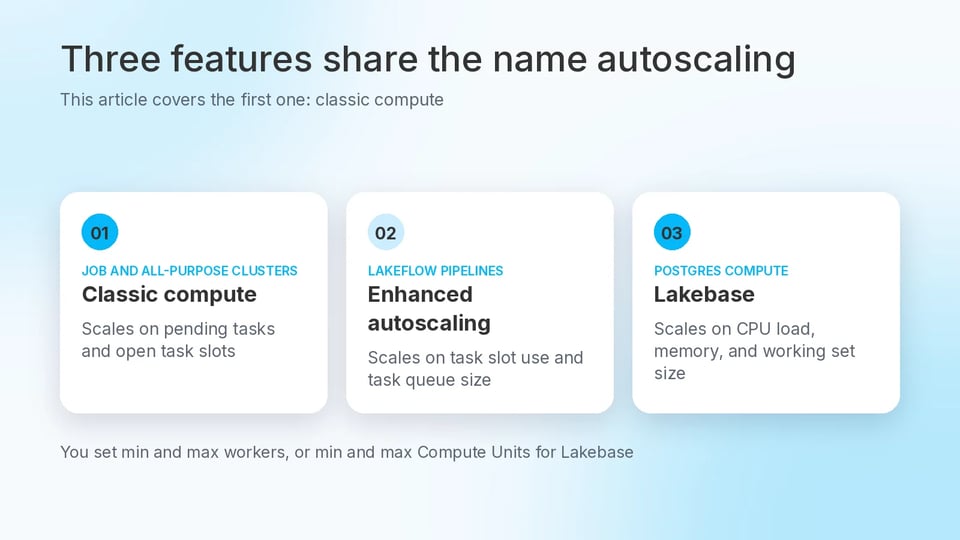
Three Databricks features share the name autoscaling. This article covers the first.
This article covers cluster autoscaling on classic compute. If you're sizing a Postgres database, read our Lakebase guide.
How does classic autoscaling decide to scale up?
A job cluster adds workers when Spark has more tasks pending than task slots to run them. Autoscaling decides from Spark scheduler signals, so CPU percentage alone won't tell you when a cluster is about to grow.
All-purpose clusters use the same autoscaler. On the Premium plan or above, every cluster type uses optimized autoscaling by default, and it can scale from minimum to maximum in at most two scaling events. Standard plan workspaces use standard autoscaling, which starts by adding eight nodes and then scales up exponentially.
Two limits apply before you rely on it. Autoscaling isn't available for spark-submit jobs. And a cluster can drop below your minimum when the cloud provider terminates instances, in which case Databricks keeps retrying until the minimum is restored.
Everything below describes optimized autoscaling on AWS and Azure.
Here's the baseline cluster spec, with an autoscaling range of 2 to 10 workers. Swap the two uppercase placeholders for a runtime version and a node type from your own workspace.
{ "cluster_name": "nightly-etl", "spark_version": "YOUR_RUNTIME_VERSION", "node_type_id": "YOUR_NODE_TYPE", "autoscale": { "min_workers": 2, "max_workers": 10 }}Worker count is only part of what a cluster costs. The rate each worker bills at counts too. On classic clusters, Photon-enabled compute consumes Databricks Units (DBUs) at a higher rate than equivalent non-Photon compute, and Photon's DBU math shows when that pays off.
Why does Databricks wait to let idle workers go?
Databricks waits because scale-down runs on a window. A job cluster will scale down once it has been underutilized for 40 seconds, and an all-purpose cluster after 150 seconds. So an all-purpose cluster that holds its size for a couple of minutes after a job ends is behaving normally.
A Spark configuration property, spark.databricks.aggressiveWindowDownS, sets in seconds how often the cluster makes down-scaling decisions. You set it in the cluster's Spark config, and the maximum is 600.
Scale-down doesn't need the whole cluster to go quiet. Optimized autoscaling can remove workers while the cluster is still busy by checking the shuffle file state, and how far it will scale down is based on a percentage of the current nodes. Streaming is different. Autoscaling has limits when scaling down Structured Streaming workloads, and Databricks recommends pipelines with enhanced autoscaling for those.
The window helps bursty workloads. A higher value holds onto nodes longer, through the short idle gaps between stages.
Raising the value makes the cluster scale down more slowly. Lower values are undocumented, so don't build a cost plan on one.
Here's the baseline spec with the property set to 300 seconds, for a bursty workload.
{ "cluster_name": "nightly-etl", "spark_version": "YOUR_RUNTIME_VERSION", "node_type_id": "YOUR_NODE_TYPE", "autoscale": { "min_workers": 2, "max_workers": 10 }, "spark_conf": { "spark.databricks.aggressiveWindowDownS": "300" }}Does the default suit a team that answers for the bill? We think it does. A higher value keeps idle workers running longer, and you pay for them while they run. We'd only raise it for a bursty workload, to hold workers through the short gaps between stages.
Autoscaling is one setting among many. Download our free ebook, The Guide to Databricks Cost Optimization, for five core strategies and a decision tree that maps your specific cost problem to the right fix.
How do you resize a running cluster to release workers?
Use databricks clusters resize, the Databricks command-line interface (CLI) command for changing the worker count on a running cluster. Set the cluster to its minimum, then set the autoscale range again when work resumes.
# Set a fixed worker count of 2databricks clusters resize YOUR_CLUSTER_ID --num-workers 2# Set the autoscale range againdatabricks clusters resize --json '{ "cluster_id": "YOUR_CLUSTER_ID", "autoscale": { "min_workers": 2, "max_workers": 10 }}'The first command resizes the cluster to a fixed number of workers, and it only works while the cluster is running. The second sets the autoscale range again. It passes the cluster ID inside the JSON because the CLI doesn't accept a positional argument alongside --json.
It takes two commands because an autoscale range can't be a single number. In the Clusters API, max_workers must be strictly greater than min_workers, so you set a fixed count of 2 and set the range again later.
Don't use databricks clusters edit here. Editing a running cluster restarts it, and clusters created by the Jobs service can't be edited at all.
Try this on a non-production cluster first. The moments to use it are the ones where you know no work is coming, like the end of a batch window or the start of a maintenance freeze.
Skip it on all-purpose clusters that people query through the day. You can't predict the next request there, so the 150-second window is the better guard.
If dropping to the floor is safe at the end of every batch window, why is someone on your team still doing it by hand? We don't think they should be. A step that's safe every time, and only happens when someone remembers it, is a step to automate.
What happens when new work shows up?
When work returns, the cluster needs workers again, and new nodes take time to provision. After a resize from 5 to 10 workers, for example, the target size updates at once while the workers increase gradually as nodes come up.
An instance pool shortens that wait by keeping idle instances ready, but only if the pool is big enough. If the cluster asks for more than the pool's minimum number of idle instances, it starts no faster than a cluster without a pool.
Idle pool instances still add to your costs. Setting Min Idle instances to 0 avoids paying for instances that aren't doing work, and the Idle Instance Auto Termination time controls how long a released instance stays in the pool before it's dropped.
Which anti-pattern breaks all of this?
The anti-pattern is enabling Apache Spark Dynamic Allocation (spark.dynamicAllocation.enabled) on a cluster that already uses Databricks autoscaling.
Databricks autoscaling already manages worker nodes and executor lifecycle at the platform level, so turning on Dynamic Allocation gives you two systems making the same call. That can cause conflicting scaling decisions, executor churn, NODES_LOST errors, and tasks that are never picked up.
If you see either symptom on an autoscaling cluster, check for that setting first. Remove it from the cluster's Spark config, and check your compute policies too, since workspace admins can use them to enforce Spark configurations.
Autoscaling changes the worker count. Shutting down an idle cluster is a different job, and auto termination is a separate control.
What does doing this by hand cost, and what does SELECT automate?
Everything above is engineering time. You read a cluster spec, set a Spark config, run a resize at the end of the batch window, and run another one when work resumes. Then you do it again for the next cluster. And autoscaling parameters are only one of the cluster choices that shape your bill, next to cluster size, instance type, and spot instance usage. We count autoscaling in the easy wins tier of Databricks cost work.
That's the work we built Automated Savings to take over. SELECT's Automated Savings for Databricks automatically adjusts worker count and auto-scaling behavior to reduce costs on SQL warehouses and All-Purpose Compute. We report savings of up to 30 percent on eligible workloads, with no ongoing engineering effort. The Optimize chapter of our ebook goes deeper on this layer.
Is running these steps by hand a defensible trade, or a cost that compounds as your clusters and schedules multiply? That call is yours. Our view: for one or two clusters on a fixed schedule, doing it by hand is a fair trade. Past that, every new cluster adds another resize someone has to remember, and that's the cost that compounds.
To see your own savings potential, book a demo or start a free trial.