

Use SELECT Copilot from Claude Code, Cursor, and other AI tools with MCP
Wednesday, May 06, 2026
 Jonathan TalmiProduct Engineer @ SELECT
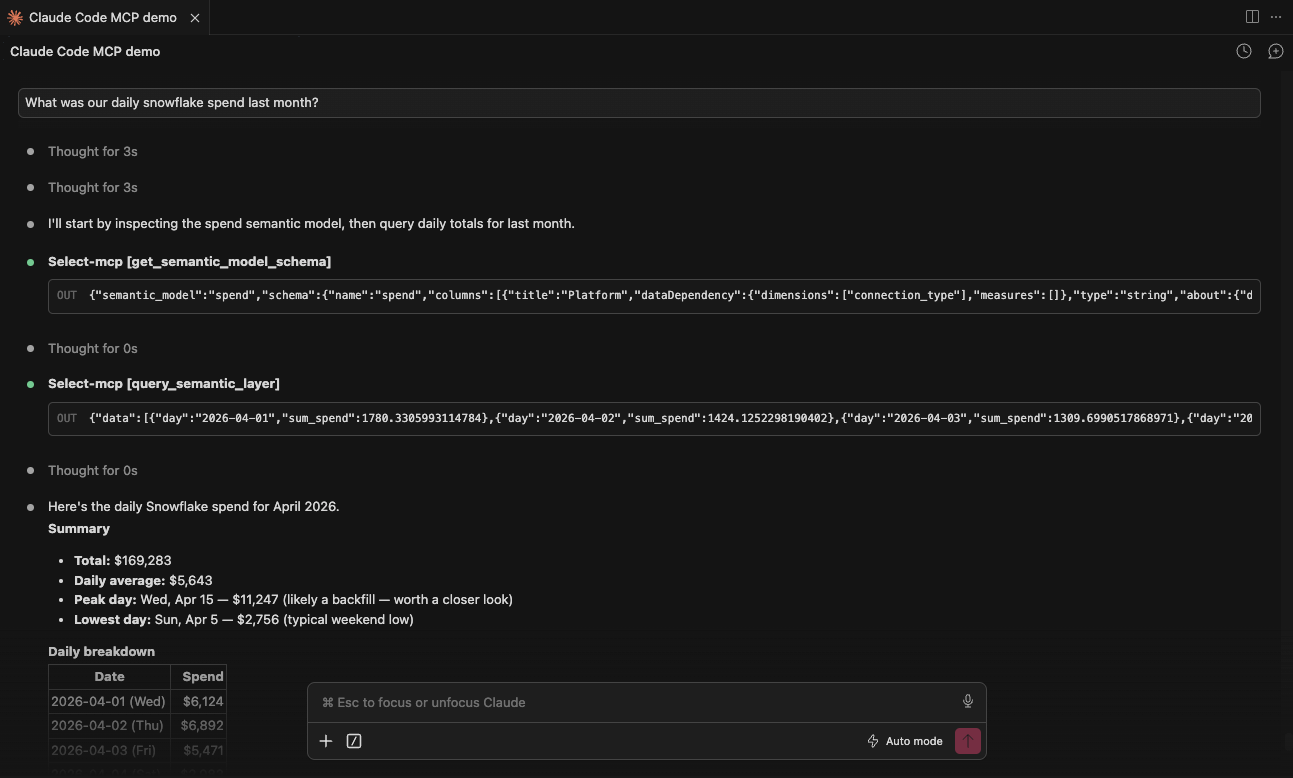
SELECT Copilot is now available over the Model Context Protocol (MCP). You can ask the same questions you'd ask Copilot in the SELECT app or in Slack, but right from any MCP-compatible AI client — Claude Code, Cursor, Codex, and more.
If you spend most of your day in your editor or terminal, you no longer have to switch contexts to investigate a Snowflake cost spike or analyze a slow query. Copilot meets you where you already work.
Get started
Setup is a one-line install for Claude Code, or a small config snippet for Cursor and Codex CLI. See the MCP Server documentation for the exact commands. After a quick browser sign-in on first use, your client takes care of the rest.
As always, Copilot only sees data you already have permission to view in SELECT, and it can't change anything in SELECT or Snowflake.
What you can ask
Ask the same questions you would ask in the SELECT app, like:
- "Why did our Snowflake spend spike yesterday?"
- "Which warehouses are most expensive this week?"
- "Find the slowest queries on LOAD_WH in the last 24 hours and tell me how to fix them."
- "Analyze query <query_id> and explain why it's slow."
Other Things We shipped
- 🚀 Added support for one-time run and notebook orchestration jobs in Databricks
- 🚀 Added an All Workloads page for Databricks, providing a consolidated view of workload activity and spend across workspaces
- 🪄 Added Activity Feeds to Budgets
- 🪄 Improved UI for large usage group sets in the Usage Group Set management modal
- 🪄 Improved taglist +N Show All UI
- 🐛 Fixed an issue where Databricks insights were not visible despite having sufficient user permissions
Up next.Previous Changelog Entries.