

If you lead platform or data engineering and are weighing Databricks cost optimization tools, start by asking what a paid tool adds beyond Databricks. Databricks' announcement of Governance Hub describes FinOps (Financial Operations) leads drilling into spend and identifying its drivers without maintaining dozens of queries and dashboards. Governance Hub brings that analysis into the account console.
The right tool for you depends on your estate and how much control you want it to have over your Databricks resources. This guide compares four categories based on write access, scope, and public pricing. Write access shows you what the tool can change, while scope indicates whether it works only with Databricks or across several platforms. Each tool is classified by the write-access model its vendor describes.
TL;DR
- Native controls and Governance Hub (Beta) show your total Databricks spend and how much of it is tagged.
- Cost intelligence platforms such as LakeSentry give you job- and team-level attribution, anomaly detection, and prioritized actions for your team to apply.
- Autonomous engines such as Sedai, Altimate, Capital One Slingshot, Unravel, and SELECT can modify your Databricks resources for you, with approval levels that vary by tool.
- Broad FinOps platforms such as Flexera combine your Databricks costs with cloud and data platform spend.
- Choosing between them comes down to how much authority you give a tool to modify your Databricks resources.
Do you still need Databricks cost optimization tools in 2026?
You still need a paid tool if Governance Hub leaves work undone for your team. Governance Hub entered Beta in July 2026 and was announced publicly in August.
Governance Hub changes how you evaluate paid tools. Its Cost page shows you where your money goes. If you need attribution down to the user or query, or want optimizations applied to your resources for you, you need more than the Cost page offers.
To determine what you need, start with the five habits in Databricks cost optimization actually explained, which outline the work involved in reducing Databricks costs. The FinOps Foundation's Inform, Optimize, and Operate phases show where that work sits, with Inform examining cost and usage data, Optimize identifying efficiency opportunities, and Operate implementing the changes. Whatever Governance Hub does not cover across those habits and phases is what a paid tool has to add.
What are the four categories of Databricks cost tooling?
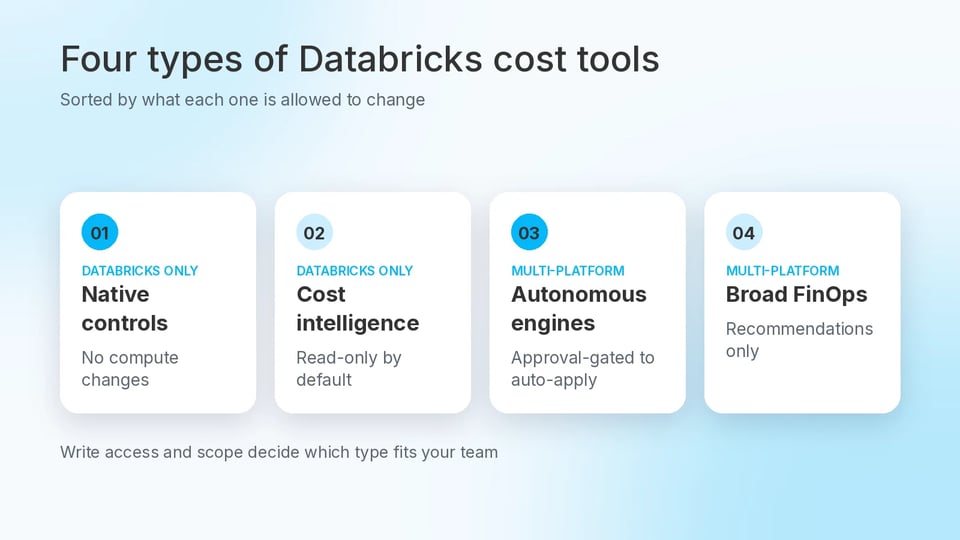
Databricks cost optimization tools fall into four categories: native controls, cost intelligence platforms, autonomous optimization engines, and broad FinOps platforms. Each is sorted by what the tool is allowed to change and how many platforms it covers. LakeSentry's comparison page uses a near-identical four-group split, so this framework is not unique to this guide, and it is not an industry standard.
Native controls are the cost tools included with Databricks. System tables and Governance Hub Cost read your usage data and cannot change your compute, while budgets and compute policies are the limits you set yourself.
Cost intelligence platforms build on that data with attribution, anomaly detection, and prioritized actions. LakeSentry is a Databricks-only example, and it is read-only by default, so your team decides whether to act.
Autonomous optimization engines can make resource changes. Sedai, Altimate, Capital One Slingshot, Unravel, and SELECT can resize warehouses or adjust clusters, with controls ranging from approval gates to automatic execution.
Broad FinOps platforms combine Databricks with AWS (Amazon Web Services), Azure, GCP (Google Cloud Platform), Snowflake, and other platform spend. Flexera is one example, and Databricks is one line among many in that view.
The categories differ mainly in write access and scope. The table below summarizes those differences alongside their pricing models.
| Category | Write Access | Scope | Pricing Model |
|---|---|---|---|
| Native controls | No compute changes (budgets can be set) | Databricks-only | Built into Databricks |
| Cost intelligence | Read-only by default | Databricks-only | Public, listed |
| Autonomous optimization engines | Approval-gated to auto-apply | Multi-platform | Varies by vendor |
| Broad FinOps | Recommendations only | Multi-platform | Not published on the product page |
What do System Tables and the new Governance Hub cover?
Native controls give you detailed visibility into Databricks spend. System tables provide the underlying billing data, while Governance Hub adds an account-level view on top.
In the billing system tables, system.billing.usage records billable usage, including the Databricks Units (DBUs) consumed, and joining it with system.billing.list_prices converts that usage into list-price dollars. You attribute that spend to a team or project with tags, which compute policies enforce on classic compute and serverless usage policies apply on serverless compute.
Governance Hub includes Data, AI (artificial intelligence), Cost, and Tags pages, and Cost is the one that applies here. It adds a spend explorer for viewing costs by product, workspace, resource, or tag, along with tagged-spend tracking and budgets that workspace admins create and manage for their workspaces. Its cost recommendations are read-only, and every amount on the Cost page is shown at list price, so your negotiated discounts do not appear.
In Governance Hub, you can ask Genie questions such as why costs spiked and get answers grounded in your governance data. Databricks' August 2026 announcement says Genie will soon take actions such as configuring policies, setting up alerts, and implementing recommendations. As of that announcement, Genie explains and does not act.
system.billing.usage covers Databricks charges only, while classic compute also incurs cloud-provider charges for the underlying virtual machines. If you run classic compute, you need both Databricks billing data and cloud-provider costs to calculate the full compute cost. Databricks' February 2026 blog post on unifying Databricks and cloud infrastructure costs introduces an open source solution that joins the two on AWS and Azure.
What does LakeSentry add in the Databricks-only cost intelligence category?
LakeSentry adds job- and team-level attribution, anomaly detection, and prioritized actions on top of your system table data. It connects through a read-only service principal, and its GetApp listing says it attributes spend across workspaces and environments by job and team.
For cost spikes, LakeSentry compares recent spend against a baseline using z-scores, with minimum cost thresholds so small workloads do not raise findings, as its anomaly detection docs describe. Each finding shows its evidence, such as the baseline and the cost increase.
Pricing is public and based on user count. Free supports one user, Standard costs $499 per month for up to five users, and Pro costs $849 per month for unlimited users, with paid plans billed annually. All plans include unlimited workspaces, and pricing does not depend on DBU usage or workspace count. The pricing page also lists "Safe optimization" on every plan, so ask the vendor what that includes and which write-access model applies before you connect.
LakeSentry also publishes a comparison of Databricks cost tools, last updated August 5, 2026. It places LakeSentry in a cost-intelligence category and groups Unravel with broader efficiency and FinOps platforms. This guide places Unravel with autonomous engines because its Arvix AI engine can apply changes, while LakeSentry's own table describes Unravel as using autonomous remediation.
Because LakeSentry sells one of the products being compared, treat that categorization as the vendor's view and check it against independent sources.
How do Sedai, Altimate, Slingshot, and Unravel handle autonomous optimization?
Sedai, Altimate, Slingshot, and Unravel each let you hand Databricks optimization changes to software, but they differ in how much control you keep, from automatic execution to approval gates and per-job settings.
Sedai
Sedai says you can connect your cloud and monitoring accounts in under 15 minutes. In copilot mode you approve each change with one click, or you can let optimizations run automatically. Sedai's June 2025 launch announcement places Databricks alongside AWS, Azure, GCP, and Kubernetes and cites cloud cost reductions of 30% or more across its platform. Its Databricks page advertises 30 to 50%.
Altimate
Altimate's Auto Tune agents use approval gates, with controls available per job, task, and warehouse, according to Altimate's guide. Altimate's Databricks page reports a typical reduction of 20 to 35%, and Auto Tune rolls back changes that degrade performance automatically.
Capital One Slingshot
Slingshot gives you job-level control through technology from Sync Computing, whose team joined Capital One Software in 2025. According to Capital One's Databricks announcement, you can apply an optimization in one click or fully automate it, and Slingshot's documentation shows that each job's project has its own auto-apply setting, so different jobs in the same deployment can run at different levels of automation.
Unravel
Unravel covers Databricks, Snowflake, and BigQuery. Its Arvix AI engine can rewrite code, rightsize compute, and clean up storage. It tests each change against workload behavior before applying it and reverts automatically if performance declines.
What to check before you automate changes
Vendors give you different levels of control over automated changes, from manual approvals to automatic execution. Before you connect a tool, confirm when a change requires your approval, when it can act automatically, and what happens if a change causes problems.
For any tool you consider, including SELECT, check which permissions it holds, which resources it can change, its rollback capabilities, and the audit trail it provides. Also check how those changes enter your deployment process, because settings changed outside infrastructure as code can drift from the configuration you defined. SELECT's setup guide requires CAN_MANAGE on jobs, clusters, and warehouses when Automated Savings is enabled.
Where does Flexera fit in broad multi-cloud FinOps?
Flexera fits when you want your Databricks costs in the same view as the rest of your cloud and data platform spend, and its Databricks product recommends changes instead of making them. The autonomous engines above are built to change resources, while Flexera focuses on FinOps across multiple cloud and data platforms and gives you one consolidated view of your costs.
Flexera One Data Cloud Optimization is the product formerly known as Chaos Genius, which Flexera acquired in January 2026. It provides Databricks and Snowflake rightsizing guidance within a FinOps suite for budgeting and forecasting. Flexera's June 2026 release notes describe a Databricks Analyzer dashboard that combines DBU spend with the underlying cloud infrastructure compute cost, giving you a unified view of platform and compute spend.
Flexera's acquisition announcement says Chaos Genius has helped Fortune 500 enterprises reduce costs by up to 30% and describes the product as autonomous, agentic optimization. Its Data Cloud Optimization documentation focuses on visibility, allocation, and savings recommendations, so this guide treats its documented Databricks workflow as recommendation-led unless Flexera documents specific write actions. Flexera does not publish pricing on its product page.
Where does SELECT fit, and what are its limits?
SELECT fits when you want continuous, toggle-controlled changes to Databricks worker counts and autoscaling. It does not report your cloud infrastructure bill or rewrite your code. The key questions are what it can see, what it can change, and where its limits are.
SELECT breaks down Databricks spend by workspace, workload type, job, cluster, user, and query, according to its Databricks launch changelog. Once you configure it, Automated Savings adjusts worker counts and autoscaling for All-Purpose Compute and SQL Warehouses without day-to-day tuning. This guide places SELECT in the autonomous category because that write access is continuous and toggle-controlled. SELECT reports savings of up to 30% on eligible workloads.
SELECT reports Databricks platform spend using Databricks billing and list-price system tables, so you account for cloud infrastructure costs separately. SELECT's guide to Databricks cost optimization gives you a rule of thumb for estimating those costs alongside your DBU bill.
Treat Governance Hub as your baseline. Its Cost page shows amounts at list price, while SELECT's custom rates let you include negotiated discounts in your numbers. SELECT also attributes spend down to the user and query, and Automated Savings acts where Governance Hub's read-only recommendations stop.
Know the limits before you buy. SELECT does not rewrite code, and Unravel's May 2026 launch material says Arvix AI does. Pricing starts at $1,499 per month, and the final quote depends on your environment, so Governance Hub may be enough for a smaller estate.
Which category fits your team?
Choose based on how much authority you are willing to give a tool to modify your Databricks resources. If you mainly need better visibility, start with native controls and Governance Hub, which leave changes in your hands. Governance Hub is in Beta as of October 2026. If you also need attribution and anomaly detection while keeping changes in-house, add a cost intelligence platform such as LakeSentry.
If you want changes applied for you, choose an autonomous engine. Control varies by tool, from approval gates to automatic execution and rollback, so decide how much automation each workload should get. If you run Databricks alongside other platforms, choose a broad FinOps platform such as Flexera, which puts Databricks alongside the rest of your cloud and data platform spend.
Before you pay for another tool, check what Governance Hub already provides and what the additional tool adds. SELECT's post on what to do beyond the easy wins covers the next layer once the basics are in place. If you want to evaluate SELECT in your environment, you can connect a workspace, which SELECT says takes about 20 minutes, or book a demo.