

TL;DR
Databricks Unity Catalog is the governance layer above your workspaces: one metastore per cloud region, a three-level namespace, and one set of grants that applies everywhere that metastore is attached. The part that decides whether it works for you is not the feature list, it is how you organize catalogs and schemas. That answer is specific to your organization, and it changes as you grow.
Intro
Most explanations of Databricks Unity Catalog stop at the definition. You learn it is a unified governance layer, that the namespace has three levels instead of two, and that lineage comes for free. All true, and none of it answers the question you have twenty seconds later: what should a catalog represent? Do bronze, silver, and gold belong in separate schemas? And what does any of this do to the bill? This post covers what Unity Catalog is and how it works, then spends most of its time on the part nobody writes about: how to organize it, and why that decision has cost consequences you will not see coming.
What is Databricks Unity Catalog and why does it matter?
The governance gap Unity Catalog was built to solve
Before Unity Catalog, the metastore lived inside the workspace. The namespace had two levels (schema.table), leaving nowhere to express environment or ownership except the name itself. Groups were workspace-local, so a user's access had to be rebuilt in every workspace they touched. Access control attached to the compute rather than the data object, so the same table could be readable or not depending on which cluster you opened it from. Lineage and audit did not exist.
Unity Catalog moves the metastore to the account level, scoped to a cloud region. One metastore attaches to many workspaces, a privilege granted in one is effective in all of them, and the grant lives on the data object rather than on whatever compute is reading it.
What actually lives in the three-level namespace
The third level of catalog.schema.table holds more than tables: views (including materialized and metric views), volumes, and functions, which covers UDFs, stored procedures, and MLflow models. A further set of securable objects sits directly under the metastore: storage credentials, external locations, connections, shares, and clean rooms.
Volumes are worth a second look, because they extend the same grant model to files in cloud storage. READ VOLUME behaves like SELECT on a table: attached to the object, not to the compute reading it, which is precisely what mounts could never do.
Why Unity Catalog is no longer optional
The pull is what matters. Serverless compute, Lakeflow, Genie, model serving, vector search, and Lakebase all require Unity Catalog. So do system tables. Staying on the Hive metastore does not just mean worse governance, it means being locked out of most of what Databricks has shipped in the last three years. The push is smaller: from September 30, 2026, Databricks will provision new workspaces without a Hive metastore, though existing workspaces are unaffected.
How should you organize your catalogs and schemas?
Here the documentation goes quiet. Databricks says catalogs are "typically" organized by organizational unit or lifecycle scope and leaves you there. Three things are worth stating before any recommendation:
The right answer is specific to your organization. No layout generalizes across a five-person platform team and a federated org with engineers in every business unit. That is why so few people write about this.
The right answer changes. Believing your first implementation survives indefinite growth is utopic. The goal is not a structure that never changes, it is one whose changes are cheap.
Your team's size and maturity set your starting point. A centralized team of six does not need what a distributed org of sixty needs, and adopting it early costs more than it saves.
What follows is where I keep landing across finance, aerospace, and energy clients, with the reasoning attached so you can argue with the reasoning rather than the conclusion.
How inheritance works, and why it drives every other decision
Two rules shape the entire layout.
Storage location is set by default at the metastore and can be overridden at the catalog and schema levels. Every object inherits from its nearest parent.
Grants inherit downward from catalogs and schemas. SELECT on a catalog reaches every current and future table, view, and volume inside it. There is no DENY in the grant model, so an inherited grant cannot be revoked on a single child object. ABAC policies and row filters give you something DENY-shaped, and they are genuinely useful, but they are less obvious and less robust than a grant: the grant says yes while a policy quietly says no somewhere else, and nobody reading the grant can see it. Reach for them deliberately, not as a patch over a layout that does not fit.
The consequence is the whole argument: the level you want to grant at is the level your layout has to make meaningful. If your schemas do not correspond to groups of people who should see the same data, you will end up granting table by table.
Catalogs by environment, usually
For a centralized data team, align catalogs with deployment environments.
- Storage location. Separate storage per environment is common practice and often a regulatory requirement. Set it once at the catalog and every table inherits it.
- CI/CD. Environment at the top level makes promotion a variable substitution rather than a rewrite.
- Workspace alignment. Most teams already align workspaces to environments, and workspace-catalog binding can enforce it.
- Lineage. Any other component at the catalog level produces cross-catalog lineage graphs that are harder to read.
The nuance is team topology. If each business unit has its own data engineers building their own pipelines, one catalog per business unit is the better fit, because the catalog boundary then matches the ownership boundary. The single-catalog-per-environment recommendation holds for a centralized team and stops holding the moment producers multiply.
Two things make that transition survivable. Prefix from the beginning: do not name your first catalog prd. Name it edp_prd after the platform team, or something generic like analytics_prd. It costs nothing on day one, and it means that when finance_prd and hr_prd arrive later, the model stays consistent instead of one bare environment catalog sitting beside a family of business unit catalogs. Choose names that survive a re-org: a catalog named after a department that gets renamed every eighteen months is a rename you will not do, so it becomes a lie in your namespace.
Schemas by data producer and data product
The most debated part. My default is a hybrid: bronze and silver tables live in a schema named for the data producer, and gold tables live in a schema named for the business unit or data product.
The instinct is to put an entire flow under one schema. It works in simple cases and falls short in most:
- Ownership segregation. Many teams split the work: a core group builds bronze and silver with engineering discipline, while analysts and domain experts build gold aggregations. The schema boundary matches the ownership boundary.
- Access control. People who run a source system should generally see the data it produces. Business users should see what their unit aggregates. Both are schema-level grants here. Neither is under a flow-based layout.
- Data quality. Every business-facing dataset gets built from cleaned producer data rather than from raw.
Make the two roles explicit in the name: source_<source_name> for producers, bu_<bu_name> for business units and products. You will sometimes end up with both source_hr and bu_hr, and that is fine. It is often exactly what you want, because it separates the raw HR feed from the HR-owned gold tables built on top of it.
A third option is worth knowing. If your organization genuinely requires different access levels per medallion layer, promote the layer to the schema: brz_sap, slv_sap, gld_finance. This is the only structure that lets you grant an analyst silver without granting them bronze, and it is what to reach for when bronze carries raw PII. For most organizations it is more structure than the problem justifies, and keeping bronze and silver together with column-level protection through ABAC is the better trade.
Medallion layers as table prefixes
Unless you promoted the layer to the schema, it lives in the table name: brz_*, slv_*, gld_*. By now storage location is set at the catalog and access control at the schema, so a new table needs neither. The only reason to configure anything at the table level is row-level security or column masking.
Three starting points, and two real layouts
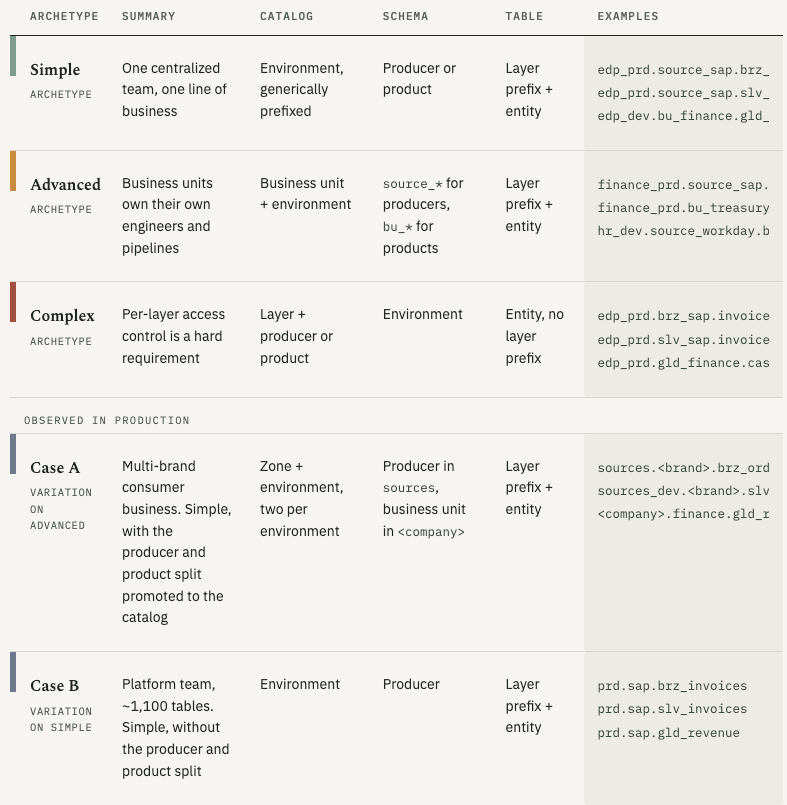
The first three rows are archetypes. The last two are structures I have worked with, dropped into the same grid so you can see which archetype each one is a variation on.
What the two real layouts cost their teams
Case A. The detail worth arguing about is the missing _prd. Dropping it makes the catalog everyone lives in the shortest to type, which is a real courtesy to the people navigating it every day. It also means _ is no longer a template. Production becomes a special case in every deployment, and someone maintains that switch forever. Nice for users, a headache for the engineers, and not a trade I would make.
Case B. Look at the third row of its examples: bronze, silver, and gold in one schema. Nothing enforced where gold belonged, so some schemas hold all three. That sounds cosmetic. It is not. An analyst who should see only gold cannot be granted it at the schema level, because the same schema also holds bronze. The grant you want does not exist, so you build it table by table, forever.
They also encode the intended consumer in the table name: [], now 181 objects across 27 targets. It came from a legacy system the tables were carried over from, and at the time it was the right call. It is still the wrong shape, because the bracket grants nothing and enforces nothing: it records an intention the platform cannot act on. The replacement is still being debated there. The most promising version is tags on the tables plus a scheduled job that reads them and issues the grants, which turns a naming convention into something that actually changes access.
Ready to see where your Unity Catalog spend is actually going?
Grouping billing_origin_product by hand tells you that predictive optimization cost you something last month. It does not tell you which table, which user, or which structural decision three years ago caused it. SELECT gives data platform teams query-level attribution across the whole environment, including the line items that collapse into one row everywhere else. See what it surfaces in your workspace.
What does Databricks Unity Catalog actually cost?
The governance layer itself is free
Unity Catalog has no separate charge. Catalogs, schemas, grants, lineage, audit logs, and system tables cost nothing beyond the plan you are on, and Databricks open sourced the project under the Linux Foundation in June 2024.
System tables deserve a note, because they only exist inside a Unity Catalog metastore and can only be queried from a Unity Catalog-enabled workspace, even though they report on non-UC workspaces too. Every cost query in our Databricks cost optimization ebook and every control in Databricks Pricing Explained runs through them, which makes Unity Catalog the entry requirement for managing Databricks cost at all.
What costs money is what Unity Catalog enables, and those charges are easy to miss because they do not look like anything you launched. The billing_origin_product column in system.billing.usage separates them out. Group by it and rows like PREDICTIVE_OPTIMIZATION and VECTOR_SEARCH appear next to the compute you recognize. Quality monitoring shows up twice, under both LAKEHOUSE_MONITORING and DATA_QUALITY_MONITORING, which is a fair warning that these names track Databricks' internal plumbing rather than the product names you know them by.
Managed tables and predictive optimization
Predictive Optimization is the one most people meet without noticing. It runs compaction, cleanup, clustering, and statistics collection on managed tables on your behalf, and it bills.
It is usually a good trade: left unrun, those operations produce bloated storage, worse data skipping, and slower queries, which you pay for anyway in compute, spread across every query instead of itemized. It is on by default for accounts created since November 2024, with rollout to existing accounts expected around August 2026, so scope it at the catalog or schema level rather than accepting the account default everywhere.
Why your layout is a cost decision
Most of what a bad layout costs never appears on an invoice. It is the person maintaining grants on individual tables, and the quarterly review that cannot be automated because the model only exists in someone's head. That work scales with the gap between your namespace and your access pattern, and it never stops. Fine-grained access control also has to run somewhere, so every query against a row filter or column mask carries compute you would not otherwise pay for. A layout that lets you grant at the schema level is the one where neither cost exists.
So where should you start?
Pick the simplest layout that matches your team today, prefix your catalogs so the next one fits, and accept that you will restructure. What you cannot do is defer the decision, because the default is not "no structure," it is whatever accretes while you are not looking: individual grants, one-off views, and naming conventions that each looked reasonable in isolation. The teams that stay ahead of it watch what their structure costs them while there is still time to change it. That is why we built SELECT for Databricks. Book a demo to see what it finds in your environment.
FAQ
Does Unity Catalog cost extra?
No. Unity Catalog is included with Databricks Premium plans and above, and there is no charge for the metastore, catalogs, schemas, grants, lineage, audit logs, or system tables. What costs money is what it enables: Predictive Optimization, quality monitors, vector search, and fine-grained access control all bill, and they are easy to miss unless you group system.billing.usage by billing_origin_product, where they appear under names that do not match the products you know them by.
Should bronze, silver, and gold tables live in separate schemas?
Only if you need different access levels between bronze and silver. Putting the medallion layer in the table name (brz_, slv_) and using schemas for producers and products is the better default, because it keeps grants aligned with ownership. Gold is already separate under that layout: it sits in the business unit or product schema, not alongside the producer's raw and cleaned tables.
The consequence people discover late is that anyone with SELECT on a producer schema sees bronze exactly as clearly as silver. If bronze carries raw PII that certain users must not reach, that is not a permissions change you can make later, it is a restructure. In that case, promote the layer to the schema (brz_sap, slv_sap, gld_finance) from the start.
What is the difference between managed and external tables in Unity Catalog?
For a managed table, Unity Catalog determines the storage path. The data still lives in your cloud account, but Databricks controls layout and lifecycle, so dropping the table deletes the files and Predictive Optimization can maintain it automatically. For an external table, you specify the path: Unity Catalog governs metadata and access, but lifecycle and optimization stay yours, and dropping the table leaves the files behind. Managed is the default and the better choice unless an external system needs to read the files directly.