Databricks Liquid Clustering Simplified

Niall WoodwardMonday, September 21, 2026
Enabling Databricks liquid clustering takes one line of SQL. Declare CLUSTER BY on a table and Databricks handles the rest. That single line is also where most explanations of the feature stop. What happens after it is what actually decides whether liquid clustering helps your table.
Getting value from it starts with choosing clustering keys that match how the table is queried. It also means understanding why OPTIMIZE skips files that ZORDER would still rewrite, deciding whether CLUSTER BY AUTO fits the table, and checking whether the compute cost justifies moving beyond what partitioning already provides.
Liquid clustering has become Databricks' recommendation for new tables through 2025 and 2026, and the syntax is easy to find. Choosing the right strategy is harder, and that is the question this piece answers.
TL;DR
- Clustering keys matter more than the CLUSTER BY syntax. Choose columns that queries frequently filter on, since low-cardinality columns give OPTIMIZE fewer opportunities to skip files.
- ZORDER rewrites all affected files on every run. OPTIMIZE on a liquid-clustered table re-clusters only files written or modified since the previous run.
- CLUSTER BY AUTO selects and updates clustering keys automatically, but requires Unity Catalog and Predictive Optimization.
- Lighter OPTIMIZE runs still consume Databricks Units (DBUs), so compare maintenance costs with query-performance improvements when evaluating the migration.
What's the real cost of getting table layout wrong?
Databricks liquid clustering exists because poor table layout creates costs that are difficult to undo. Two common failure modes drive it: partition regret and OPTIMIZE cost.
Partition regret usually comes first. You pick a column at creation time, before you know how the table will be queried. Databricks found that Hive-style partitioning leads to over-partitioning and small-file issues in more than 75% of cases. Delta Lake gives you no way to change that column later, so fixing it requires a full rewrite.
OPTIMIZE cost follows. As covered in reducing Databricks costs beyond the easy wins, teams often run OPTIMIZE ZORDER BY on a schedule. Each run rewrites the whole table, consuming warehouse resources and leaving older file versions behind, since VACUUM cannot remove them until the retention window expires.
Engineers in Databricks community forums frequently describe the same problem. A table gets partitioned for one filter, then a new dashboard or workload starts querying another column, reducing the value of partition pruning.
Natural-language querying is adding even more variation to how tables get queried. Databricks Genie Explained covers how Genie turns plain-English questions into SQL against Delta tables, creating query workloads your partitioning strategy was never designed to handle.
Databricks encountered the same issue on a 1.1 PB internal table. It was partitioned by date and hour, but engineers frequently filtered on source and ID as well. Each request had to scan every file in the matching date-and-hour partitions to return a small number of rows, while adding source and ID as partition columns would have created billions of small files.
Across 16 representative production queries, the table took 406 seconds and scanned 3.5 TB of data. After adopting liquid clustering, those same queries completed in 70 seconds and scanned 0.48 TB, a 5.9× speedup with 86% less data read. Table size also fell from 1.1 PB to 0.8 PB, a 27% reduction with no change to the underlying data.
What is Databricks Liquid Clustering?
Databricks liquid clustering replaces two familiar techniques, PARTITIONED BY and ZORDER BY. Instead of fixing the table layout at creation, CLUSTER BY lets you name the columns that matter to your queries, and OPTIMIZE incrementally reorganizes the data to colocate related rows. Databricks uses a Hilbert space-filling curve to organize the clustered data.
That mechanism reached General Availability (GA) for Delta Lake tables on Databricks Runtime (DBR) 15.4 LTS and above. Apache Iceberg support remains in Public Preview and requires DBR 16.4 LTS and above, so treat Iceberg tables with more caution before a production rollout.
Databricks now recommends automatic liquid clustering for all Unity Catalog managed tables, while CLUSTER BY is also available for streaming tables and materialized views. That guidance is easy to state, but what matters more is how OPTIMIZE maintains the layout over time, since it works differently from a periodic full-table rewrite.
How does Databricks liquid clustering work under the hood?
Liquid clustering separates file organization from how often files get rewritten, and both affect performance for different reasons. Organization explains why liquid clustering skips more files than ZORDER on the same query. Rewrite frequency explains why it costs less to maintain.
Z-curve vs. Hilbert curve
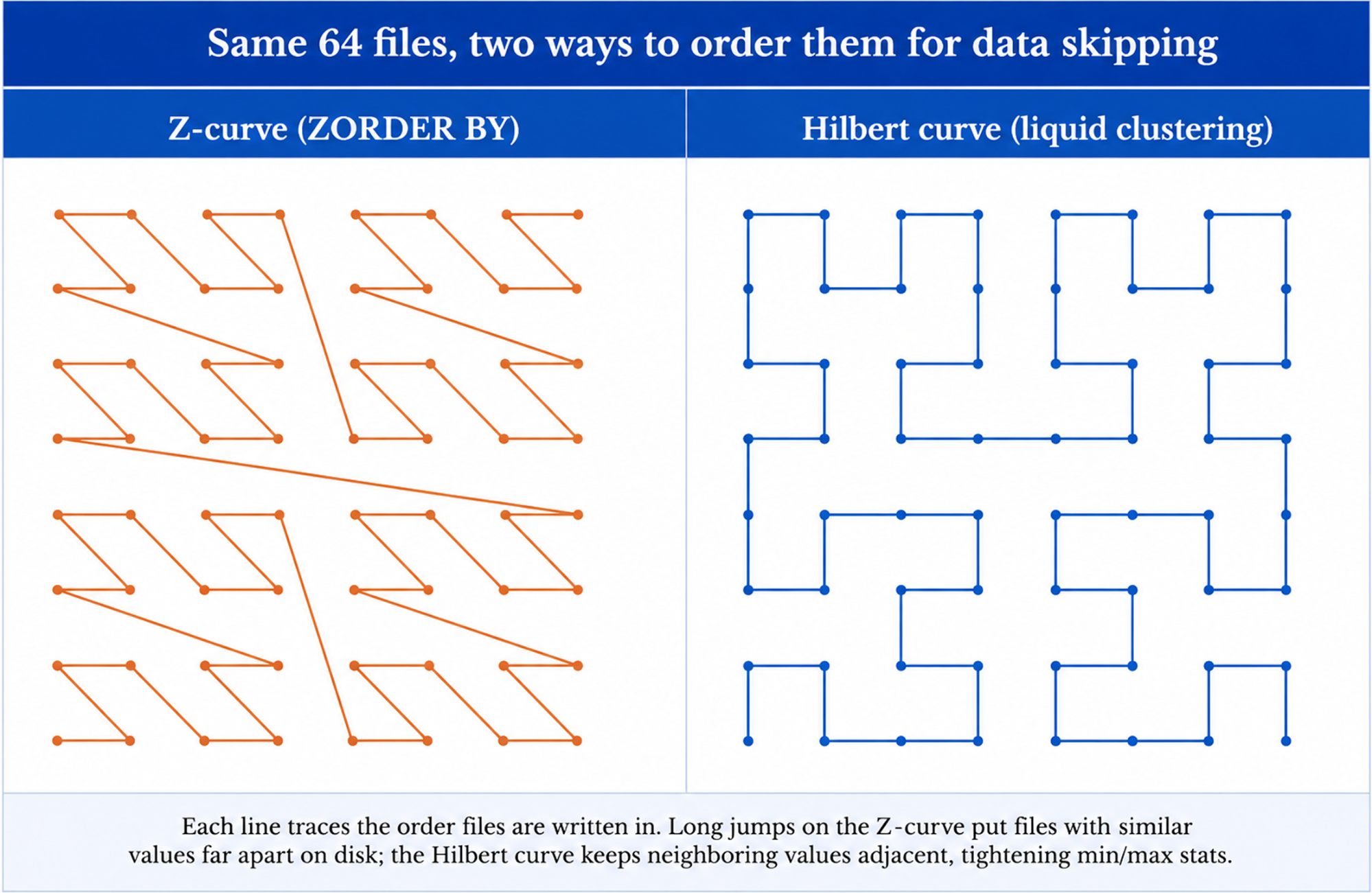
Organization starts with how a table's files get sorted in the first place. ZORDER BY uses a Z-curve, a space-filling curve that maps several column values into one dimension so Delta can sort files by more than one predicate at once. Liquid clustering uses a Hilbert curve for the same job, and the difference becomes more noticeable as cardinality rises. A Hilbert curve preserves locality better than a Z-curve, so rows with similar values across your clustering columns land closer together on the curve, and therefore in the same files.
That locality advantage drives query performance. Tighter locality produces narrower per-file min/max statistics, which allow OPTIMIZE to skip more files during a scan. That's why liquid clustering outperforms ZORDER on the same column set when queries filter on more than one column at a time.
Incremental OPTIMIZE
That locality advantage would be expensive to maintain if every OPTIMIZE run rebuilt the layout from scratch. Rewrite frequency is what keeps that from happening. Standard OPTIMIZE re-clusters only files written or modified since the previous run. Files already sitting at their target Hilbert coordinates and sizes are skipped, consistent with the idempotent behavior Databricks documents for file-optimization commands. Z-Ordering offers no such guarantee. It is not idempotent, so a run without partition scoping can reprocess files a previous Z-Ordering pass already touched.
OPTIMIZE FULL sets that incremental behavior aside on purpose. It re-clusters every file regardless of whether anything changed, and it requires Databricks Runtime (DBR) 16.0 LTS or above. You would typically use it after changing clustering keys, when historical data needs to adopt the new layout immediately rather than over time.
OPTIMIZE on a liquid-clustered table costs a fraction of ZORDER on the same table because ZORDER rewrites all affected files on every run, regardless of what changed. Databricks cost optimization explores other areas where Databricks costs accumulate.
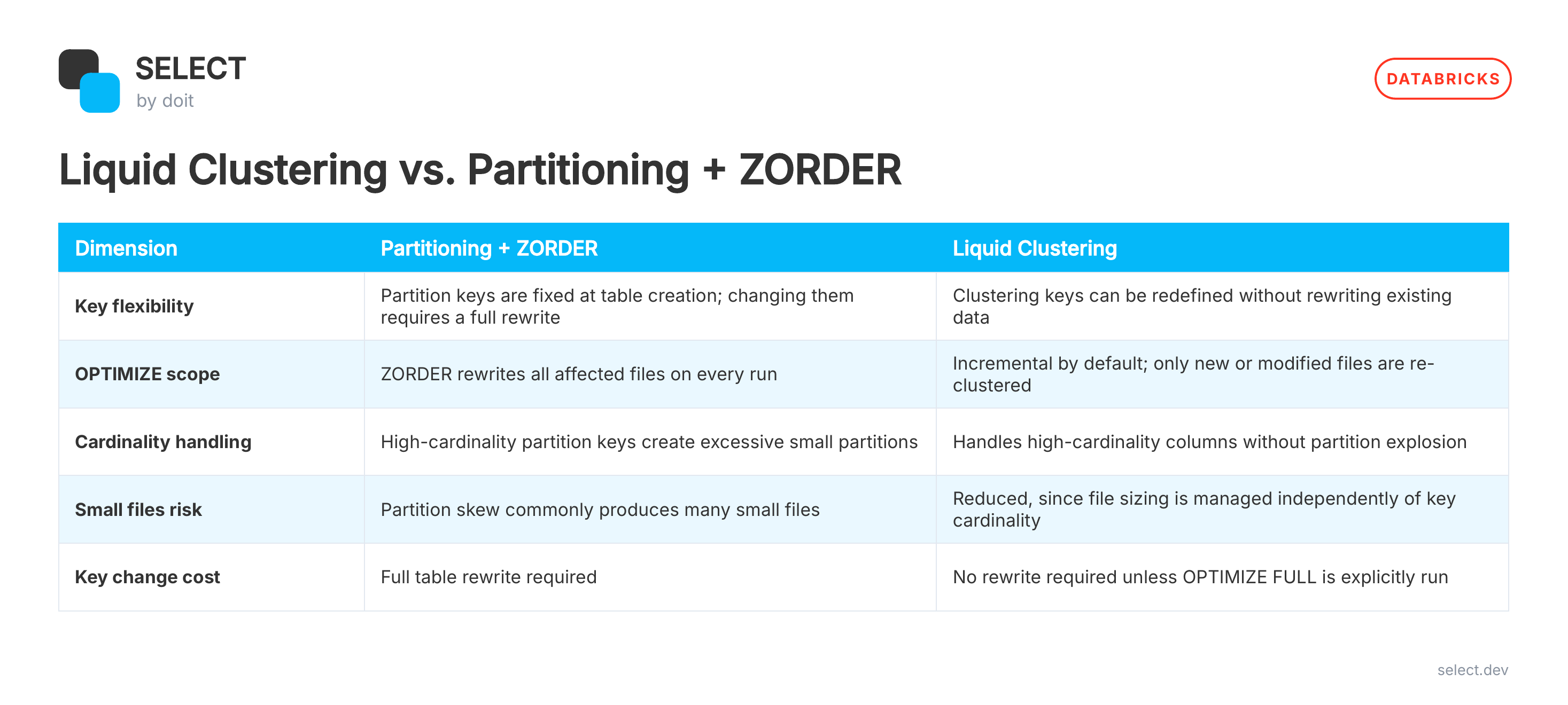
That table explains why liquid clustering skips files more efficiently than ZORDER, but it says nothing about which columns belong in the CLUSTER BY clause. That choice is where much of the value gets won or lost.
How do you choose the right clustering keys?
Pick clustering keys based on what your queries filter on most often, prioritizing columns that show up in WHERE clauses and joins, including high-cardinality ones. Liquid clustering skips files using stored min/max statistics rather than physical folder separation, so millions of distinct values do not create the explosion of small partitions that come with traditional partitioning.
Low-cardinality columns are usually less effective. When a column has only a handful of distinct values, OPTIMIZE has limited opportunity to skip files. The four-column limit still applies, but two or three columns cover most production tables well, while a fourth often provides little additional benefit.
Correcting the wrong keys later is far less disruptive than correcting a wrong partition column. ALTER TABLE ... CLUSTER BY is a metadata-only operation. New writes and subsequent OPTIMIZE runs adopt the updated keys immediately, while existing data retains its current layout until you run OPTIMIZE FULL to recluster it under the new keys. That still avoids the forced rewrite required when changing a partition column, since you decide when to incur that cost rather than triggering it during the change.
Teams that prefer not to manage clustering keys manually can use CLUSTER BY AUTO, provided Unity Catalog and Predictive Optimization are enabled. Databricks analyzes query history and adjusts the clustering keys as your filters shift. Check DESCRIBE DETAIL afterward. The clusteringColumns field shows the keys AUTO selected and updates each time that happens again.
Can you migrate an existing table to liquid clustering?
Understanding how liquid clustering differs from partitioning and Z-order only becomes useful when you have a practical way to migrate existing tables. Liquid clustering cannot coexist with PARTITIONED BY or ZORDER BY. A table uses one approach or the other, so migration replaces both rather than adding clustering on top.
The migration process depends on your runtime version. On Databricks Runtime (DBR) 18.1 and above, a single statement handles the conversion: ALTER TABLE events REPLACE PARTITIONED BY WITH CLUSTER BY (...). That command removes the existing partitioning scheme and defines the clustering keys in one step. Earlier runtimes do not support it. The usual fallback is to create a new unpartitioned table with CLUSTER BY using CTAS, backfill it in date-range batches, and then swap the table names when the new table is ready.
The clustering columns matter more than the migration method. Where possible, keep them close to the columns previously used for partitioning. Databricks recommends this approach because a very different column set can trigger a larger reclustering effort during the first OPTIMIZE run instead of a lighter incremental one.
After the conversion, stop running OPTIMIZE with ZORDER BY. Standard OPTIMIZE takes over from that point forward. The first run processes data written since the last Z-order operation, while later runs remain incremental. The examples below show both migration paths, the ALTER TABLE approach for DBR 18.1 and above and the CTAS fallback for earlier runtimes.
Both approaches arrive at the same outcome: an OPTIMIZE process focused on newly written or modified data rather than repeated full-table rewrites. The next question is what that change means for cost, and whether the savings justify the migration.
What does OPTIMIZE cost, and what does SELECT show you?
Liquid Clustering reduces the ongoing cost of OPTIMIZE, but every run still consumes Databricks compute and Databricks Units (DBUs), the metric Databricks bills against. Photon can affect that cost further. Although Photon carries a higher DBU rate, it often processes less data on a liquid-clustered table because OPTIMIZE works incrementally instead of rewriting large portions of the table. As a result, the premium applies to a smaller workload.
Predictive Optimization removes the scheduling burden. When enabled on a Unity Catalog managed table, Databricks decides when OPTIMIZE runs and records the usage under the predictive_optimization SKU in system.billing.usage, alongside other billable activity on your account.
Knowing that OPTIMIZE consumes DBUs is useful. Seeing how many a specific job consumed over time is what validates whether a migration delivered the savings you expected. SELECT's June 2026 launch for Databricks was built for that level of visibility, providing DBU attribution granular enough to track individual OPTIMIZE jobs by cluster and workload.
Teams that want to compare OPTIMIZE costs before and after a migration can book a SELECT for Databricks demo and connect in about 20 minutes.
Frequently asked questions
Does Liquid Clustering work on streaming tables and materialized views?
Yes. Liquid clustering applies to streaming tables and materialized views as well as standard Delta tables. You declare CLUSTER BY the same way, and OPTIMIZE reorganizes files consistently across all three table types.
Can I still use OPTIMIZE on a Liquid-clustered table?
Yes. OPTIMIZE is the command Databricks uses to maintain liquid-clustered tables, the same command it uses for partition compaction and Z-order elsewhere. Standard OPTIMIZE re-clusters only new or modified files, while OPTIMIZE FULL, available on Databricks Runtime (DBR) 16.0 LTS and above, forces a complete recluster. ZORDER BY is not supported on a clustered table.
What is CLUSTER BY AUTO and when should I use it?
CLUSTER BY AUTO allows Databricks to select and update clustering keys by analyzing query history, provided Unity Catalog and Predictive Optimization are enabled. It works well for tables whose workloads change over time or for teams that prefer not to manage key selection manually.
How do I check which columns a table is clustered on?
Run DESCRIBE DETAIL on the table. The clusteringColumns field shows the current clustering keys. When CLUSTER BY AUTO is enabled, the field updates as Databricks adjusts the key selection over time.
When should I keep partitioning instead of switching to Liquid Clustering?
Liquid clustering is usually the better default for datasets between 1 TB and 100 TB. For larger workloads, test it before deciding on partitioning. Partitioning still makes sense when queries consistently target a narrow slice of data, such as a single day, since directory pruning remains highly effective in that situation.
Niall is the Co-Founder & CTO of SELECT, a SaaS Snowflake cost management and optimization platform. Prior to starting SELECT, Niall was a data engineer at Brooklyn Data Company and several startups. As an open-source enthusiast, he's also a maintainer of SQLFluff, and creator of three dbt packages: dbt_artifacts, dbt_snowflake_monitoring and dbt_query_tags.
Want to hear about our latest data cloud learnings?Subscribe to get notified.
Get up and running in less than 15 minutes
Connect your Snowflake, Databricks, or BigQuery account and instantly understand your savings potential.