Databricks Lakebase? What Every Engineer Needs to Know

Niall WoodwardTuesday, September 08, 2026
Databricks has spent years becoming the place where teams process, govern, and analyze data. The awkward part starts when that data needs to power an application.
A SQL Warehouse is great at scanning millions of rows. Yet, it is not where you want an application doing thousands of tiny inserts, updates, and point lookups. So teams fall into a familiar pattern of keeping analytics in Databricks, spinning up Postgres somewhere else, wiring the two together with CDC or reverse ETL, and then managing that second database and synchronization layer for as long as the application exists.
Lakebase is Databricks' attempt to remove that split. The idea is compelling because it puts Postgres alongside the rest of the platform, gives applications an operational database, and moves information between transactional and analytical systems without forcing teams to build the plumbing themselves.
But Lakebase is not simply "Postgres inside Databricks." The integration comes with tradeoffs such as sync having two different directions and mechanisms, and scale-to-zero changing what happens to session state. Also, Postgres compatibility does not mean every self-managed Postgres assumption carries over and the economics do not look like the DBU model most Databricks teams already know.
A useful way to evaluate Lakebase is to focus on whether its tradeoffs fit the application you actually need to run.
TL;DR
- Use Lakebase if your application needs transactional Postgres and your data already lives in Databricks. The integration removes the CDC pipeline you would otherwise have to build and maintain
- Do not use it as a general-purpose managed Postgres replacement. If your application has no dependency on Databricks analytics, governance, or AI workflows, a standalone managed Postgres is simpler
- Check extension support and session state behavior before migrating anything from RDS or Cloud SQL
The Problem Lakebase is Built to Eliminate
Analytical and transactional workloads place very different demands on a database, which is where the architectural split starts.
Your SQL Warehouse is built for Online Analytical Processing (OLAP), handling large scans, joins, aggregations, and queries that may touch millions or billions of rows. An application backend operates in the Online Transaction Processing (OLTP) world, where short transactions, predictable concurrency, point lookups, and millisecond inserts or updates matter more.
Trying to make one system behave like the other usually ends badly.
Before Lakebase, the practical answer was to add Postgres. Keep the analytical side on the Databricks platform, run a PostgreSQL instance or hosted service for the application, then connect them with Change Data Capture, reverse ETL, or custom jobs.
That works. It also gives you another production system to own.
Now you are managing PostgreSQL credentials, schema changes, failure recovery, networking, synchronization lag, and whatever breaks when the transactional schema changes before the analytical pipeline catches up. The database itself is rarely the painful part. Keeping two systems aligned is.
That is the problem Lakebase is trying to remove.
There is clearly demand for it. Databricks says adoption since June 2025 has grown at more than twice the rate of its warehousing product, and it reports thousands of companies running production workloads on operational records.
The adoption number is interesting, but it is not the reason to choose the product. The real question is whether keeping your transactional database inside the same platform removes enough operational work to justify the new constraints that come with it.
What is Databricks Lakebase?
Lakebase Postgres is a fully managed Postgres service in the Databricks platform. Lakebase fully separates compute from storage, so the compute layer can adjust with demand while storage remains durable.
That separation is what makes features such as autoscaling and scale-to-zero possible. When the database is idle, compute can shut down instead of sitting there waiting for traffic. When activity returns, it can come back without rebuilding the stored database.
For development, instant branches and zero-copy clones are just as interesting. Instead of copying an entire production database every time someone needs an isolated environment, a team can branch the database and work against that copy without duplicating all of the underlying storage.
The technology comes from Neon. Databricks announced its agreement to acquire the serverless Postgres company on May 14, 2025, shortly before launching Lakebase.
But the database technology is only half of the story. The reason to evaluate Lakebase instead of another managed Postgres provider is the integration around it.
This integrated Databricks design connects the database to platform capabilities such as Unity Catalog, Synced Tables, and the reverse change path back into Delta tables. If your application already lives next to Databricks Apps, AI systems, feature pipelines, or analytical workflows, that proximity can remove a surprising amount of plumbing.
If none of those integrations matter to your application, the case is much less obvious. In that situation, you are mostly comparing one managed Postgres implementation with another.
Lakebase reached general availability on AWS on February 3, 2026, followed by Azure on March 3, 2026.
How the Bidirectional Sync Works
This is where the architecture gets more interesting.
"Bidirectional sync" can make it sound as though one replication engine continuously mirrors the same tables in both directions. That is not the model here. Lakebase has two directional paths that solve two different problems:
- Synced Tables bring governed source tables into Lakebase when an application needs low-latency access to analytical or governed records.
- Lakehouse Sync moves operational database changes into managed Delta tables for analytics, audit, and downstream processing.
The direction matters because the mechanisms, ownership model, and operational constraints are different on each side.
Lakehouse to Lakebase - Synced Tables
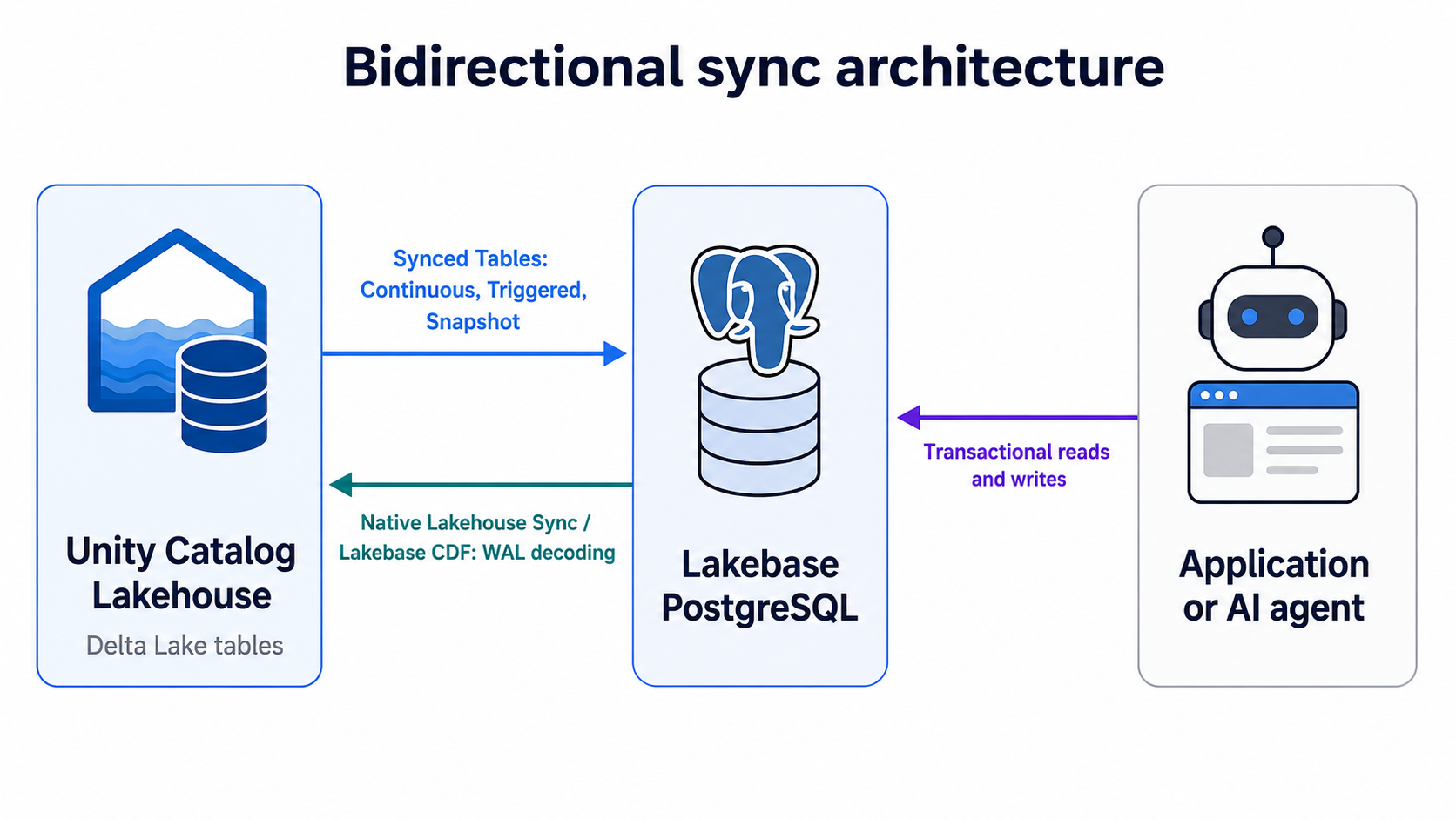
Synced Tables are for the case where the source of truth already exists in governed analytical tables, but an application needs to read that information with database-style latency.
Instead of making the application query analytical tables directly, the sync process publishes the relevant source into Lakebase. Applications then access the synchronized copy through the PostgreSQL interface using standard drivers.
That ownership model is important. Treat a synced table as something the synchronization pipeline controls, not as another application-owned table you happen to be replicating. Read-only application access is the safer default.
You get three synchronization modes:
- Snapshot makes a one-time copy. This is the straightforward choice for bulk publishing, sources without Delta Change Data Feed, or cases where a large percentage of the table changes between refreshes.
- Triggered performs incremental updates when you run it or on a schedule. This is usually the better fit when freshness requirements are measured in minutes or hours rather than seconds.
- Continuous keeps changes flowing with seconds-level latency. You get the lowest lag, but you also keep the synchronization machinery active continuously.
Choose Continuous when the application has a measured freshness requirement that Snapshot or Triggered cannot meet. Real-time synchronization carries both cost and operational overhead, so the required freshness should drive the sync mode.
There are also sizing limits worth planning around.
Continuous and Triggered writes are estimated at roughly 150 rows per second per Capacity Unit, while Snapshot writes can reach up to 2,000 rows per second per CU.
Treat those figures as practical capacity-planning benchmarks, since actual throughput will vary with table shape, indexing, and change patterns.
The aggregate logical size across synced tables is capped at 16 TB. There is no separate hard quota for an individual table, but Databricks recommends keeping tables that require refreshes at or below 1 TB.
The refresh behavior is easy to overlook. During a full refresh, the old synchronized version stays available while the replacement is built. Both versions temporarily consume storage against the logical database quota.
If you are already close to the limit, a refresh can be the thing that pushes you over it. Plan capacity for the refresh, not just for the steady state.
Autoscaling vs Provisioned: What Changed in March 2026
Older Lakebase material can blur the shift from Provisioned to Autoscaling, but for current designs the distinction is mostly historical.
Provisioned and Autoscaling were different operating models. That distinction is now mostly historical.
New instances moved to Autoscaling by default on March 12, 2026. Existing Provisioned instances were upgraded through July 2026, and the old UI remains only as a temporary transition surface until September 1, 2026.
The sizing model changed substantially. Autoscaling uses Capacity Units, with 2 GB of RAM per CU. The older Provisioned model used a Provisioned capacity unit with 16 GB of RAM per unit.
That is not just a smaller unit size. Autoscaling can move within a configured CU range as demand changes. Provisioned meant choosing a fixed amount of capacity and living with it until you changed the configuration.
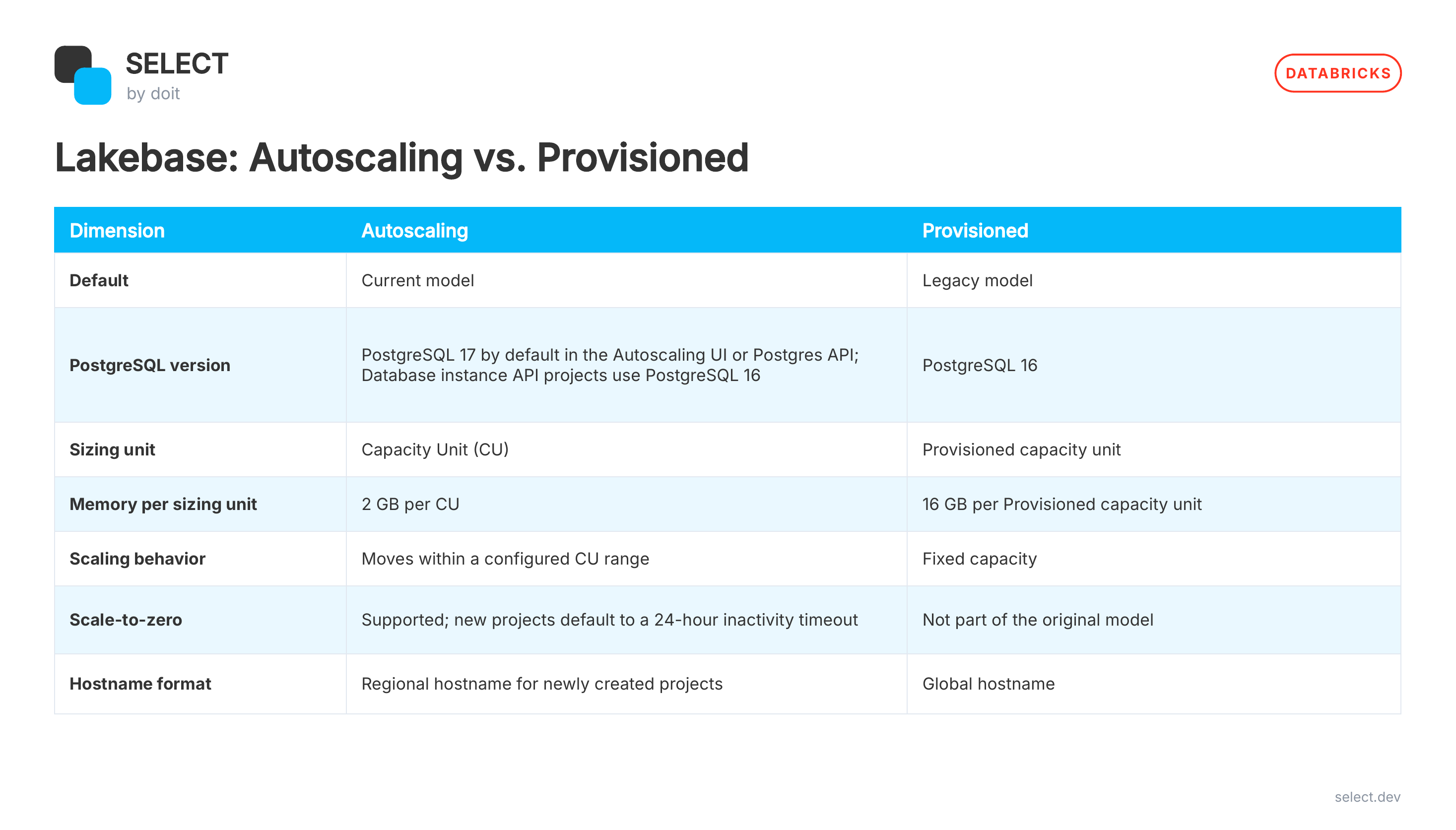
For most new designs, there is no decision to make between Provisioned and Autoscaling anymore. The useful question is how wide a CU range you should set and whether scale-to-zero makes sense for the application.
Those two choices affect both cost and behavior. If you are evaluating the wider operating model, Databricks cost optimization covers the broader cost drivers across compute, infrastructure, and workload design.
A database that receives unpredictable bursts benefits from room to scale. A quiet development environment benefits from scale-to-zero. A production application that depends on persistent sessions may want neither an aggressive lower bound nor an inactivity timeout.
That is the tradeoff to model.
What Lakebase Does Not Give You From Standard Postgres
PostgreSQL compatibility is not the same thing as "every Postgres deployment behaves the same."
If you are migrating from RDS, Cloud SQL, or a self-managed cluster, test the assumptions your application makes about the database, not just whether the SQL syntax works.
Start with administration. Access is tied to the account and workspace management, with users managed through platform APIs. Do not assume automation that expects self-managed PostgreSQL superuser semantics will carry over unchanged.
There are other gaps worth checking before migration. Tablespaces are not supported. Native PostgreSQL logical replication is not currently available. Extension support is curated rather than unrestricted.
None of those limitations automatically make Lakebase a bad fit. They become problems when your existing system depends on them.
The bigger operational gotcha is scale-to-zero.
When compute shuts down after the inactivity period, the connection goes with it. Temporary tables disappear. Prepared statements disappear. Advisory locks disappear. LISTEN and NOTIFY state disappears. Anything that only existed inside that database session is gone.
A well-behaved application pool should reconnect cleanly. But plenty of production systems quietly depend on sticky connections or long-lived session state without anyone realizing it until the connection disappears.
If your application does that, either fix the dependency or turn off scale-to-zero. Do not discover it in production.
A good migration rule is to validate how the application behaves, not just whether the schema is compatible.
Lakebase Use Cases
The strongest Lakebase use cases are the ones where keeping the transactional database close to the rest of the platform removes a real system boundary.
The three strongest use cases are agent state, online feature serving, and application backends.
AI Agent Memory
AI agents need somewhere to keep state between turns.
That can include user context, tool outputs, workflow progress, task status, or application-specific information the agent needs again later. Once that state matters across requests, it needs a durable store rather than another in-memory object inside the serving process.
A PostgreSQL store works well when the application needs direct SQL access and control over its own schema. In this model, the application owns the state and keeps it close to the rest of the Databricks environment.
There are other governed state options, so I would not choose Lakebase simply because the workload contains an agent. Choose it when the agent needs application-controlled relational state.
Online Feature Store in Lakebase
Feature serving is another clean fit because the offline and online sides want completely different access patterns.
You may calculate features from large governed tables, but the model endpoint does not want to run a warehouse query every time it needs customer_risk_score or days_since_last_purchase.
Instead, publish the feature values into a PostgreSQL-backed online store using Snapshot, Triggered, or Continuous synchronization. The serving endpoint can then perform low-latency lookups against the operational copy.
The interesting choice is not whether the feature can be synchronized. It is how fresh it really needs to be.
If the value changes once a day, Continuous is a waste. If the model decision depends on something that changed 20 seconds ago, Snapshot is not enough.
That freshness requirement should drive the sync mode.
And the online store does not make upstream table design irrelevant. [How your Delta tables are laid out affects serving latency because the source pipeline still has to produce and synchronize fresh feature values efficiently.
Application Backend
This is the most straightforward use case.
An application needs inserts, updates, deletes, indexes, short reads, and predictable concurrency. It can use the database for those transactional operations while analytics stays on the platform.
That includes Databricks Apps, but it does not have to be limited to them.
The more interesting part comes afterward. Once the application starts generating operational records, the reverse sync path can make those changes available to managed Delta tables. Analytics, audit jobs, and downstream pipelines can consume them without you standing up a separate external CDC platform.
This is where the Lakebase architecture earns its keep.
You are not using it because Postgres is novel. You are using it because the operational and analytical sides stop feeling like two unrelated systems you have to glue together yourself.
Lakebase Costs and What SELECT Surfaces
Lakebase pricing needs to be considered separately from the DBU mental model most Databricks teams already use.
Current pricing includes Always-On pricing for serverless autoscaling, with a 25% lower baseline rate and no long-term commitment. The point is to keep serverless elasticity without forcing an always-running production database to pay the same baseline economics as a workload that regularly scales down.
That is useful, but it also means your overall Databricks bill now spans more than one pricing model.
Classic jobs can have DBU charges plus cloud infrastructure. Serverless bundles infrastructure differently. Model serving has its own economics. Operational databases add another cost surface.
This is why looking at a single rate card rarely tells you what a workload actually costs.
The SELECT Databricks Cost Optimization Guide uses system.billing.usage and system.billing.list_prices as starting points for understanding where spend originates. That works well for DBU-priced workloads, but Lakebase should still be evaluated in the context of the rest of the environment rather than as an isolated database line item.
For the processing side, how Photon affects cost per job [LINK PENDING].
SELECT combines DBU usage with underlying cloud infrastructure costs so teams can attribute spend back to jobs, queries, users, workspaces, and other dimensions. DoiT says the connection uses a read-only service principal and takes roughly 20 minutes to set up.
SELECT helps you evaluate Lakebase alongside the rest of your platform bill. It shows whether adding the operational layer reduces overall architecture cost and complexity or simply shifts spend into another category.
That is the comparison worth making.
If you need that broader cost view, teams can get started with SELECT in approximately 20 minutes. Book a demo to see how the rest of your Databricks spend breaks down alongside the database.
Frequently Asked Lakebase Questions
Is Databricks Lakebase Just Managed Postgres?
No.
The database is PostgreSQL, but its value comes from the surrounding platform integration, including serverless operation, branching, Synced Tables, and the path for moving operational changes into managed analytical tables.
If those integrations replace infrastructure you would otherwise have to operate, Lakebase has a strong case. If you only need a general-purpose Postgres database, compare it with other managed Postgres options.
How Do Synced Tables and Lakehouse Sync Differ?
They solve opposite directions.
Synced Tables publish governed source tables into Lakebase when an application needs low-latency access to them.
Lakehouse Sync covers the reverse direction. Databricks calls the WAL-based implementation Change Data Feed, which captures inserts, updates, and deletes from PostgreSQL and makes those changes available in managed Delta tables.
Think "analytical source to application" for Synced Tables and "application changes back to analytics" for the reverse path.
Does Lakebase Support Every Postgres Extension?
No.
Extension support is curated and can vary by PostgreSQL version. Check the current supported-extension list before migration if your existing RDS, Cloud SQL, or self-managed PostgreSQL deployment depends on a particular extension.
That check belongs near the start of a migration assessment, not the end.
What Happened to Lakebase Provisioned?
Provisioned is the legacy model.
New creation ended in March 2026, and existing instances moved to Autoscaling through July 2026. The Provisioned UI remains temporarily available during the transition.
For new designs, focus on the Autoscaling settings that affect production behavior, including the CU range, inactivity timeout, PostgreSQL version, and connection details for the current project model.
When Should I Use Lakebase for AI State?
Use Lakebase when an AI application needs application-controlled relational state.
That usually includes direct SQL access, a custom schema, transactional writes, or durable context that other application components also need to query.
If the agent only needs memory, compare Lakebase with higher-level managed memory options. The right choice depends on whether the application needs direct control over the state model.
Niall is the Co-Founder & CTO of SELECT, a SaaS Snowflake cost management and optimization platform. Prior to starting SELECT, Niall was a data engineer at Brooklyn Data Company and several startups. As an open-source enthusiast, he's also a maintainer of SQLFluff, and creator of three dbt packages: dbt_artifacts, dbt_snowflake_monitoring and dbt_query_tags.
Want to hear about our latest data cloud learnings?Subscribe to get notified.
Get up and running in less than 15 minutes
Connect your Snowflake, Databricks, or BigQuery account and instantly understand your savings potential.