Databricks Agent Bricks: What It Is and How It Works in Production

Ian WhitestoneMonday, September 14, 2026
Getting an AI agent to work is no longer the hard part. You can wire a retrieval-augmented generation (RAG) loop to a model endpoint, give it two tools, and have something convincing running by lunchtime. Getting that same agent through a security review and into a budget somebody will sign off on is where the months go.
Databricks Agent Bricks is built for that second problem. It moves the work surrounding an agent into the Databricks platform, so model choice, retrieval, memory, and policy enforcement all run on Unity Catalog, the same governance layer that already decides who can read your tables.
TL;DR
- Databricks Agent Bricks is a platform for building, running, and governing production AI agents on your own data.
- Databricks reports the agent loop itself is "just 1% of the work" across the more than 100,000 agents built on its platform. Deployment, security, evaluation, monitoring, context, and cost are the other 99%.
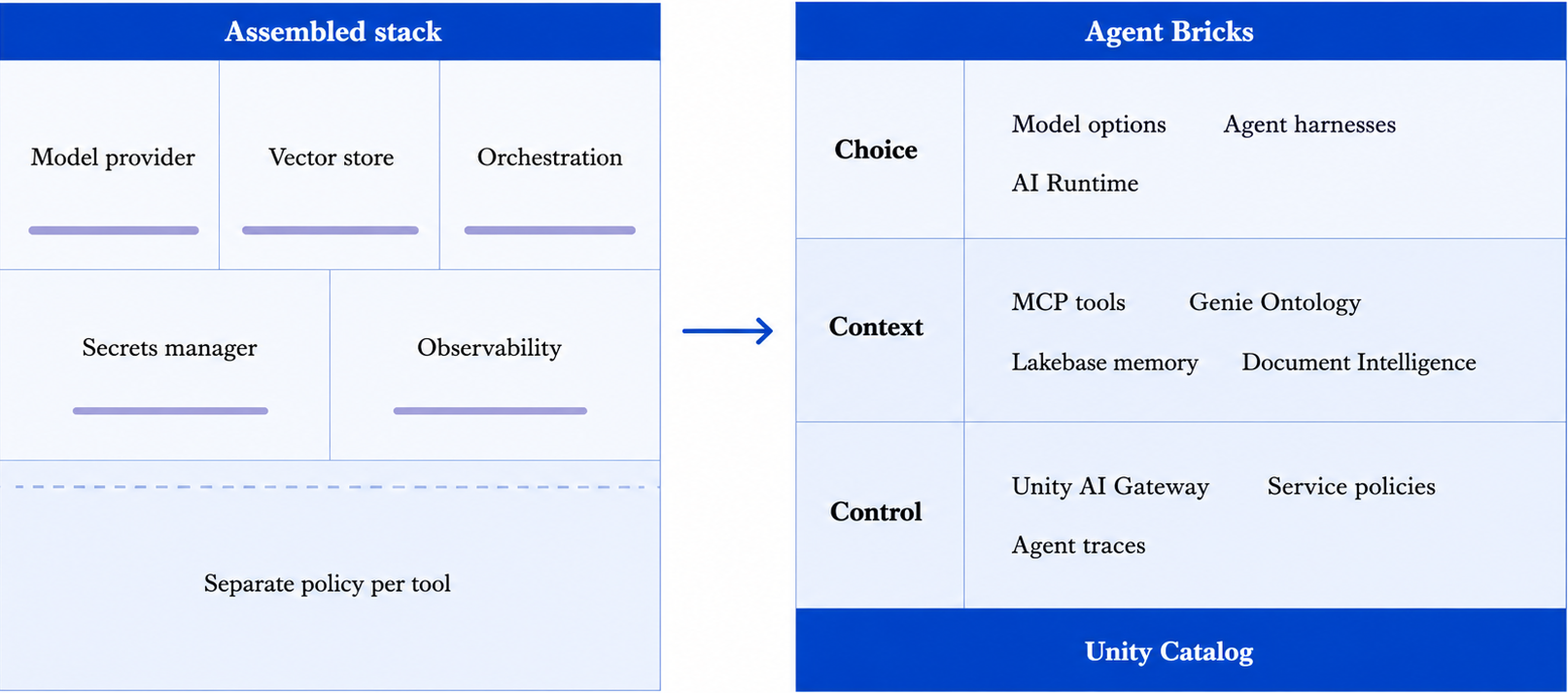
- Agent Bricks organizes that work into three parts. Choice is which models and frameworks you can use, Context is what the agent actually knows, and Control is what the agent is allowed to do.
- You need Unity Catalog, serverless compute, the Mosaic AI Agent Bricks preview toggle, and a serverless usage policy to run it.
Why do enterprise agents stall before they ship?
The agent loop is the part teams get right. Everything wrapped around it is where enterprise agents stall. After more than 100,000 agents built on its platform, Databricks sizes the core agent loop at "just 1% of the work", with the other 99% going to "the hidden technical debt of agentic systems: token capacity, deployment, security, evaluation, monitoring, context, sharing."
Every item on that list arrives after the demo already works. You have an assistant running on your own laptop, and then the questions start.
- Which model does it fall back to when the primary provider rate limits you?
- Who is allowed to invoke the tool that writes to production tables?
- How do you know its answers improved after last week's prompt change?
- What happens to conversation state when the serving process restarts?
- Whose budget does the token spend land on?
None of that is the agent loop, and it all stands between you and production.
A Databricks Community post from July 2025 is blunter, calling the jump from prototype to production "where AI projects go to die." The same community-reported piece blames complexity, weak evaluation, rising cost, governance gaps, and scattered tooling.
Agent Bricks is Databricks' answer to that 99%, meaning it handles deployment, security, evaluation, monitoring, and cost outside the agent loop. It is built to make that work part of the Databricks platform where you already run your data.
What is Databricks Agent Bricks?
Agent Bricks is Databricks' platform for building, running, and governing production AI agents on your own data. The infrastructure those agents need ships with the platform.
Databricks launched it at the Data + AI Summit on 11 June 2025 in Beta, and access is still gated behind a workspace preview toggle an admin must switch on. Databricks reports that over 100,000 agents have been built on it since, now processing more than 1 quadrillion tokens per year, and names AstraZeneca, 7-Eleven, Fox Corporation, and Block among its customers.
The difference from a general-purpose agent framework is where the surrounding machinery lives. With a framework, you pick a model provider, wire up a vector store, add an orchestration library, build evaluation and tracing, and keep governance coherent across all of it yourself. Agent Bricks treats model access, data context, and policy enforcement as platform services sitting on Unity Catalog, which already holds the permissions and lineage for the tables your agents read.
So an agent's access to data is the requesting user's access, enforced by the same catalog that governs everything else. There is no second permission model to maintain.
How does Agent Bricks cover the 99%?
Choice, Context, and Control are the three problems Databricks organizes the platform around. Choice answers being locked into one model or one framework. Context answers agents that cannot reach your business definitions and documents. Control answers agents that hold more privilege than oversight.
Choice: which models and frameworks you can use
You are not locked into one model or one agent framework. Databricks builds for "model diversity to strike the right balance of quality and latency."
A subagent that only routes questions to the right specialist does not need the model that drafts the final answer. Paying frontier prices for both is a common source of avoidable spend.
The models you can reach through Agent Bricks include OpenAI, Anthropic, Gemini, Qwen, Kimi, and Grok. When it comes to frameworks, Databricks states it supports "any agent harness developers may want to use, from open-source frameworks such as LangGraph, Agno, CrewAI to harnesses such as Claude Code SDK or OpenAI Agent SDKs."
If none of the available models fit, AI Runtime lets you train custom Large Language Models (LLMs) on your own data. Databricks names Merck and First American among the customers doing this.
Context: what the agent actually knows
Context is everything an agent reaches beyond the model's own weights, meaning your tools, your business definitions, your documents, and what it remembers from earlier in the conversation. Databricks describes LLMs as "powerful reasoning machines" that "need the ability to retrieve and process the right context in order to make business-correct decisions." A model that returns the right number from the wrong table is the hardest case to catch, because the answer looks fine.
Tools reach the agent through Unity Catalog, which is what decides who may use which tool. Managed OAuth connectors implement the Model Context Protocol (MCP), an open standard for exposing tools and data to models, and Databricks uses them to "securely connect external services like GitHub, Atlassian, and Glean as governed tools." You permission a tool once and every agent that calls it inherits that permission, which saves wiring credentials into each agent separately.
Genie Ontology carries your business definitions into the agent's view of the data. Document Intelligence parses, extracts, classifies, and governs documents through SQL-native AI functions, which turns contracts and PDFs into something you can query. And agent memory backed by Lakebase supplies "memory, conversation history, and state" for long-running workflows. On the Lakebase product page, that means an agent's chat sessions and messages persist, so "users can resume conversations and your agent can reason over prior turns across deploys."
Context does not help you if retrieval is slow or scans more data than it needs to, and that comes back to the data layout of the tables agents read.
Databricks reports that grounding agents in this business context delivers "70% higher accuracy than standard RAG and a 30% improvement in multi-step workflows," and credits the combination of Unity Catalog metadata and Genie Spaces for the gain.
Genie Ontology is one of four Genie products, and they bill for both LLM usage and compute. Download our free ebook, Databricks Genie Explained, to see what each one does and what it costs.
Control: what the agent is allowed to do
Control covers what an agent may do, which is a wider question than what it may see. The difference matters most once an agent can write, because a bad read leaks data while a bad write changes it.
Agents are "some of the most privileged actors in an enterprise, with access to sensitive data," in Databricks' own assessment.
Unity AI Gateway is the enforcement layer. Agents inherit the requesting user's identity through on-behalf-of token passing, so identity is enforced end-to-end, with no service account standing in for the user. Guardrails screen for personally identifiable information, unsafe content, prompt injection, data exfiltration, and hallucinations.
Beyond access, contextual service policies control actions. They are in Beta, so expect them to change. You define them in SQL as Unity Catalog functions, and they can allow, deny, or require approval for operations such as "modifying files, pushing code, accessing enterprise systems, or interacting with sensitive information." Policies apply based on the user, agent, model, MCP service, tool being invoked, or the contents of the request and response. If you want a human to sign off before an agent pushes to a production repository, you write that as a policy and the platform enforces it.
Unified tracing captures model interactions and MCP tool activity in one governed telemetry layer. Traces land in the Lakehouse for analysis and in Lakewatch, Databricks' agentic security information and event management (SIEM) product, for investigation.
Control also covers spend. Unity AI Gateway supports budgets and hard spend caps that "automatically stop requests when budgets are exceeded." That enforcement is real, and it stops at a specific boundary, which the cost visibility section below takes up.
What do you need to run Agent Bricks?
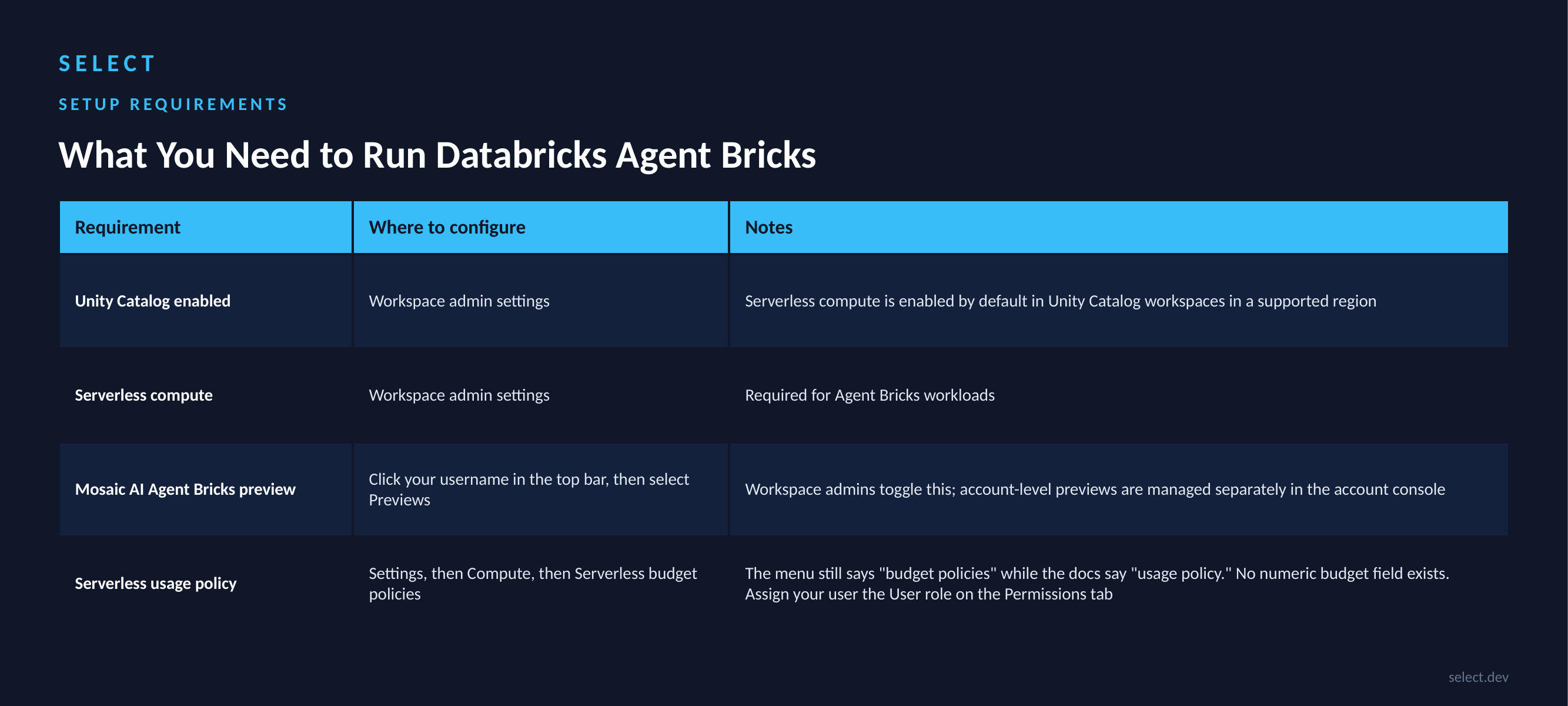
Your workspace needs four things.
- Unity Catalog enabled. If you have not stood that layer up yet, start with what Unity Catalog is and what it costs.
- Serverless compute available. Databricks enables this by default in Unity Catalog workspaces in a supported region.
- The Mosaic AI Agent Bricks preview switched on. A workspace admin does this from the Previews panel.
- Access to a serverless usage policy. The Knowledge Assistant docs word this as "access to a serverless usage policy with a nonzero budget."
That fourth requirement is the one that stalls people. It reads "nonzero budget," and there is no amount to enter. Serverless usage policies are "tags that are applied to any serverless compute activity", which a Databricks employee confirmed in a community thread are "tagging mechanisms for cost attribution, not spending caps." Create the policy under Settings, then Compute, then Serverless budget policies, and give your user the User role on the Permissions tab.
Region coverage moves, so check it before committing to one. As of August 2026, Agent Bricks runs in nine AWS regions and twelve Azure regions outright, with four more on AWS and thirteen more on Azure behind cross-geography routing. Current lists are in the AWS and Azure feature availability tables, under "Agent features availability."
What are real Agent Bricks use cases?
Three Agent Bricks products cover the common shapes of production work. Knowledge Assistant answers questions over your documents, Document Intelligence pulls structure out of them, and Supervisor Agent coordinates several at once.
Knowledge Assistant answers questions grounded in your documents. Hawaiian Electric used it to replace an existing open-source implementation. Their manager of enterprise data and analytics, Joel Wasson, reported that "Agent Bricks significantly outperformed our original open-source implementation in both LLM-as-judge and human evaluation accuracy metrics."
Check the ingestion limits first. Files over 100 MB and PDF or Office documents over 500 pages are skipped, and one assistant takes at most 10 knowledge sources.
Document Intelligence turns unstructured documents into structured fields. At AstraZeneca, Joseph Roemer, Head of Data & AI, Commercial IT, reported that "our teams were able to parse through more than 400,000 clinical trial documents and extract structured data points — without writing a single line of code." Both customer quotes come from the Agent Bricks launch release.
Supervisor Agent coordinates a multi-agent system. It routes work across Genie Agents, agent endpoints, Unity Catalog functions, MCP servers, and custom agents, so a single endpoint can span specialized domains. A supervisor takes at most 50 agents, end users need explicit access to each subagent they interact with, and web search availability depends on region and security configuration.
What does Agent Bricks not tell you about cost?
Agent Bricks tells you which people and which agents are spending your AI budget. It does not tell you which workspace, job, cluster, or model serving endpoint that spend came from, and that blind spot widens as agent workloads grow.
Unity AI Gateway enforces budgets and hard spend caps, and tracks token consumption across users, teams, applications, and model providers. If your question is "which team is burning the model budget," the platform answers it.
Those budgets and caps apply to agents, tools, models, and MCP services. They do not reach the compute cost by job and cluster underneath. Every agent run consumes serverless compute, where the infrastructure is folded into the DBU rate, and the networking and storage that workload drives still land on your cloud bill.
That second layer is why we built SELECT. Every Databricks workload drives a parallel layer of cloud infrastructure spend that Databricks provisions under the hood, along with associated networking and cloud storage costs. Your cloud provider bills those directly, Databricks' own reporting does not show them, and true total cost of ownership stays out of reach without dedicated tooling.
Model serving is where this hurts most, and it is exactly what Agent Bricks generates. As Databricks has become a primary home for AI model training and inference, we see model serving costs growing quickly, with even less native visibility and fewer controls than traditional workloads.
Any Databricks cost optimization framework must reconcile both layers. SELECT for Databricks connects through a read-only service principal and, DoiT reports, adjusts cluster configurations to reduce costs on all workloads by up to 30%.
Teams running Databricks who want granular visibility into AI model serving costs can connect SELECT in approximately 20 minutes. Book a demo.
Frequently asked questions
What is the difference between Databricks Agent Bricks and Mosaic AI?
Mosaic AI is Databricks' broader AI product layer, covering Model Serving, foundation model APIs, vector search, and the underlying agent infrastructure. Agent Bricks is the agent-building product that sits on top of it and handles the loop, tool wiring, evaluation, and optimization for you.
What are the four types of Agent Bricks agents?
Databricks launched Agent Bricks with four agent types. Knowledge Assistant answers questions grounded in enterprise data, Information Extraction turns documents into structured fields, Supervisor Agent enables multi-agent systems, and Custom LLM Agent transforms text for custom tasks. Information Extraction has since moved under Document Intelligence, the umbrella capability for parsing, extraction, and classification, which is why this article covers three shapes of production work rather than four.
Does Agent Bricks support LangGraph and other frameworks?
Yes. Databricks states it supports "any agent harness developers may want to use," naming open-source frameworks including LangGraph, Agno, and CrewAI, alongside harnesses such as the Claude Code SDK and OpenAI Agent SDKs. Omnigent is also supported.
How does Agent Bricks handle agent memory?
Through native integration with Lakebase, which Databricks describes as providing "memory, conversation history, and state for long-running workflows." Databricks positions Lakebase as persistent storage for an agent's chat sessions and messages, so "users can resume conversations and your agent can reason over prior turns across deploys."
What are the access requirements for Agent Bricks?
A workspace with Unity Catalog enabled, serverless compute available, access to Model Serving, access to a serverless usage policy, and a location in a supported region. A workspace admin must also enable the Mosaic AI Agent Bricks preview.
How many agents have been built on Agent Bricks?
Databricks reports that over 100,000 agents have been built since launch in June 2025, processing more than 1 quadrillion tokens per year.
Ian is the Co-founder & CEO of SELECT, a SaaS Snowflake cost management and optimization platform. Prior to starting SELECT, Ian spent 6 years leading full stack data science & engineering teams at Shopify and Capital One. At Shopify, Ian led the efforts to optimize their data warehouse and increase cost observability.
Want to hear about our latest data cloud learnings?Subscribe to get notified.
Get up and running in less than 15 minutes
Connect your Snowflake, Databricks, or BigQuery account and instantly understand your savings potential.