The Iceberg Dream: load, transform, and serve Snowflake-managed Iceberg using zero Snowflake compute

Jeff SkoldbergTuesday, July 07, 2026
TLDR
Snowflake Horizon's Iceberg REST Catalog lets you load and transform data as governed Iceberg tables using zero Snowflake compute. dlt writes raw data to Iceberg using an open-source pipeline, dbt Fusion with DuckDB transforms it, and both commit directly through Snowflake's catalog without ever starting a warehouse. The moment that data lands, it's fully governed by Snowflake: RBAC, masking, lineage, tags, Cortex. This became possible in late June 2026 once DuckDB 1.5.4, dbt Fusion preview.194+, and Snowflake Horizon's external-write support all shipped together.
At Snowflake Summit 2026 Snowflake claimed they have the broadest support for Iceberg V3, being the first fully open catalog to enable external reads and writes to Iceberg, including deletion vectors, row lineage, variant type, and default values. So, I had to put this to the test.
The “external writes” aspect, plus some recent developments from dbt and DuckDB, enables a version of the lakehouse I’ve wanted to build for my clients which was not possible until late June 2026. It goes like this: your tables live in your own cloud storage, in an open format, a catalog that has zero management, easy to stand up, simple to read and write to, readable by any engine, and writeable by other engines such as DuckDB. But these tables are still governed by Snowflake: one catalog, one set of grants, one place where masking and lineage and tags live. Open storage on the bottom, real governance + Snowflake AI on top.
- Land raw data as Apache Iceberg in your own S3 bucket, with no Snowflake warehouse running.
- Transform it into a new Iceberg table using dbt. Again: no Snowflake warehouse running.
- Serve it to AI and BI with the full Snowflake governance stack: RBAC, masking policies, row-access policies, tags, lineage, Cortex.
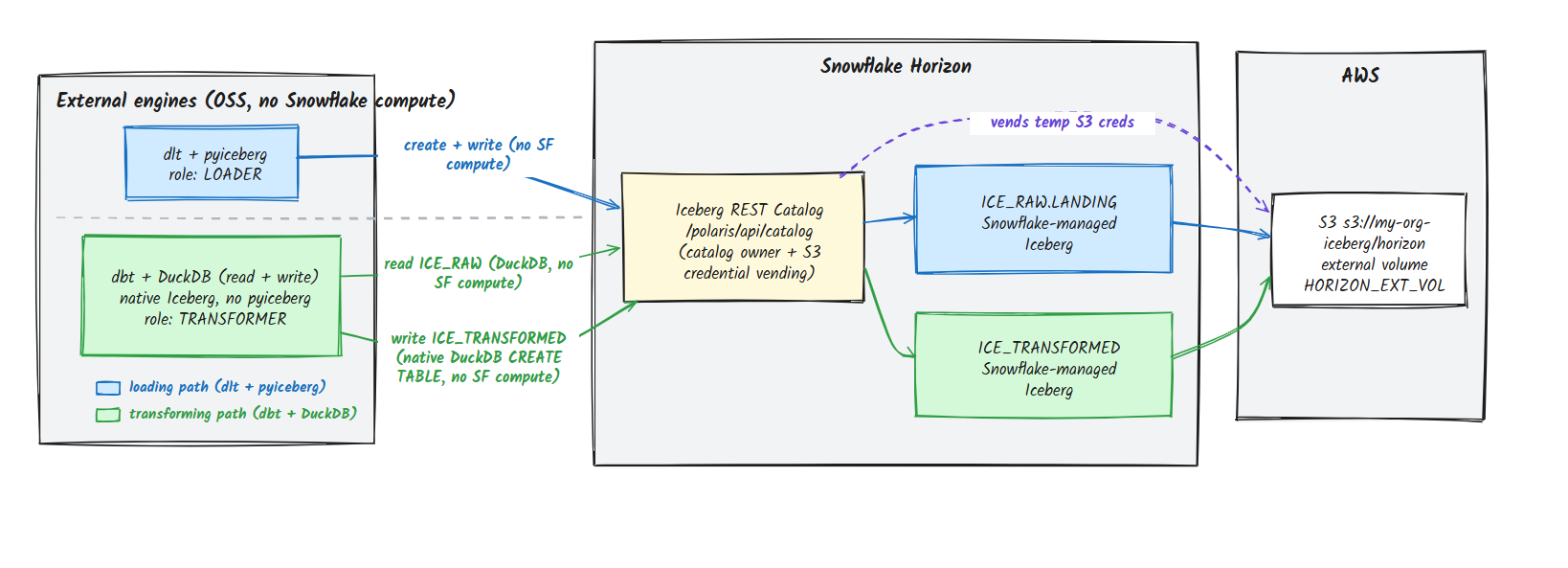
The thing that makes this possible is Snowflake Horizon's Iceberg REST Catalog. External engines (dlt, DuckDB, dbt running on your laptop or a tiny container) write Snowflake-managed Iceberg tables directly over that API. Snowflake owns the catalog, vends scoped S3 credentials at write time, and your engine does the actual compute. What comes out is a first-class governed table. Not an external table Snowflake squints at. A real one. And the catalog is already there. You don't set it up. You don't turn it on. It came with Snowflake.
The transform step is the freshest part of this stack, as the rest of it was previously possible. It took three specific releases all shipping at once: DuckDB 1.5.4 added the write-compatibly options that let DuckDB commit Iceberg back through a REST catalog, dbt Fusion preview.194+ exposed those options in catalogs.yml v2, and Snowflake Horizon completed its external-engine write path via the Iceberg REST Catalog API. If you tried this prior June 30, 2026 (Fusion 194 release), the write simply failed.
What "Iceberg REST Catalog" actually means here
Quick level-set on vocabulary. Apache Iceberg is the open table format that lets you read and write parquet files like tables (select, insert, etc.), plus a metadata tree that gives you ACID commits, schema evolution, and time travel. The REST Catalog is the open API spec that tells an engine where the current metadata is and coordinates SQL commits.
Snowflake Horizon implements that REST Catalog API and points it at Snowflake-managed Iceberg tables. So when DuckDB or dlt speaks the Iceberg REST protocol, Snowflake answers, as the catalog. The endpoint looks like this:
Two things to internalize:
- In REST-catalog speak, the
warehouseis your Snowflake database (in our example below we call itICE_RAW), not a virtual warehouse. No compute is implied by the wordwarehousein this case. - Auth is an OAuth2 token exchange. You hand Horizon a Snowflake Programmatic Access Token (PAT) as the
client_secret, with a scope likesession:role:TRANSFORMER, and it hands you back a short-lived bearer token. Your role, and every grant attached to it, rides along on that token.
That second point is the whole governance story in one sentence: the catalog hands out access by Snowflake role. Hold that thought; it comes back in the "serve" section.
The architecture, on one screen
Every arrow from an engine into the catalog carries no Snowflake compute. The engines do the work; Horizon governs and brokers. The data sits in your bucket the whole time.
The one-time foundation (and why it's not the catalog)
The setup involved is surprisingly easy. Snowflake has removed almost all of the complexity around setting up the Iceberg Catalog. Here is what you need to set up.
- Where the data lives. An S3 bucket and a Snowflake external volume that points at it, with an IAM role Snowflake assumes. This is the "your storage, your bucket" part of the open lakehouse.
- Who can touch it. A couple of Snowflake roles and a service user with Programmatic Access Tokens. This is just Snowflake RBAC. You already know it.
The companion repo does all of this with Terraform + a little SQL, so you can read every line. Storage:
Access: plain RBAC, two roles, a service user that holds them.
Then you issue the tokens. Each engine gets a PAT scoped to exactly one role, least privilege baked in:
That's it. That's the foundation. Storage you own, roles you grant. Nowhere in there did you build a catalog, because the catalog is Horizon, and Horizon is just… on.
💡One real gotcha worth saving you an hour: the hostname uses a hyphen, not an underscore. It's myorg-myacct.snowflakecomputing.com, and Python's ssl rejects the underscore form. curl tolerates it, so it'll look like it works until your pipeline doesn't.
Pillar 1: Load, with no Snowflake compute
The full code is available in the repo here. In this blog I'll pull out some relevant code for readability.
The loader is dlt using its open-source filesystem destination with table_format="iceberg", pointed at the Horizon REST catalog. No dlt+, no licensed connector. dlt writes the parquet and commits through the catalog with pyiceberg; Horizon vends the S3 creds.
The catalog connection lives in dlt's secrets, and the only Snowflake-specific trick is this: Snowflake-managed Iceberg assigns the table location itself (under your external volume), so it rejects a client-supplied location. We wrap dlt's create_table to omit it:
Run it:
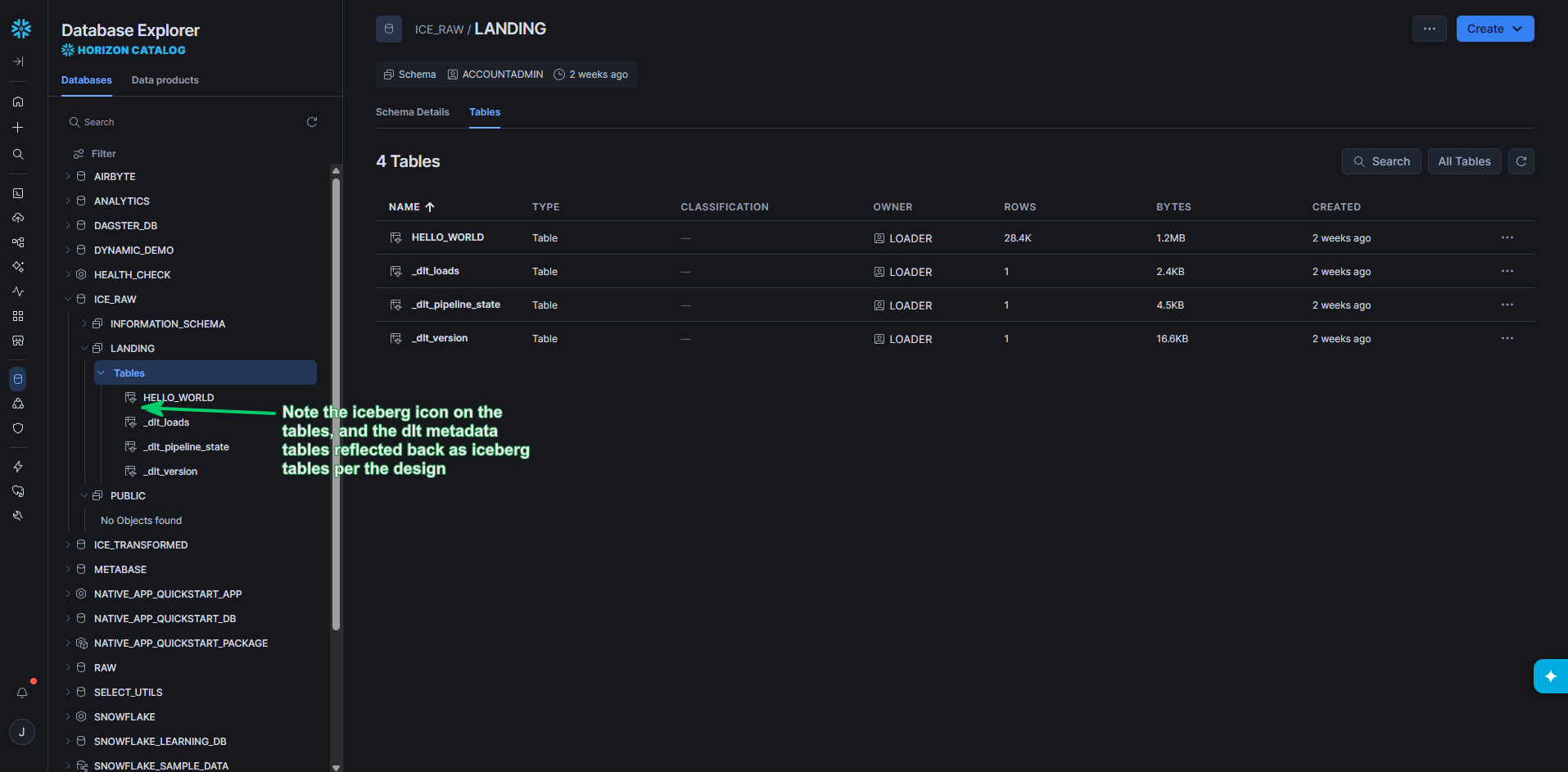
And here's the moment. Go to Snowflake (now you can use a warehouse, because you're a human running a query) and the table is right there, governed, queryable, kind MANAGED:
Rows, written by an open-source Python process, that never started a Snowflake warehouse. The bytes are in your bucket. The governance is Snowflake's. Sweet.
Pillar 1 Bonus:
For science, I decided to schedule the EL job on dltHub’s new SaaS platform, dltHub Pro. I realize how pointless it is to schedule a job that writes the words “hello” and “world” to Snowflake, but new shiny toys, I couldn’t resist.
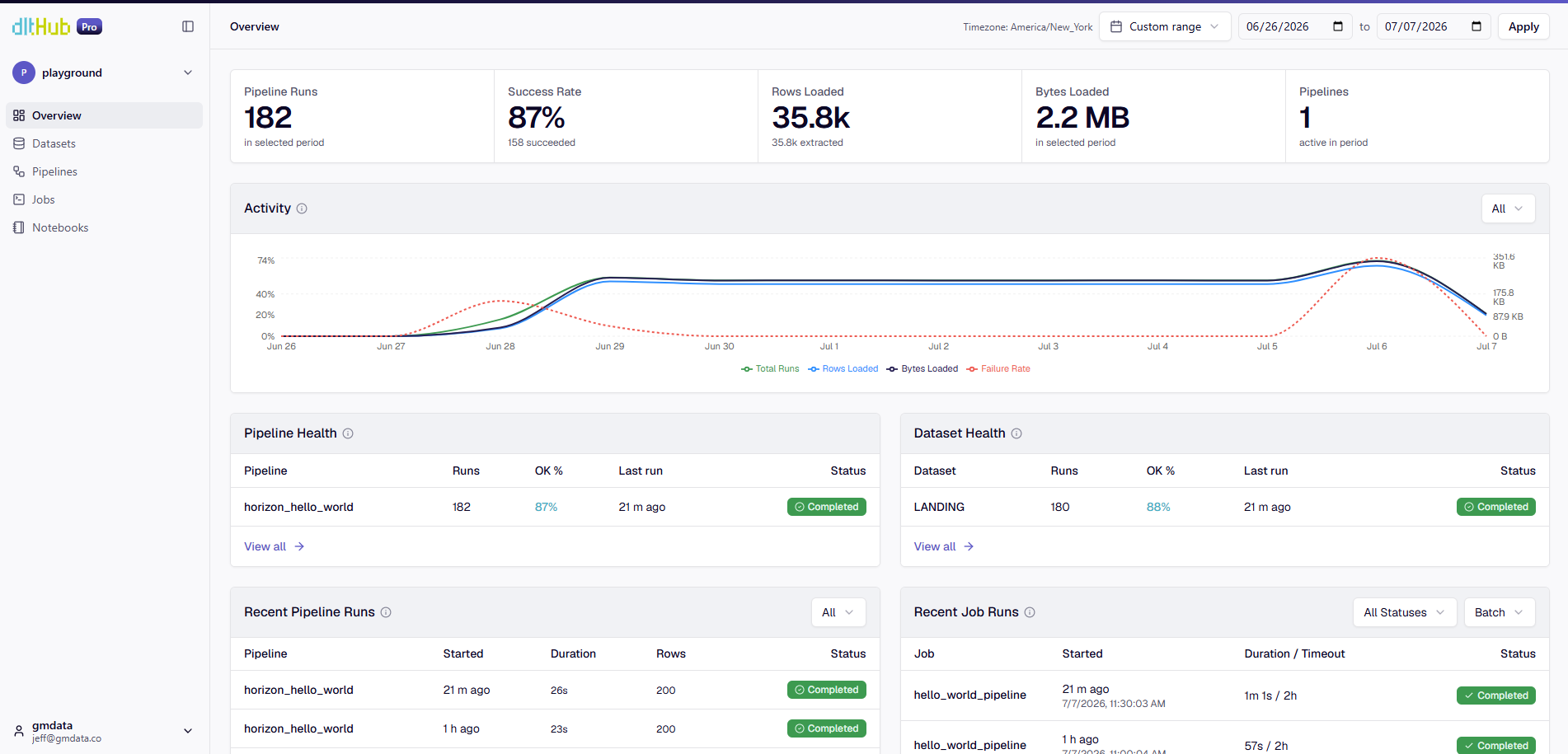
The pipeline has now been running for two weeks, every 30 minutes during business hours. It has been executed about 200 times and has cost about $2 so far. (REST catalogs are notoriously slow so most of that money has been spent waiting.)
Pillar 2: Transform, with no Snowflake compute
This next part is most exciting because it was not possible 1 week ago.
The transformer is dbt with DuckDB doing the work. DuckDB attaches the Horizon REST catalog twice: ICE_RAW to read what dlt landed, ICE_TRANSFORMED to write the result. It reads, runs your SQL, and writes a brand-new Snowflake-managed Iceberg table straight back through the catalog. No handwaving or tricks.
How this was unlocked: DuckDB 1.5.4 shipped a set of Iceberg-REST write-compat options (duckdb-iceberg#1017), and dbt Fusion (preview.194+) exposes them in catalogs.yml v2. Four options teach DuckDB to commit in exactly the shape Horizon accepts. Here's the catalog config; the write target carries the magic:
Turn the project on with the catalogs v2 flag, and bind your staging model to the write catalog:
Those +schema: values land each model in its own Iceberg namespace (STAGING, MARTS) inside ICE_TRANSFORMED. Like normal use of dbt, you don't pre-create schemas: dbt runs create schema if not exists before each model (just like normal), DuckDB-iceberg turns that into a namespace-create against the Horizon REST catalog, owned by the transformer role that created it.
💡Keep the schema names uppercase. Since duckdb handles the schema creation, you don’t get Snowflake unquoted identifier behavior.
In the repo you’ll find a basic staging model that just shows we can CTAS a new table in a different schema based on the ice_raw table. And a set of marts queries just to demo how we can use multiple schemas.
Here are the marts tables in Snowflake, owned by the transformer role:
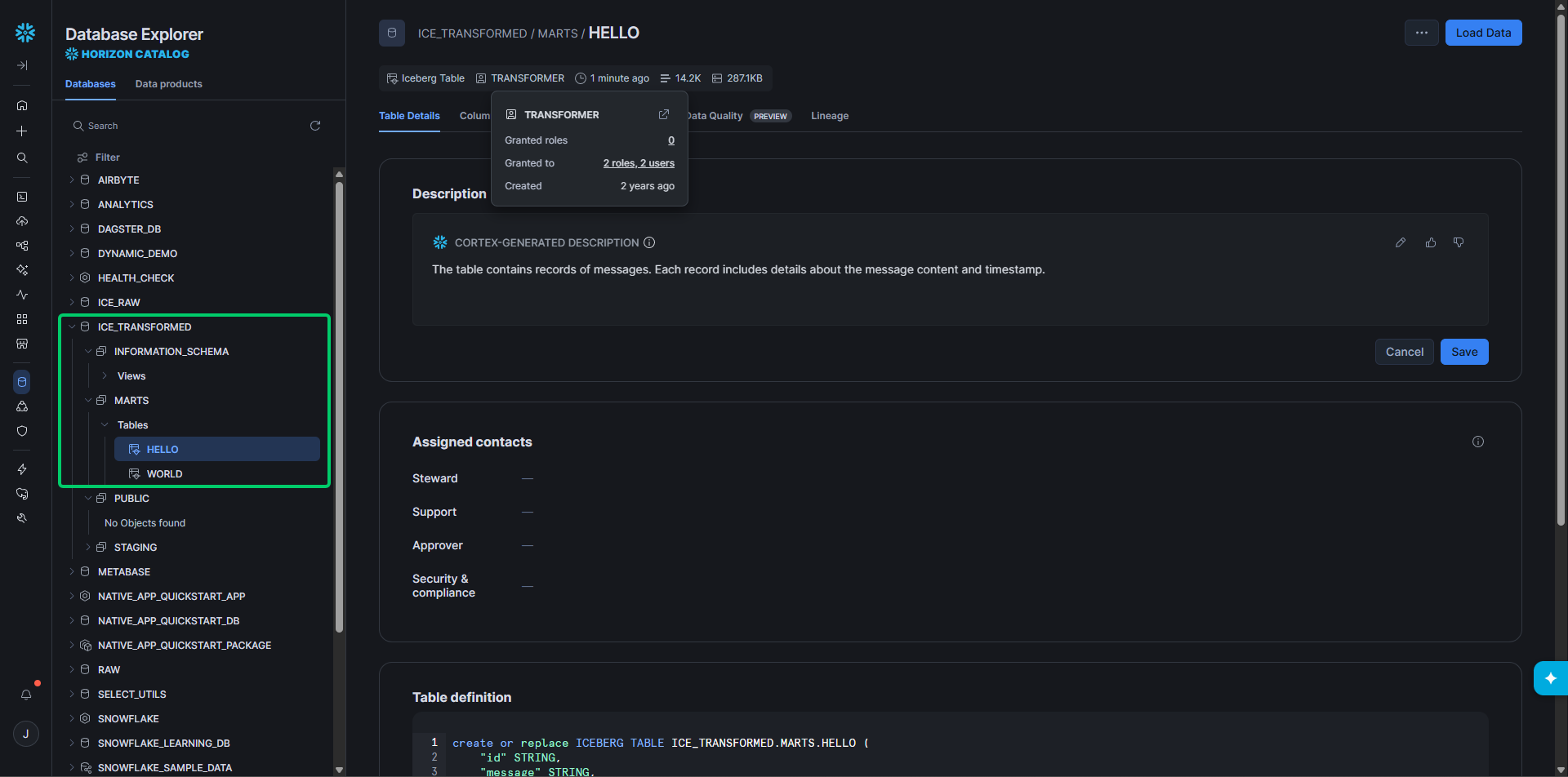
If we want proof these dbt-written tables are real catalog commits and not a local trick, we can read it back from a completely different engine: pyiceberg or duckdb straight from the catalog. (The repo also includes a set of duckdb queries to read the tables from Horizon.)
To check from Duckdb directly, launch Duckdb in the terminal then,
A model authored in dbt, executed by DuckDB, landed as governed Iceberg in Snowflake, and read back by pyiceberg. Three engines, one table, one catalog. That's the open lakehouse working as advertised.
💡If you can't run Fusion yet, the same native write works on stock dbt-core + dbt-duckdb with a tiny custom materialization. The repo ships it as a fallback in dbt/macros-duckdb/, with the two dbt-core-only gotchas documented (dbt-duckdb silently drops false boolean attach options; and the data-append needs an explicit commit). Fusion handles both for you, which is why it's the headline path.
Pillar 3: Serve it to AI and BI, governed
These are Snowflake-managed tables, so we can keep Pillar 3 very short. Everything you already do in Snowflake works: row-access policies, column masking, object tags, lineage, Cortex functions, semantic views, agents, BI tools. No special Iceberg configuration required.
Easier than DuckLake?
A few weeks ago a shared a well received demo about how easy DuckLake is. But dare I say Iceberg on Horizon is even easier?
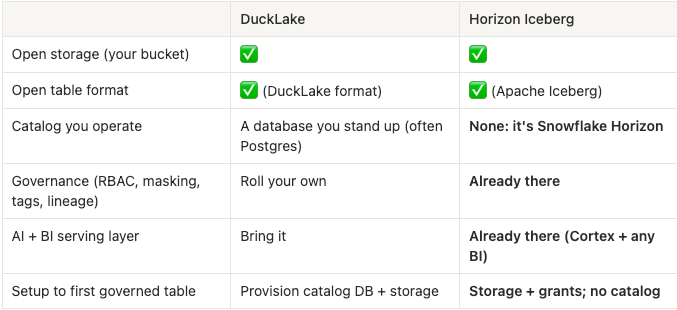
DuckLake Horizon Iceberg Open storage (your bucket) ✅ ✅ Open table format ✅ (DuckLake format) ✅ (Apache Iceberg) Catalog you operate A database you stand up (often Postgres) None: it's Snowflake Horizon Governance (RBAC, masking, tags, lineage) Roll your own Already there AI + BI serving layer Bring it Already there (Cortex + any BI) Setup to first governed table Provision catalog DB + storage Storage + grants; no catalog
The catalog row is the whole story. In DuckLake you provision and babysit the metadata database. Here you don't, because the metadata database is Horizon, and you didn't build Horizon; you bought Snowflake, and it came on.
That's the "easiest thing since sliced bread" feeling people keep describing. It's not that the lakehouse got more powerful. It's that the hardest piece (a trustworthy, governed catalog) turned out to be the piece you don't have to make.
Try it
The full, reproducible repo is here. The fast path per the readme:
Wrap up
Open data in your bucket. A catalog you didn't have to build. Loads and transforms that don't burn warehouse time. And the second that data exists, it's wearing all of Snowflake's governance (the RBAC, the masking, the tags, the lineage, the AI) because to Snowflake it was never "external" in the first place.
dbt is embracing Open Data Infrastructure (yes, a new buzz phrase for you) and making moves to make dbt more compatible with this vision.
Now go try it and let me know if Iceberg no longer feels complicated and intimidating!
FAQ
Do I need to run a Snowflake warehouse to use this architecture?
No, not for loading or transforming. Both dlt and dbt (via DuckDB) write directly to Snowflake-managed Iceberg tables through the Horizon REST Catalog API. Snowflake vends scoped S3 credentials at write time, but the actual compute happens on your engine, not a Snowflake warehouse. You only need a warehouse when a human (or Cortex, or a BI tool) queries the data afterward.
What's the difference between this and just using an external table in Snowflake?
An external table is something Snowflake reads but doesn't fully own or govern the same way. Tables written through the Horizon REST Catalog are first-class Snowflake-managed Iceberg tables. They show up with kind MANAGED, and every governance feature, RBAC, masking policies, row-access policies, tags, lineage, applies to them exactly as it would to a native Snowflake table. Snowflake was never treating this data as external in the first place.
Why wasn't this possible before late June 2026?
Three separate releases had to land together. DuckDB 1.5.4 added the write-compatibility options needed to commit Iceberg tables back through a REST catalog. dbt Fusion preview.194+ exposed those options in catalogs.yml v2. And Snowflake Horizon had to complete its external-engine write path via the Iceberg REST Catalog API. Before dbt Fusion 194 shipped on June 30, 2026, attempting the write step simply failed.
Jeff is a Data and Analytics Consultant with 15+ years experience in automating insights and using data to control business processes. From a technology standpoint, he specializes in Snowflake + dbt + Tableau. From a business topic standpoint, he has experience in Public Utility, Clinical Trials, Publishing, CPG, and Manufacturing. Reach out any time, [email protected].
Want to hear about our latest data cloud learnings?Subscribe to get notified.
Get up and running in less than 15 minutes
Connect your Snowflake, Databricks, or BigQuery account and instantly understand your savings potential.