Snowflake DCM Projects: Infrastructure as Code, in Plain SQL

Jeff SkoldbergTuesday, September 15, 2026
TLDR
- DCM Projects are Snowflake's native, declarative way to manage objects as code. You write
DEFINE <object>instead ofCREATE <object>, (exampleDEFINE DATABASE), and Snowflake works out what has to change. - The loop is edit definitions, plan, then deploy. The plan is a read-only diff. The deploy applies it.
- DCM drops what you stop defining. Delete a line, lose a database. Read the plan.
- A
manifest.ymlplus Jinja gives youDEV,QA, andPRODfrom one set of files. - DCM can manage tables and views, but I don't think it should when you already run dbt. Let DCM own the platform (roles, databases, warehouses, grants) and let dbt own what's inside the databases.
- The role and database design comes from the dbt Labs Snowflake setup guide that hundreds of dbt projects have followed. The repo makes a few improvements and turns it into code.
- Here is the GitHub repo this article is based on, with CI/CD via GitHub Actions which never touches
ACCOUNTADMIN.
How we got here
If you've been on Snowflake for a while, you've probably managed your account infrastructure in one of three ways:
- Click-ops. Someone with
ACCOUNTADMINcreates an object in Snowsight on a Tuesday. Nobody remembers why. Three years later nobody dares to drop it. - Migration scripts:
V1__create_roles.sql,V2__grant_things.sql,V47__fix_the_grant_from_V2.sql. Tools like schemachange run them in order. It works, but the "current state" of your account is the sum of 47 files, and good luck reading that. - Terraform. Declarative and powerful. It also brings HCL, a provider to keep up with, and a state file you have to store, lock, and occasionally perform surgery on. For a lot of data teams, that's a whole new discipline just to create a warehouse.
DCM Projects are Snowflake's answer to that. You get Terraform's declarative model, but the language is SQL, and the state lives in Snowflake.
The blueprint: the grant statements everyone copied
Before we get into DCM, credit where it's due. If you've set up Snowflake for dbt, there's a good chance you've read Claire Carroll's Setting up Snowflake — the exact grant statements we run on the dbt Discourse. Hundreds of dbt projects have been set up by following that outline. I've followed it myself more times than I can count.
The design is simple, and that's why it works:
- A
rawdatabase for incoming data, and ananalyticsdatabase for modelled data. - A
loaderrole that writes toraw, atransformerrole that readsrawand buildsanalytics, and areporterrole that readsanalyticsand nothing else. - Future grants, so new schemas and tables are readable without anyone lifting a finger.
The problem was never the design. The problem is that it's a list of statements you paste into a worksheet once. Six months later nobody can say whether the account still matches it, and the "dev environment" extension at the bottom of the post is left as an exercise for the reader.
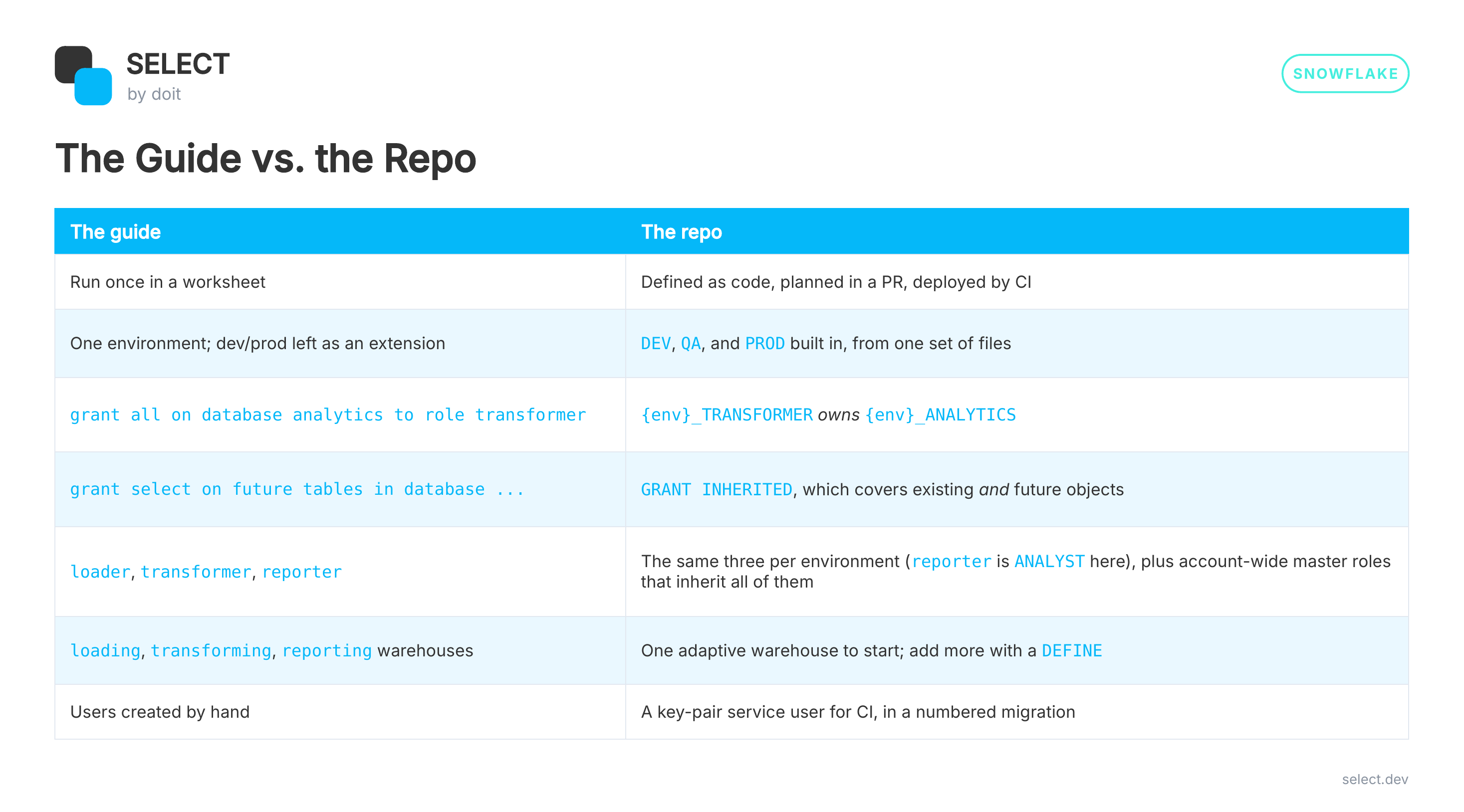
So the starter repo keeps Claire's shape and changes a few things:
Why inherited grants replace future grants
That grants row is the change that matters most, so let’s dive deeper.
Future grants were the right tool for a long time! They're what makes Claire's setup low-maintenance. But they have three problems, and anyone who has run Snowflake for a few years has hit at least one:
- They only cover the future. A future grant does nothing for tables that already exist, so every setup pairs it with a
grant select on all tablesstatement. That's two statements per privilege, and two things to remember. - Schema-level future grants override database-level ones. If anyone adds a future grant on one schema, Snowflake ignores the database-level future grants for that schema. Your
reporterrole quietly stops getting new tables there, and nothing errors. - They're a one-time copy, not a rule. A future grant is applied to each object when the object is created. Revoke or change the future grant later, and every object it already touched keeps the old privilege. The grant you can see no longer describes the access people actually have.
An inherited grant is one statement on a container (the account, a database, or a schema), and it applies to every matching object in it, existing and future:
That's the whole replacement for the future grant, the on all grant, and the per-schema version of each. When you want to know why someone can read a table, SHOW GRANTS has IS_INHERITED and INHERITED_FROM columns that point at the grant responsible.
It's also a natural fit for DCM. A declarative tool wants one line that states the rule. "Analysts can read everything in ANALYTICS" is one line now, not six.
A few trade-offs to know about:
- No exceptions. You can't revoke the privilege on one table to carve it out. Snowflake's docs warn that the revoke appears to succeed while the role keeps access through the inherited grant. If a table needs different access, it belongs in a different schema or database.
- Moving or cloning an object into a container changes who can see it, with no
GRANTstatement anywhere. That's the point, but be deliberate about clones. OWNERSHIPcan't be inherited. Ownership stays a plain grant.- It needs an account flag,
FEATURE_RBAC_INHERITED_GRANTS, which onlyACCOUNTADMINcan set. More on that in the bootstrap below.
What is a DCM Project in Snowflake?
Two things:
- A folder of files. A
manifest.ymland some.sqlfiles full ofDEFINEstatements. - A DCM project object in Snowflake. It lives in a schema like any other object, and it keeps the deployment history.
Here's the layout from my starter repo:
One file per object type is my convention, not a DCM rule. Snowflake reads everything under sources/, so organize it however your brain works.
DEFINE, not CREATE
This is the whole mental shift. With a migration script you write instructions:
With DCM you write the end state:
If the role doesn't exist, DCM creates it. If it exists with a different comment, DCM alters it. If it already matches, DCM does nothing. You never write IF NOT EXISTS again, and you never write an ALTER to fix something you wrote last week.
Grants work the same way. You don't DEFINE a grant, you just state it:
Plan, then deploy
Every change goes through two steps. With the Snowflake CLI:
The plan compares your files to what's in the account and tells you exactly what it would create, alter, and drop. It changes nothing.
[screenshot: plan output for adding a database]
Happy with it? Deploy:
That --alias is optional, but please use it. Without one, your deployment history is a list of auto-generated names nobody can read. With one, snow dcm list-deployments reads like a changelog: add_marketing_db, analyst_read_on_analytics, drop_legacy_loader.
You can do all of this in SQL too (EXECUTE DCM PROJECT ... PLAN), and Snowsight Workspaces has a UI for it. I live in the terminal, so the CLI is what you'll see here.
DCM drops what you stop defining
This is the part that could bite you.
If you remove a DEFINE that was previously deployed, the next deploy drops that object.
That's the correct behavior for a declarative tool. The files are the account. But it means two habits are non-negotiable:
- Always plan before you deploy. An unexpected
DROPin the plan means a definition went missing, not that DCM is being helpful. - Read the plan in your PR. More on how I automate that below.
One more: Snowflake's docs are upfront that a failed deploy can leave you with a partial execution. It's not one big transaction. Fix the definition and run plan → deploy again, rather than patching things by hand.
DEV, QA, and PROD from one set of files
Nobody wants three copies of roles.sql. The manifest.yml defines targets, and each target points at its own project object and passes its own templating variables:
Then every definition uses {{ env }} as a prefix:
Deploy with --target DEV and you get DEV_RAW. Deploy with --target PROD and you get PROD_RAW. Same files.
The tricky part: account-wide objects
Some objects don't belong to an environment. In my template, all three environments share one account, one warehouse, and a set of "master" roles like LOADER that inherit DEV_LOADER, QA_LOADER, and PROD_LOADER.
If I defined COMPUTE_XS with no condition, all three targets would claim it, and each target's deploy would fight over it. So account-wide objects are defined in exactly one target, with a Jinja if and a loop:
The catch: that PROD block grants to DEV_LOADER and QA_LOADER, so DEV and QA have to deploy before PROD. Deploy order becomes part of your process, and your CI.
If you put each environment in its own account, this goes away, but then each account needs its own copy of the account-wide objects. Pick your trade-off.
Here's the role model the template ends up with:
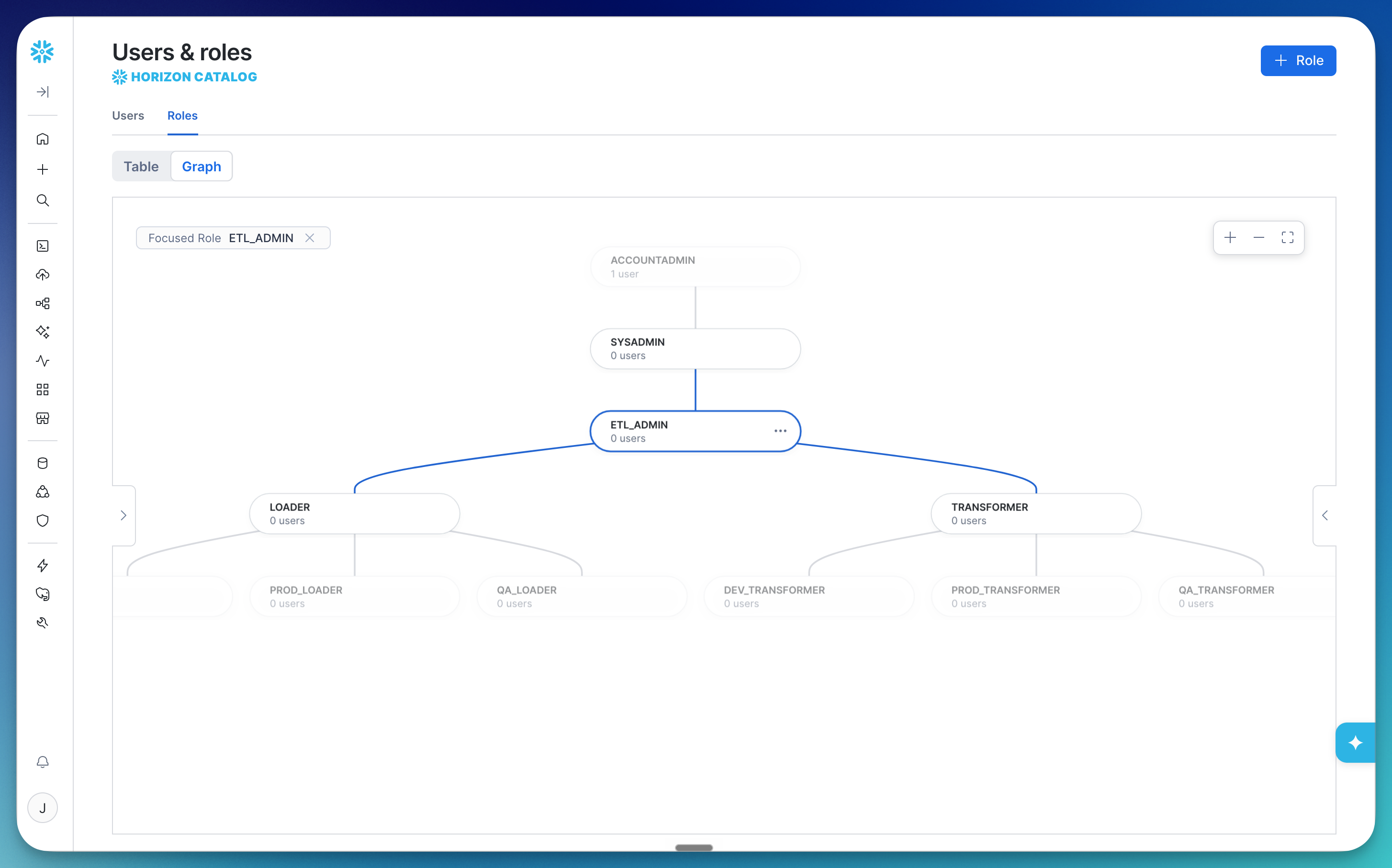
Plus the Deployer role gets the environment specific roles directly:
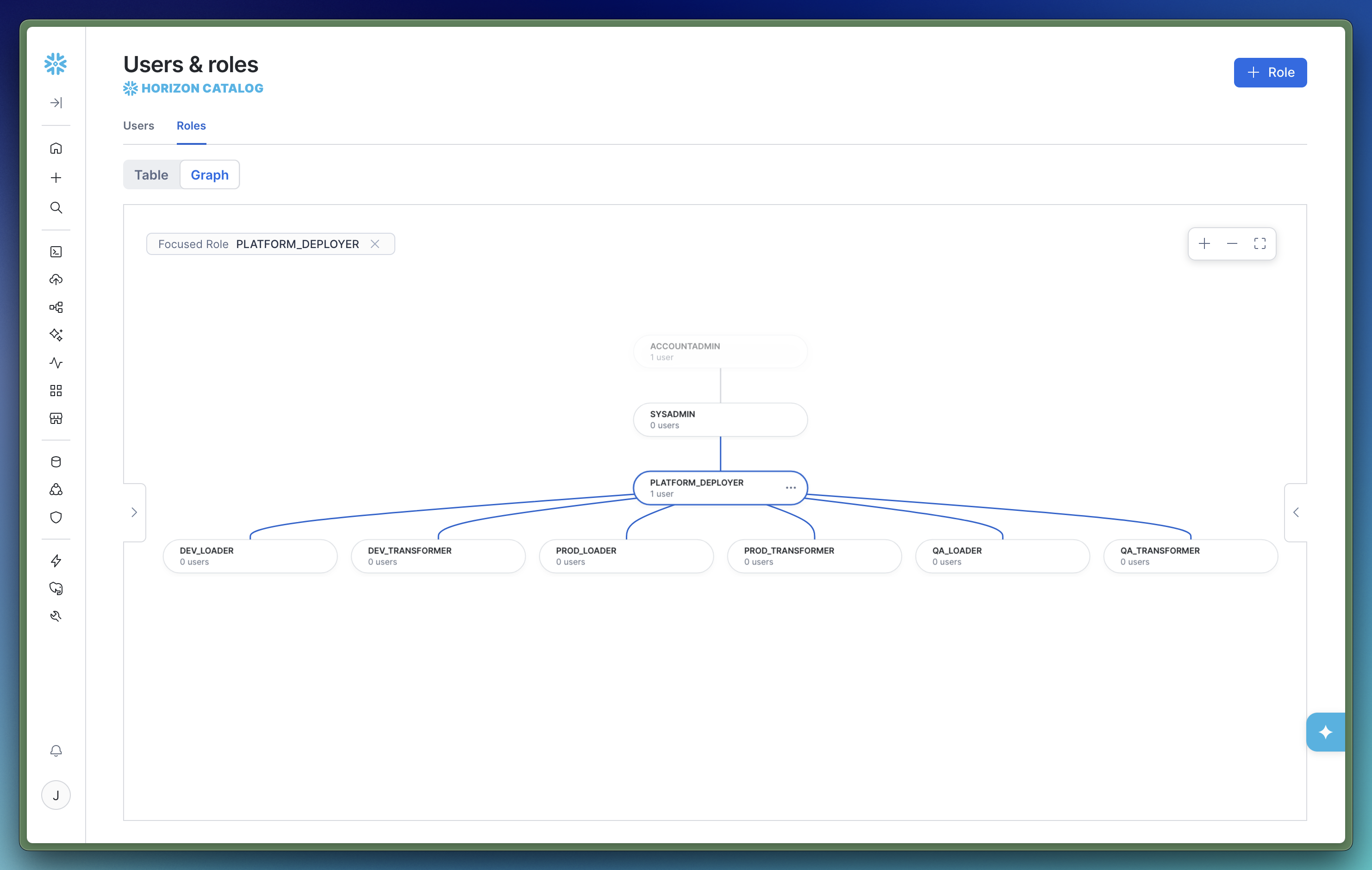
Your ingestion tool connects as {env}_LOADER. dbt connects as {env}_TRANSFORMER. Analysts get {env}_ANALYST, which can read ANALYTICS and can't see RAW at all.
If you use dbt, let it own Tables and Schemas in Analytics DB
DCM supports a long list of object types: databases, schemas, tables, views, dynamic tables, tasks, stages, functions, procedures, masking policies, tags, and more.
So why does my template only use it for roles, databases, warehouses, and grants?
Because if you run dbt, dbt already manages your tables and views, with lineage, tests, and docs. Put the same table in a DCM definition and you now have two tools that both think they own it. One of them will eventually drop what the other one built.
So I draw a hard line:
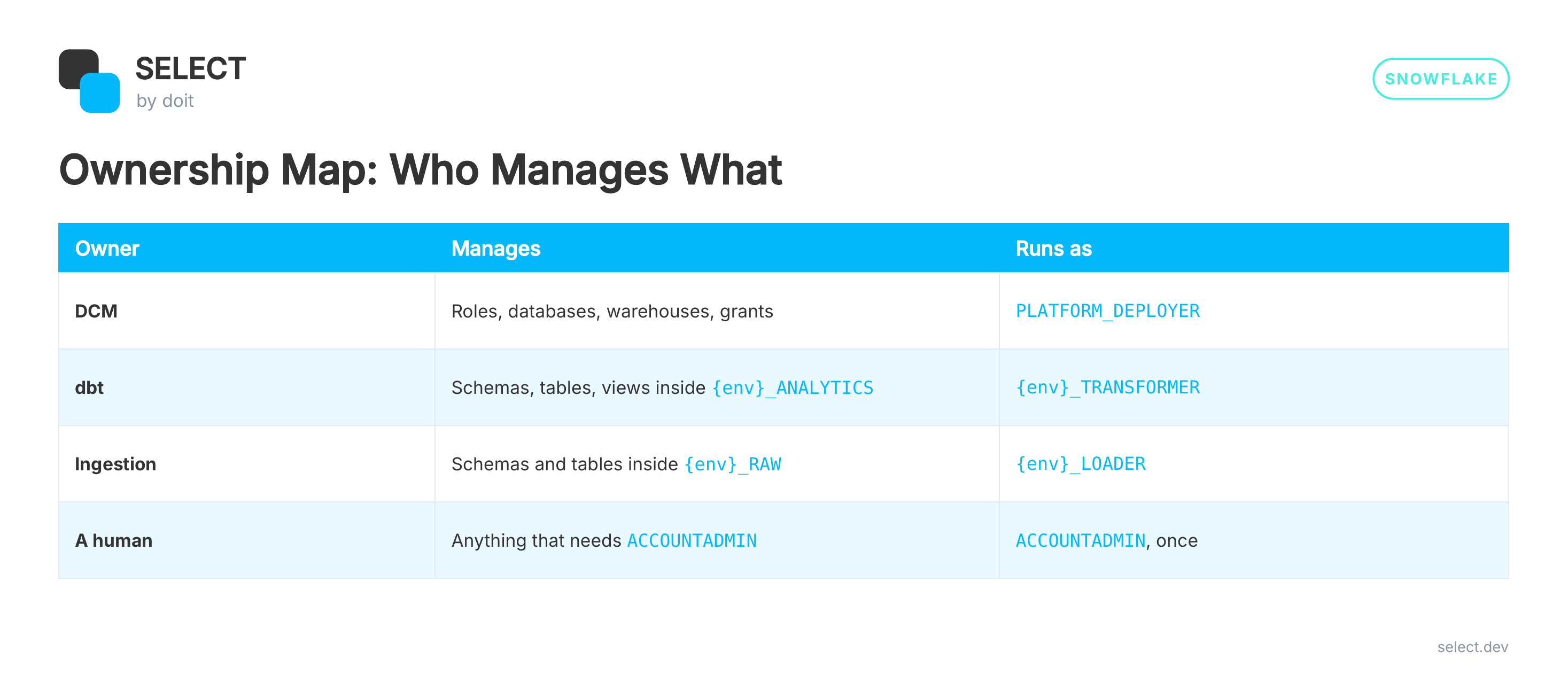
No object has two owners. If you don't run dbt, or you have objects that no transformation tool manages (stages, file formats, network rules), DCM is a great home for those. The rule is "one owner per object," not "DCM only does roles."
The chicken and the egg: bootstrapping
DCM needs a role to deploy as, and a project object to deploy into. Something has to create those, and that something needs ACCOUNTADMIN.
My rule for the whole repo:
CI/CD must never need ACCOUNTADMIN.So anything that does need it goes into a numbered SQL file that a human runs exactly once:
(Trimmed slightly. The full file is in the repo.)
After that, PLATFORM_DEPLOYER does everything. And here's a habit I love: pass --role PLATFORM_DEPLOYER locally too. If a change secretly needs more privilege, it fails on your laptop instead of in CI on a Friday afternoon.
Gotchas I hit so you don't have to
Inherited grants in DCM are marked preview. Snowflake's list of supported DCM objects flags inherited grants and container-level MANAGE GRANTS as preview features. They've worked well for me, but check the docs before you bet production access on them.
Don't lock the deployer out. When DCM hands ownership of DEV_RAW to DEV_LOADER, PLATFORM_DEPLOYER no longer owns it. On the next deploy, DCM can't manage what it can't reach. The fix is one line per role:
account_identifier in the manifest doesn't expand environment variables. Write the identifier in. It's what lets DCM warn you when you're about to deploy to the wrong account, which, if you're a consultant juggling client accounts, is a feature you want.
Don't template secrets. Snowflake says it plainly: templating variables aren't meant for credentials.
CI/CD with GitHub Actions
Here's where it all comes together. Two workflows:
On a pull request:
- Plan and deploy to
QA. - Plan
PRODand post the plan as a PR comment.
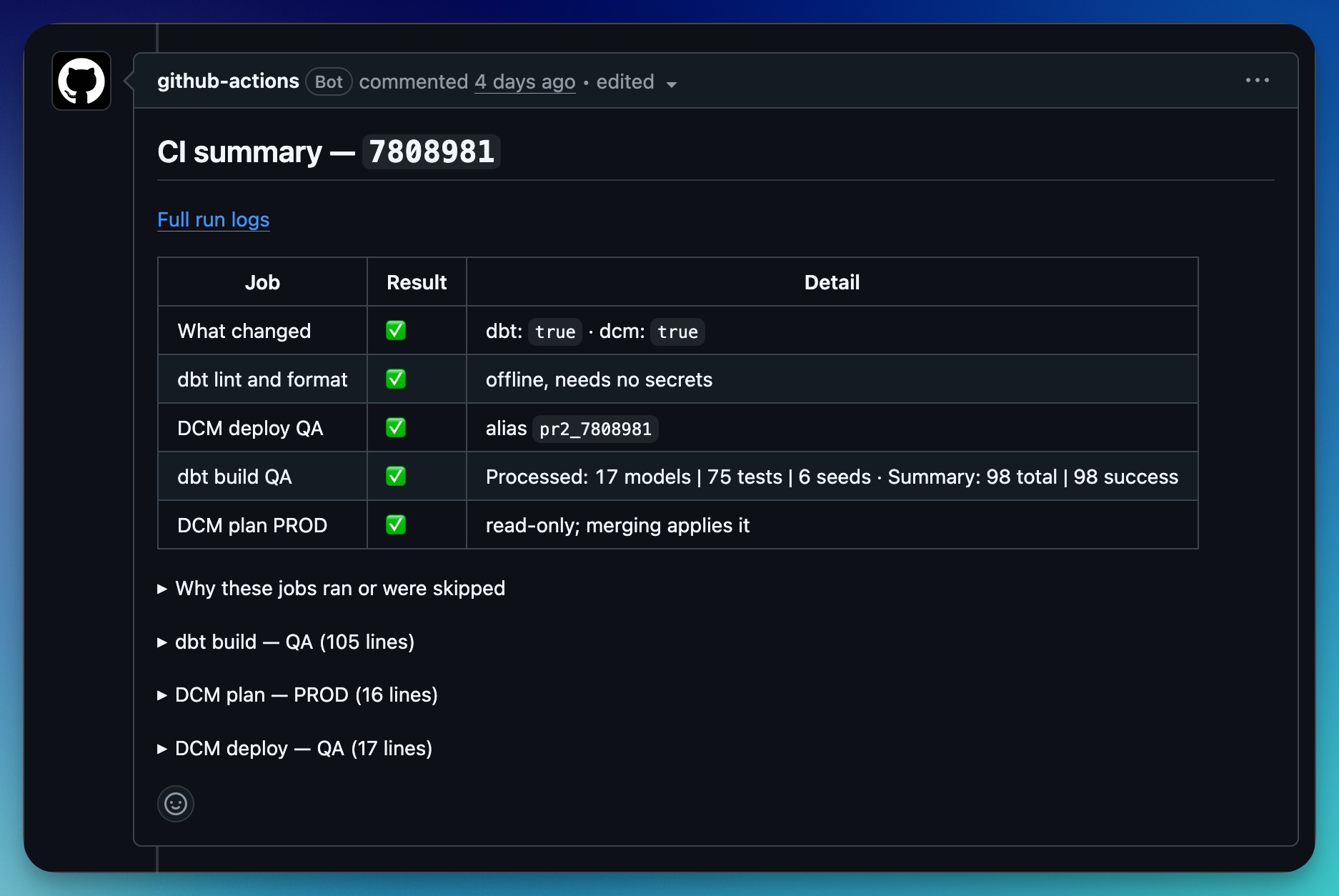
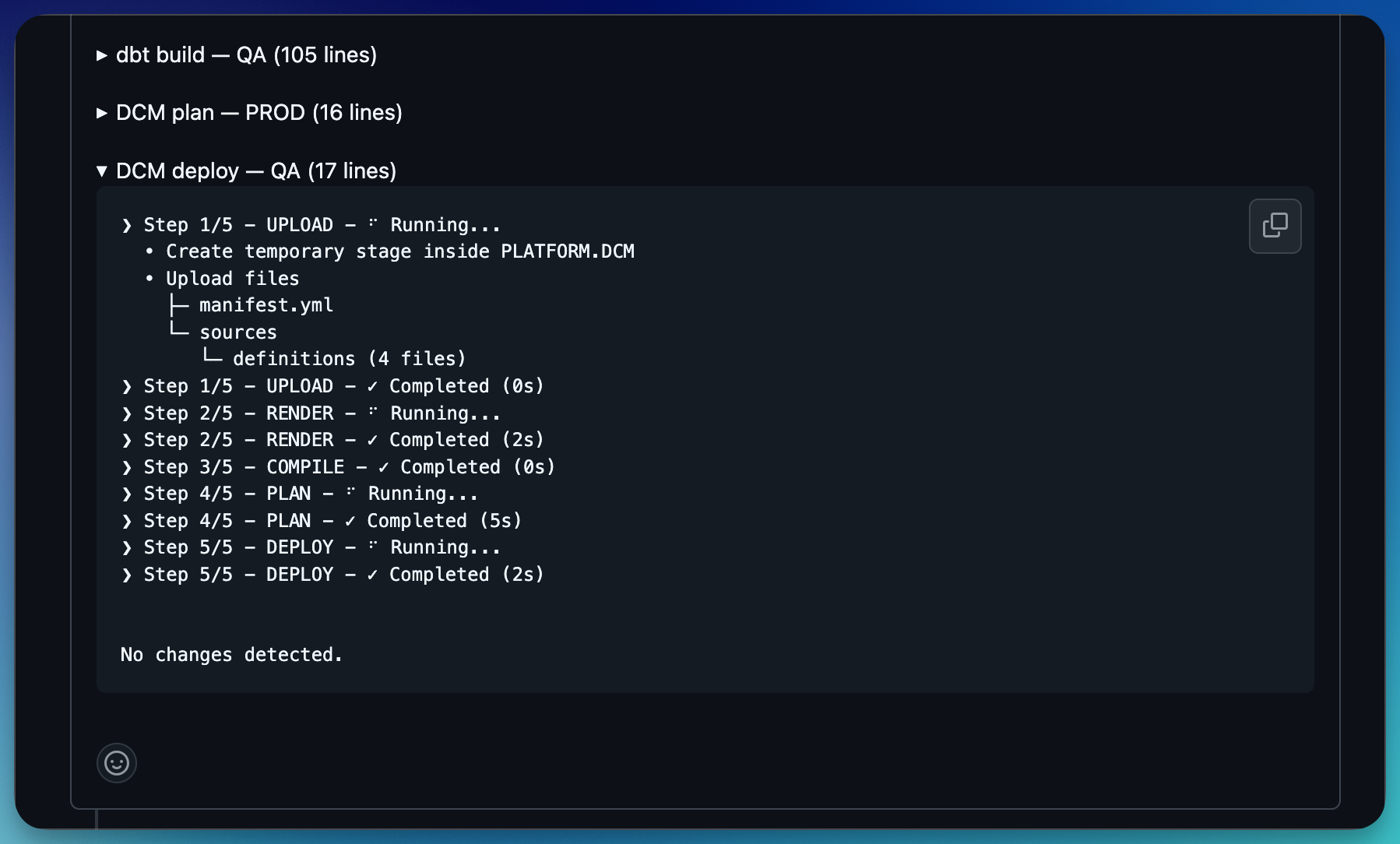
On merge to main:
- Plan and deploy
DEV, thenQA, thenPROD, in that order.
The PR comment is my favorite part. Reviewers don't have to trust that a change is safe. They see exactly what will happen to production, including any DROP, before they click merge. And the job edits its previous comment instead of adding a new one, so a PR with ten pushes still has one plan comment.
[screenshot: PROD plan posted as a PR comment]
CI authenticates as a TYPE = SERVICE user with key-pair auth. That user holds PLATFORM_DEPLOYER and nothing else. Every deploy is aliased with the commit (main_9fd3c1a), so any deployment in Snowflake traces straight back to a merge.
DCM Projects in Snowsight
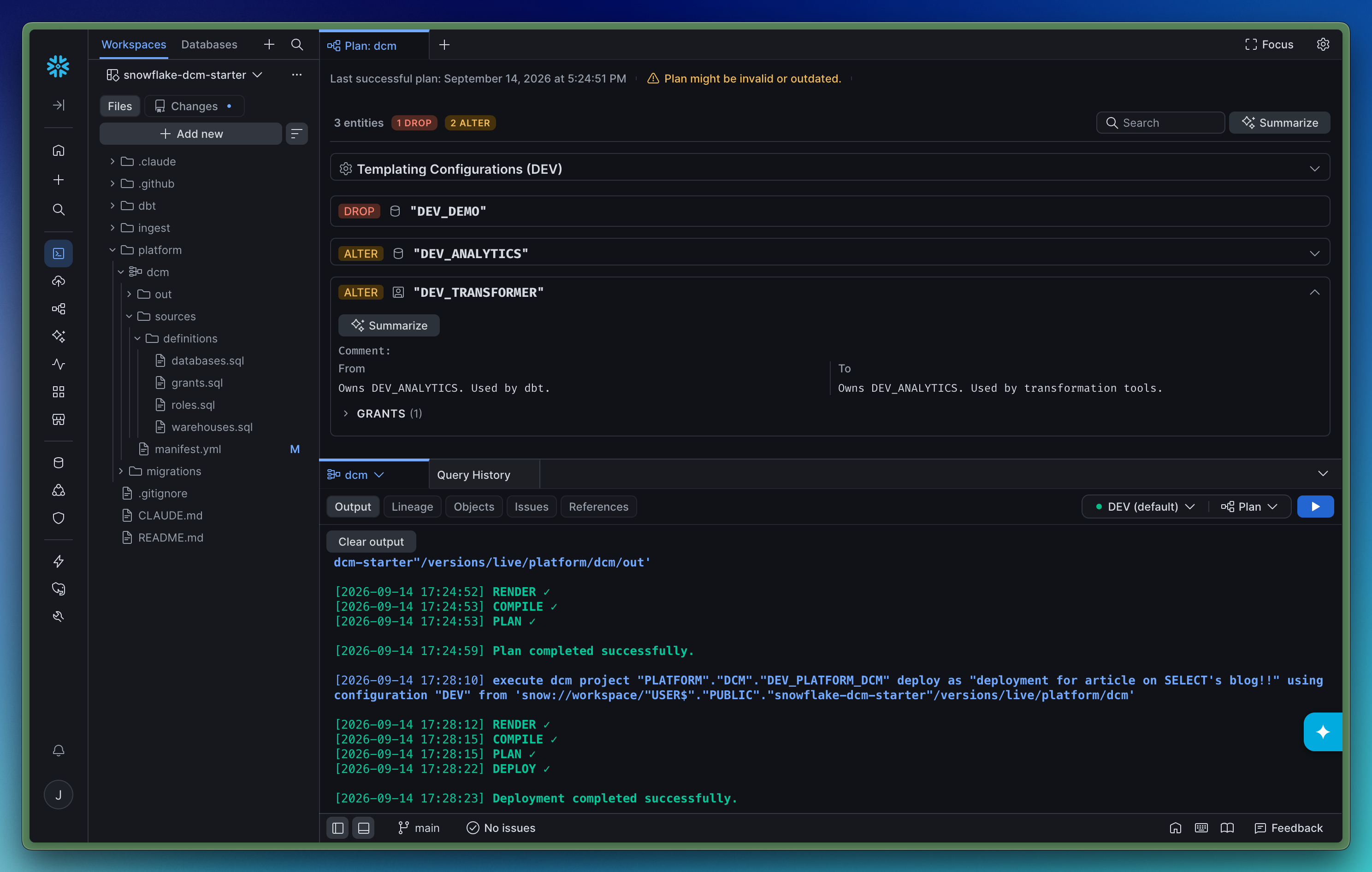
Snowflake Workspaces provides a really cool UI to manage, plan, and deploy DCM projects. Without getting into the weeds, let’s just review some screenshots.
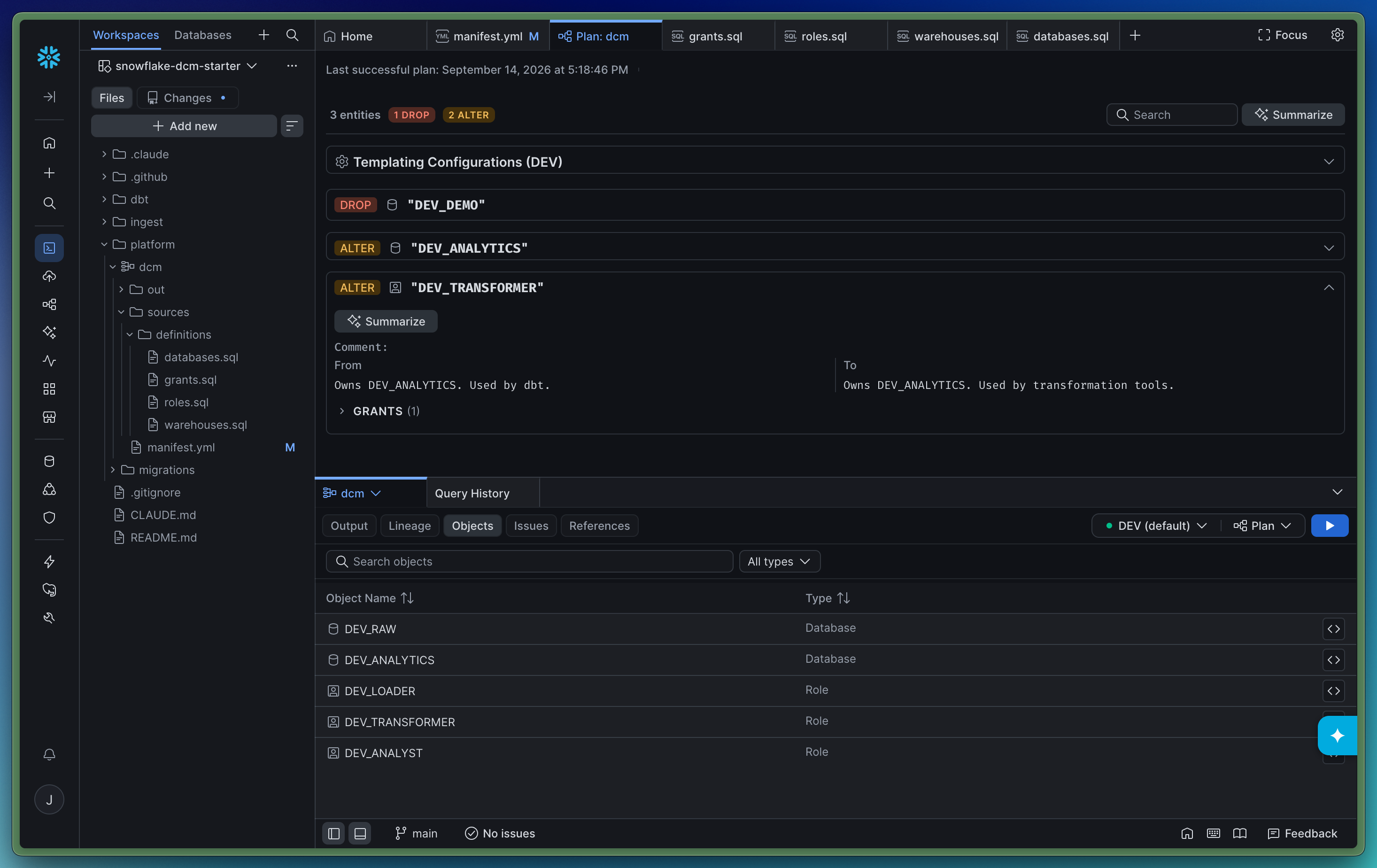
Running a plan will pop open a tab that explains the plan:
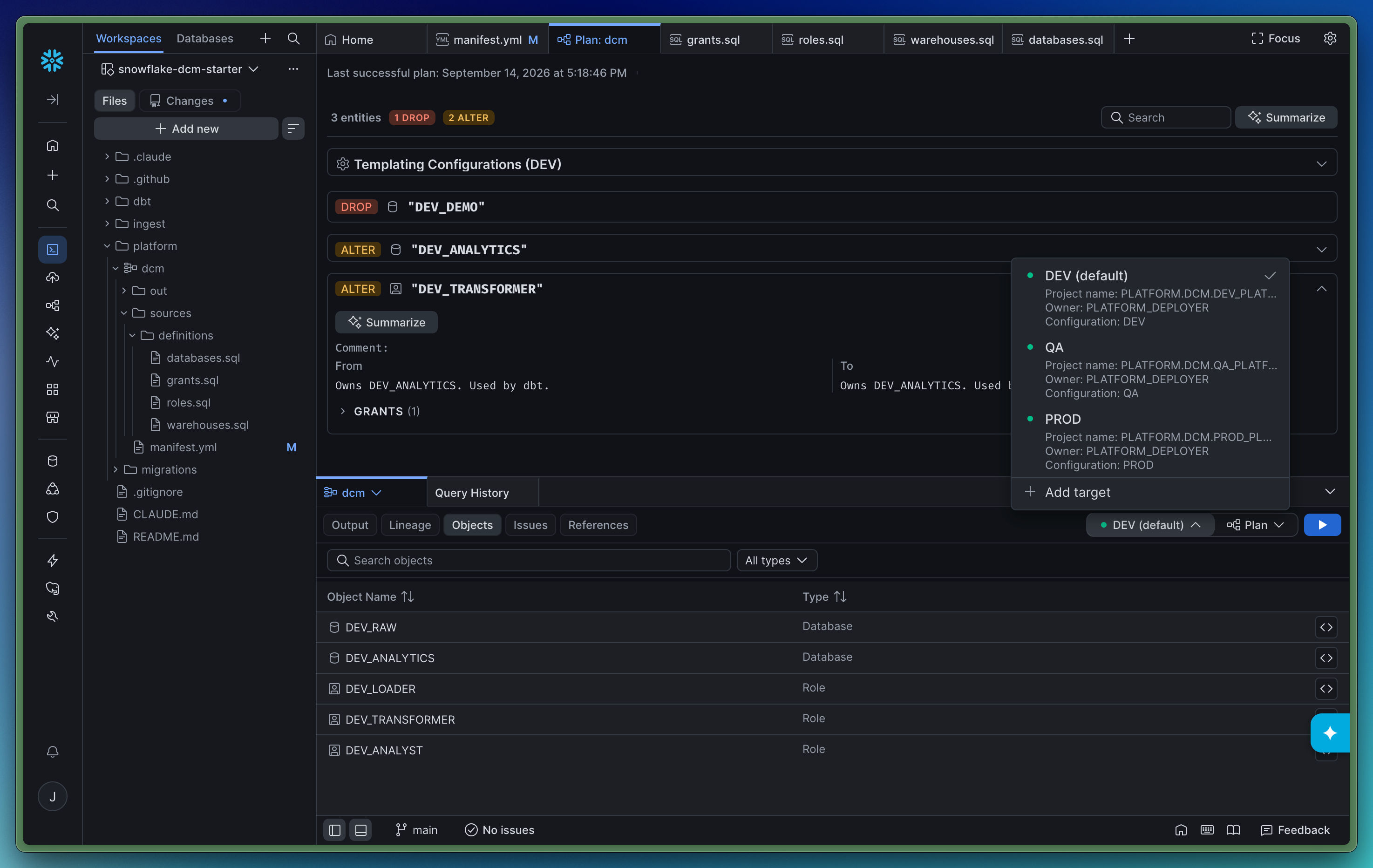
You can change your Environment using the picker:
When you’re ready to deploy, just click the Plan drop down, and select deploy:
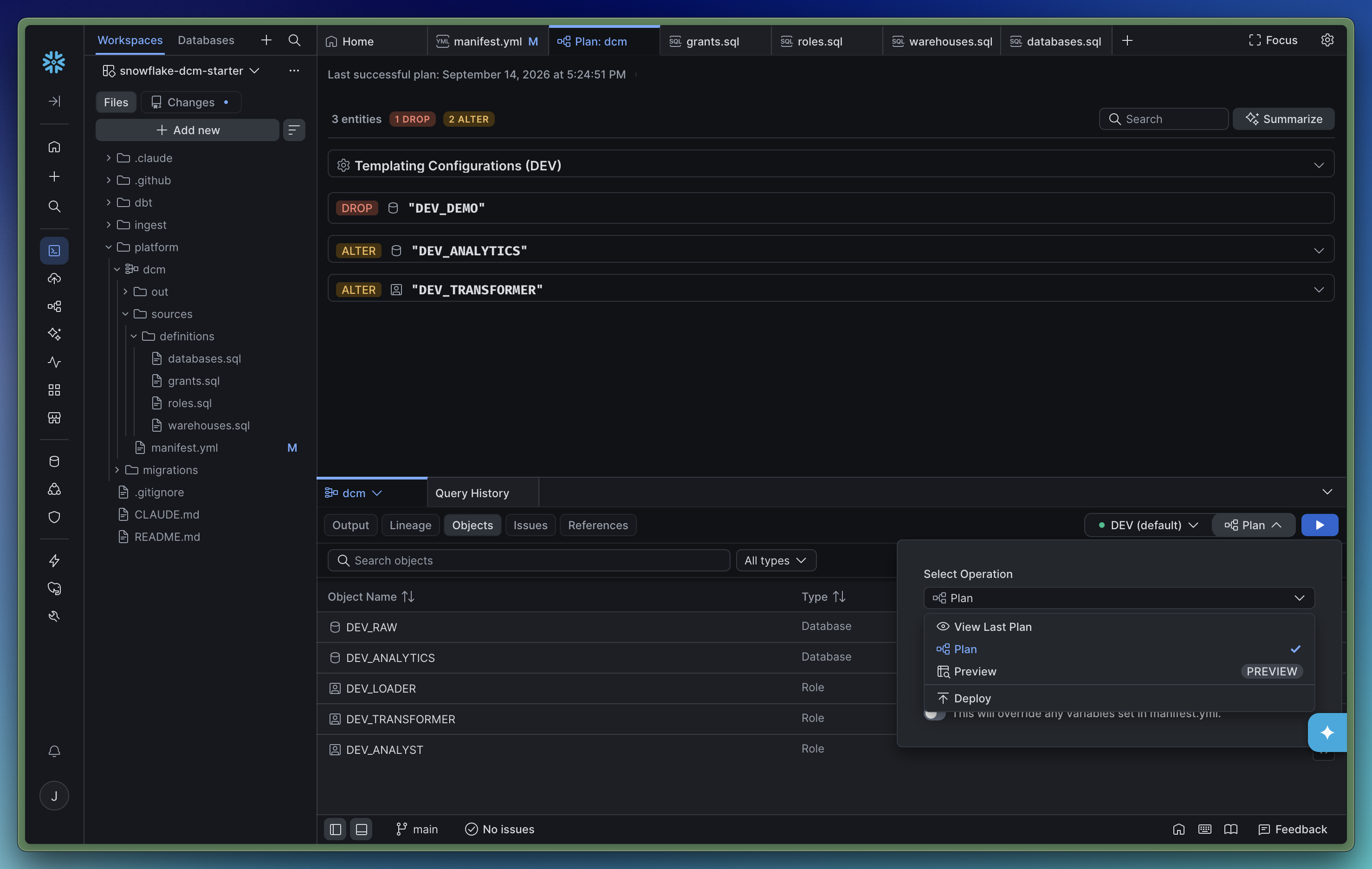
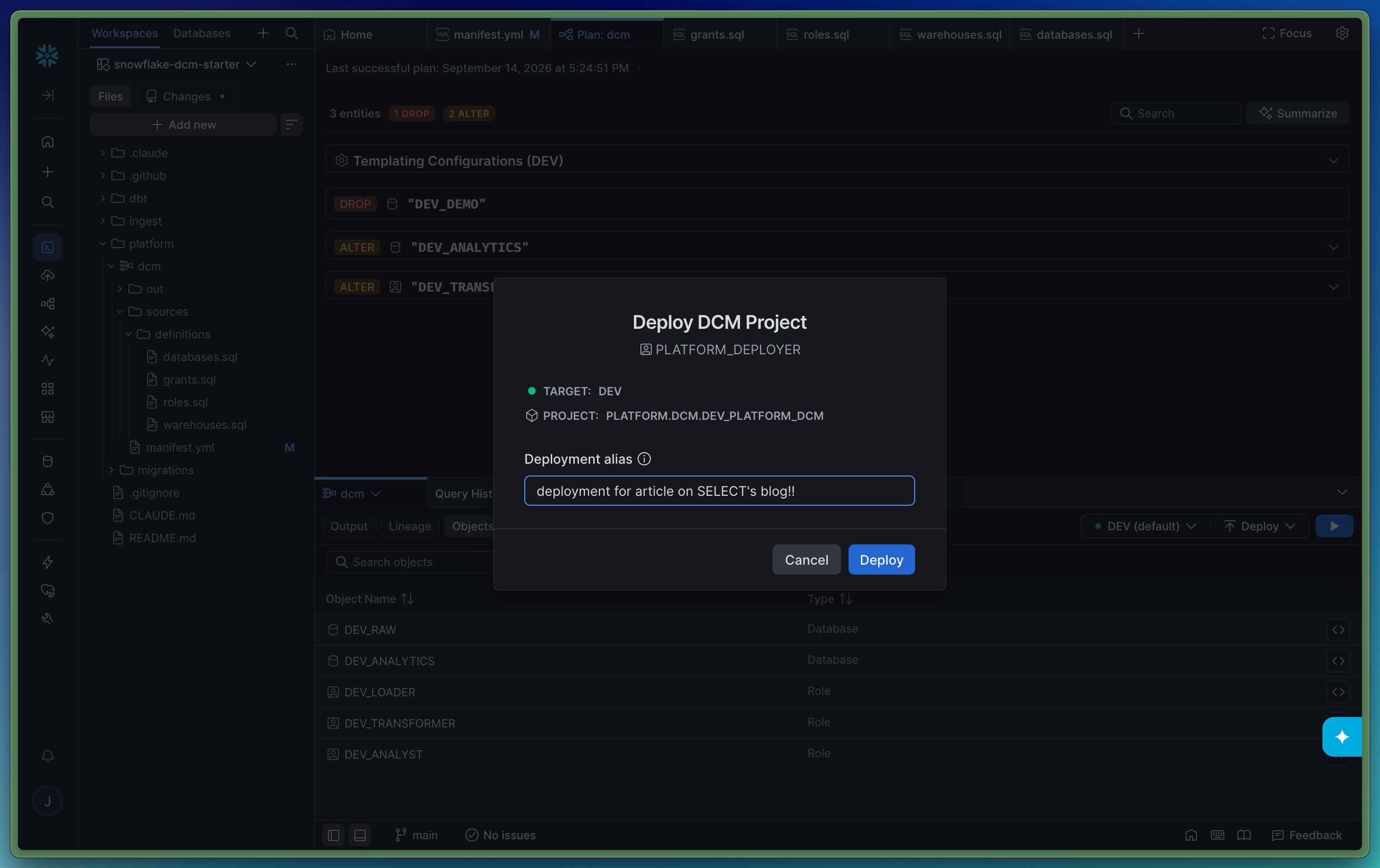
Once it is complete, a toast will pop up in the top center of the screen letting you know it is deployed.
The Output tab will show you the CLI output from all of your runs:
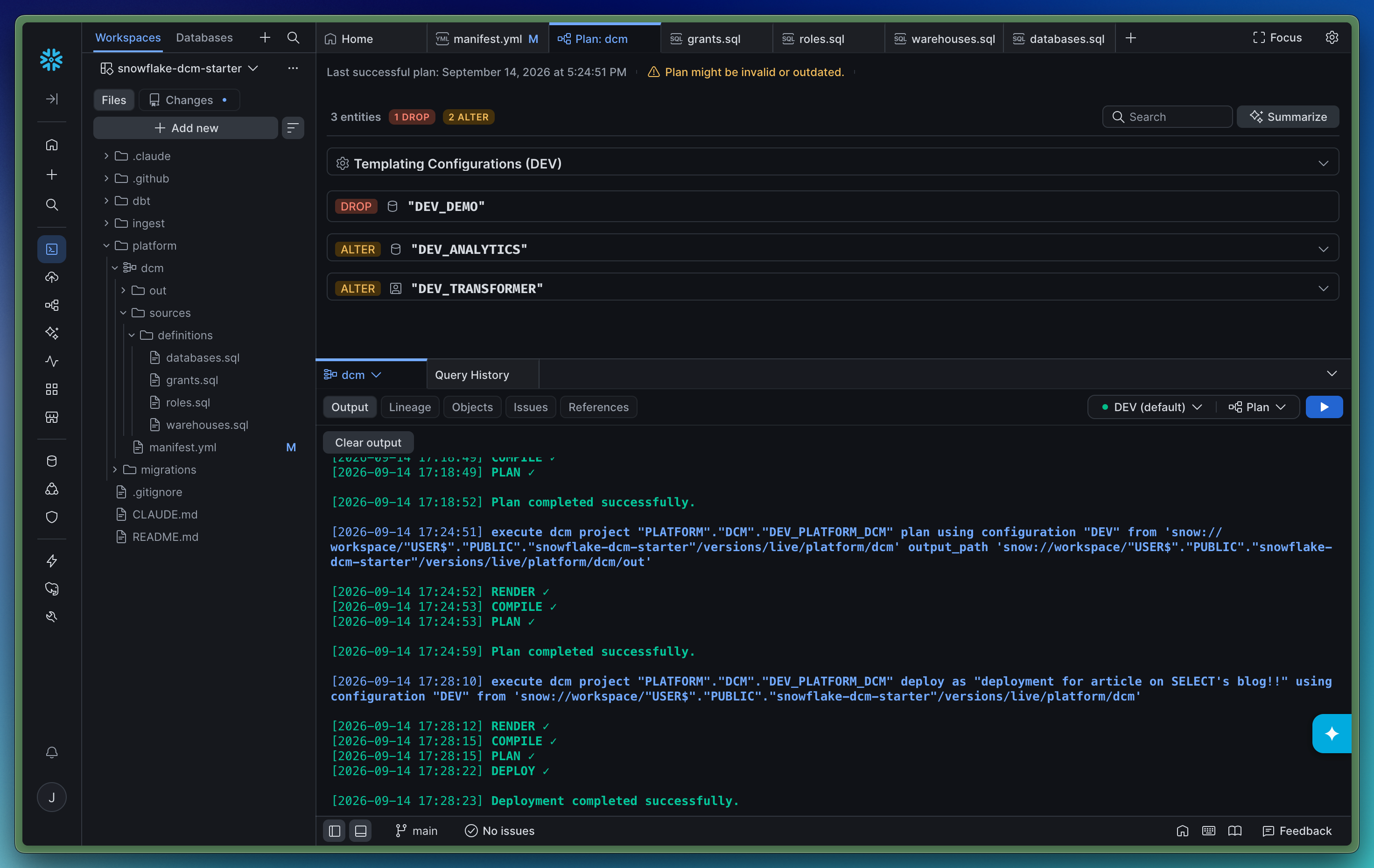
If we had a DAG of Dynamic Tables or Tasks, they would show on the lineage tab, but this project does not contain any.
Running DCM locally using CLI
Personally, I do all of my work in Visual Studio Code. Here’s the quick rundown of what deployment looks like in VS Code. dcm is a sub-command of the snow CLI command. So as long as you have snow CLI installed, you already have DCM! Here I’m showing snow dcm plan and snow dcm deploy in a single screenshot.
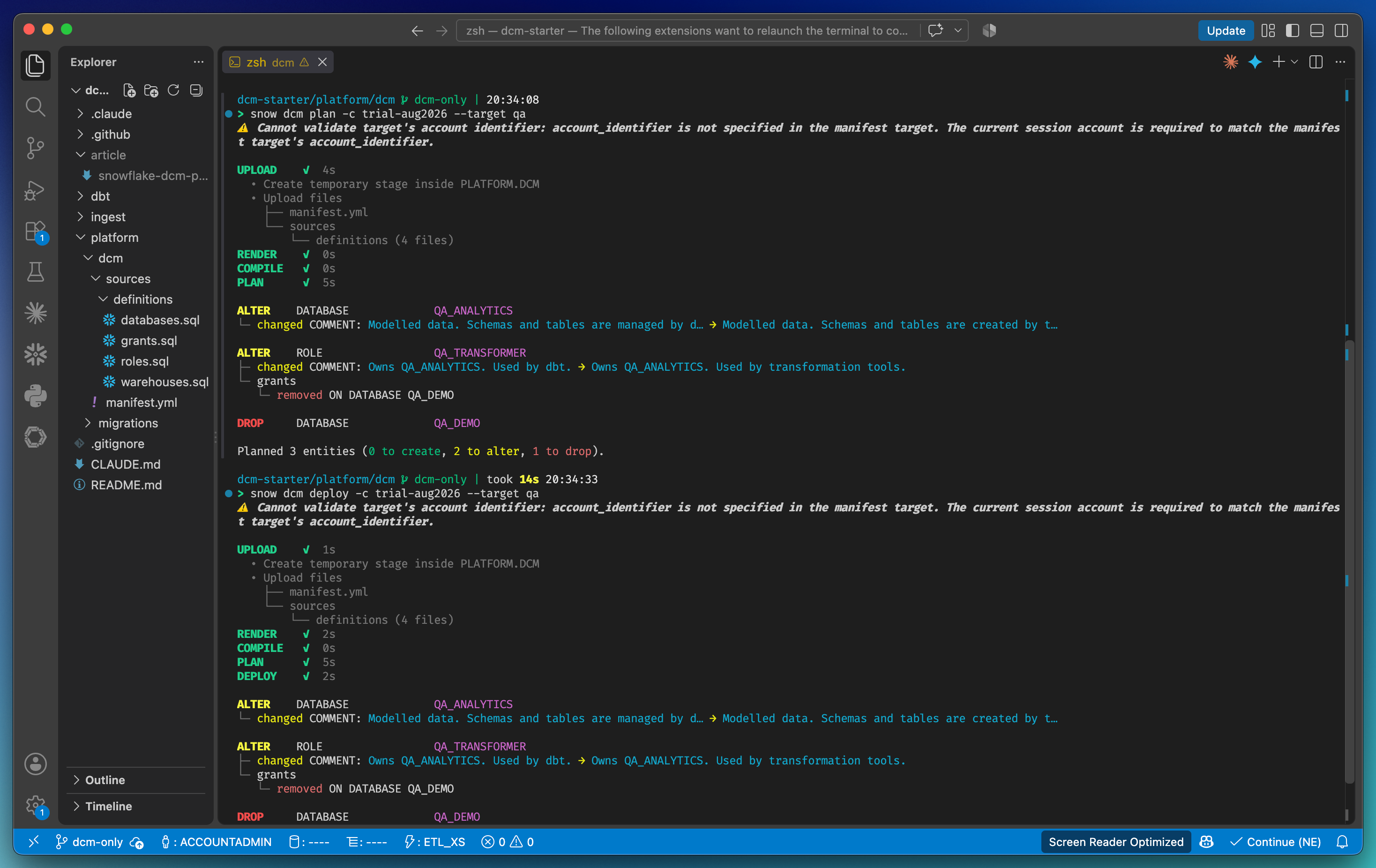
Now I can iterate on files locally, deploy in my dev env, open a PR which will plan and deploy QA and run the plan against prod. A very developer friendly workflow!
DCM vs. the alternatives
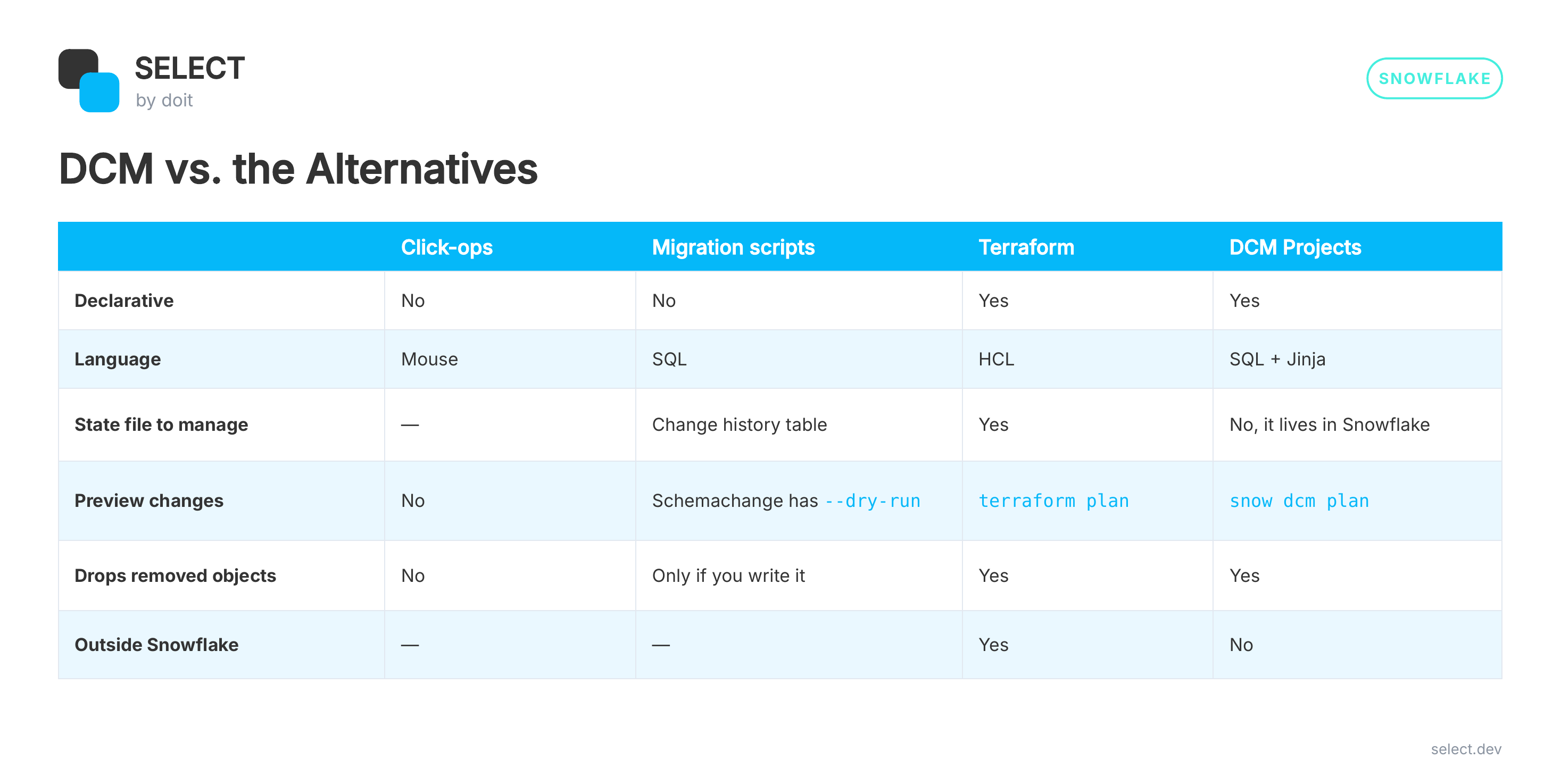
If you manage AWS, Snowflake, and your DNS in one Terraform repo, Terraform still makes sense. If your team's infrastructure is basically Snowflake and your team already speaks SQL, DCM is the lowest-friction path I've found.
Try it yourself
I put all of this in a starter repo: https://github.com/jeff-skoldberg-gmds/snowflake-dcm-starter.
It includes the definitions, the bootstrap migrations, both GitHub Actions workflows, and Claude Code skills. Run /project-setup and it walks you through the account, the manifest, the bootstrap, the first deploy, and CI, one checked step at a time.
It also has empty ingest/ and dbt/ folders, because DCM is only the foundation. You should build a mono-repo for your Snowflake platform that includes loading and transforming data. The roles and databases are waiting for your pipelines.
Now go try it, and let me know if Snowflake infrastructure as code still feels like a chore!x`
Jeff is a Data and Analytics Consultant with 15+ years experience in automating insights and using data to control business processes. From a technology standpoint, he specializes in Snowflake + dbt + Tableau. From a business topic standpoint, he has experience in Public Utility, Clinical Trials, Publishing, CPG, and Manufacturing. Reach out any time, [email protected].
Want to hear about our latest data cloud learnings?Subscribe to get notified.
Get up and running in less than 15 minutes
Connect your Snowflake, Databricks, or BigQuery account and instantly understand your savings potential.