Adaptive vs Gen1: where does Snowflake's new warehouse actually save you money?

Jeff SkoldbergFriday, May 29, 2026
TLDR
Snowflake's Adaptive Warehouse lets you set a performance ceiling and a concurrency multiplier instead of committing to a fixed size. We ran it head-to-head against Gen1 across four warehouse sizes and five workload types on TPC-H SF1000. Adaptive wins on single queries and DML refreshes, where it reads the shape of the work and doesn't over-provision. Gen1 holds its own on sequential workloads and mid-range concurrency. The dials are still yours to set. Adaptive changes what the dial controls, not whether you need to think about it.
What is Snowflake’s new Adaptive Warehouse feature?
Snowflake's new Adaptive Warehouse promises to take sizing off your hands. Instead of picking a fixed size, scale factor, QAS, and fiddling with Suspend and Resume, paying for capacity your smallest queries will never fully use, Snowflake auto-pools and scales compute behind the scenes and charges you only for what each query actually consumes. The obvious question is whether that actually saves money, and where. To find out we put it head-to-head against the classic Gen1 warehouse on TPC-H SF100 (~600M-row lineitem), across four sizes (Small → XLarge) and five workload shapes.
Adaptive Settings
Adaptive has two dials: MAX_QUERY_PERFORMANCE_LEVEL (its size cap) and QTM, the query-throughput multiplier, a concurrency/burst dial. Let's look at the these in detail; they're what every chart in this benchmark is actually measuring.
MAX_QUERY_PERFORMANCE_LEVEL
The performance ceiling for any single query, expressed as a t-shirt size from XSMALL to X4LARGE (default: XLARGE). Snowflake uses it as an upper bound, not a fixed allocation: the engine picks the resources it thinks the query needs and caps that choice at this level. For small queries it may use far less; for large ones it will not go higher. Setting it low saves money but can slow your biggest queries; setting it high unlocks full performance but means a single heavy query can spend accordingly. Importantly, this does not map to a specific underlying compute configuration; Snowflake determines the actual resources needed for each query. Specifically we can’t say “this one really ran on a Small and was billed at Small credit rates. This is NOT a billing cap, it is a performance cap.
QUERY_THROUGHPUT_MULTIPLIER (QTM)
An integer scale factor (default: 2) that sets how much burst capacity the warehouse can use at any instant. Snowflake computes an internal base capacity from your MAX_QUERY_PERFORMANCE_LEVEL, then multiplies it by QTM to get the concurrency ceiling. Setting QTM=N means the warehouse can run roughly N queries simultaneously at the full performance level, though since most queries use less than the max, you often get more throughput in practice. Setting QTM=0 means unlimited burst. The tradeoff: higher QTM reduces queuing but raises the ceiling on instantaneous spend; lower QTM caps costs but risks queries piling up.
How Adaptive Warehouses Are Priced
Adaptive uses a query-based billing model: instead of charging for a fixed warehouse reservation by the second, Snowflake charges based on the compute and software resources each query actually consumes. You pay nothing to create the warehouse; the meter starts on the first query. Usage aggregates at the warehouse level and is reported in standard virtual warehouse credits under COMPUTE, so existing chargeback and showback structures continue to work.
The billing is, frankly, quite opaque. Snowflake describes the cost as depending on "factors like the amount of compute and software resources" a query uses, but they don’t provide a formula of how to add up the components. Per query cost breakdown is planned for GA, but is not available in Public Preview. There is no way to verify what resources Snowflake actually allocated to a specific query or audit why it cost what it did. That requires putting a meaningful amount of trust in Snowflake to allocate fairly and charge accordingly. You set your two dials, run your workload, and read the aggregate bill. For many teams that trade is probably reasonable, but it is worth going in with eyes open.
Here is a screenshot of exactly how Snowflake has worded the pricing:

Monitoring Adaptive Warehouse Spend
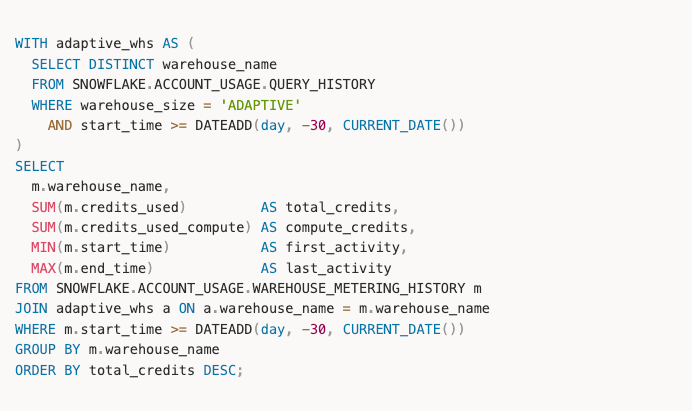
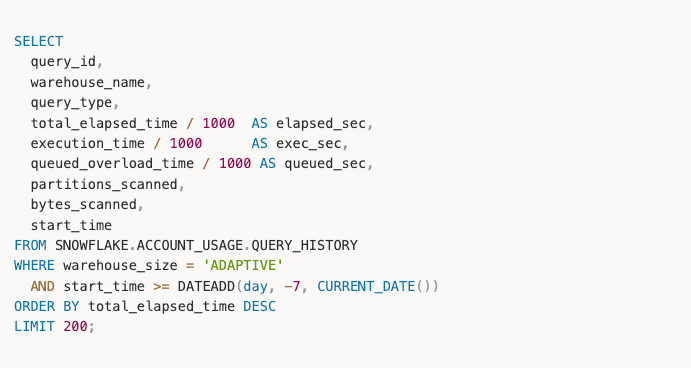
Three ACCOUNT_USAGE views are relevant for adaptive warehouses. WAREHOUSE_METERING_HISTORY is the primary one for credit consumption at the warehouse level. QUERY_HISTORY lets you see individual query performance and timing, though per-query credit costs are not broken out during Public Preview. WAREHOUSE_LOAD_HISTORY tells you about queuing, which is your signal for whether to adjust QTM. One thing worth noting: QAS usage is folded into compute credits for adaptive warehouses and does not appear as a separate column, unlike standard warehouses.
Credit consumption by adaptive warehouse over the last 30 days:
Query performance and timing from QUERY_HISTORY. This is the closest thing to per-query cost visibility available right now; actual credit attribution per query is not exposed in Public Preview:
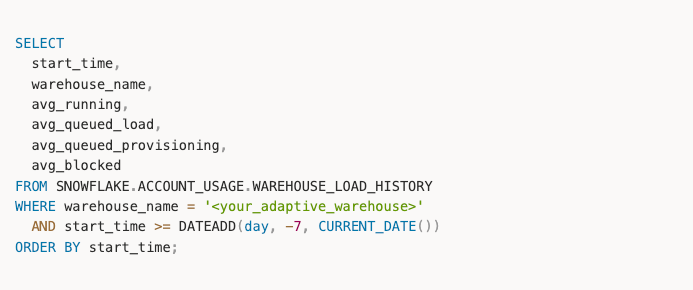
Queuing behavior from WAREHOUSE_LOAD_HISTORY. If avg_queued_load is consistently above zero, your QTM is too low for the workload:
The Benchmark Setup
The benchmark runs against TPC-H at Scale Factor 1000 (SF1000), which puts the lineitem table at roughly 600 million rows. SF1000 is large enough that warehouse size genuinely matters for scan-heavy queries, but small enough to keep per-run costs reasonable across many configurations.
All queries are adapted versions of the standard TPC-H set, written for Snowflake syntax. You can browse the full query set here: adapted_queries. Each warehouse ran on a freshly created instance so Snowflake's billing never smeared credits across configs. We tested XSmall through XLarge for both Gen1 and Adaptive. That’s right, we tested XS on 600M rows and you’d be surprised how great that warehouse does, even on the ETL steps.
We tested these five workload types:
- A single query to answer what is the least you can spend on each warehouse type.
- A sequential run of 66 queries, running the 22 queries 3 times to measure a constant workload that lasts more than a minute.
- All 22 queries fired concurrently to test throughput.
- DML refresh.
- CTAS, with several data shapes.
Last note before we dive in. You can easily run this benchmark yourself by cloning the repo and following the readme. This is 100% reproducible by you.
The cheapest way to answer a single query
The goal: Run one query that finishes in under a minute, for the least possible spend.
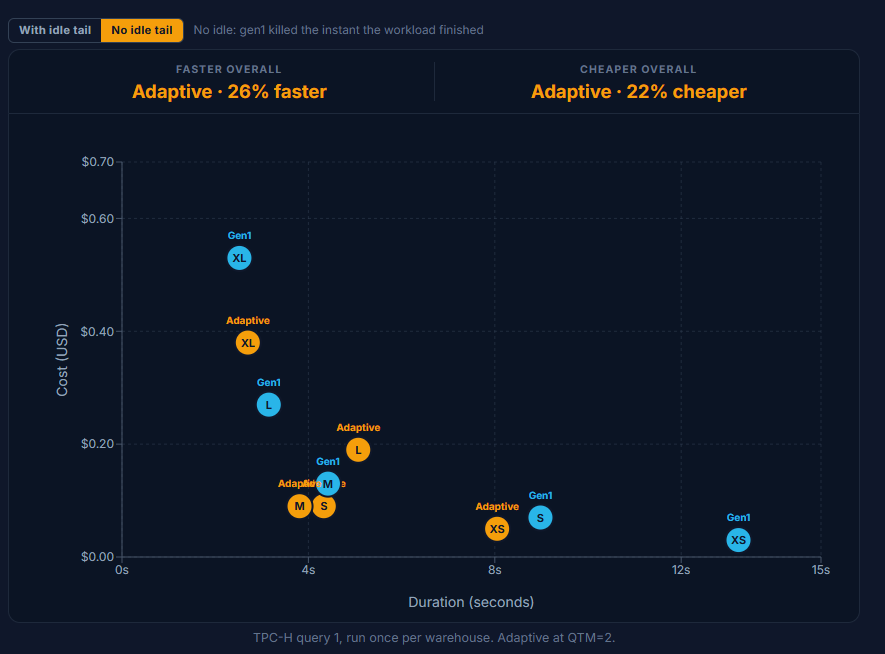
Every size answers query 1 in well under a minute; the slowest here is Gen1 Small at 8 seconds, the fastest is ~2.5s. Latency isn't the constraint; spend is. So the question becomes: how little can you pay for an answer you'll get either way?
On Gen1 the size dial behaves exactly as you would expect. Step up a size and the query time drops by roughly half while the price roughly doubles: Small in 9.5s for $0.07, Medium in 4.3s for $0.14, Large in 3.1s for $0.28. By XLarge it is pure diminishing returns, $0.55 for 3.4s, no faster than Large at double the price.
On Adaptive the picture is more interesting. Small, Medium and Large stay relatively close together, then XLarge breaks away as the outlier: it costs roughly 4x Small and Medium ($0.38 vs $0.09) while finishing only about a second faster than Medium (2.7s vs 3.8s). You pay a large premium for a speedup you can barely measure.
Chart: TPC-H query 1, run once per warehouse. Adaptive at QTM=2.
💡Takeaway
If you let Snowflake reach for the larger resources, it will happily do so, even when a smaller resources would have produced the answer cheaper. The size cap does not appear to push your work down onto smaller compute on its own; set it high and you pay high. That caveat aside, Adaptive still wins this single query overall, faster on average and cheaper on average than Gen1.
A warehouse kept continuously busy
The goal: Simulate a steady, back-to-back workload that keeps a warehouse fully saturated.
Sixty-six queries run in sequence with no gaps, so the warehouse never goes idle. Whether that load is a scheduled job chain, a steady stream of requests, or an analyst working all day, the shape is the same: continuous work. This is the cleanest test of raw compute value, because with no idle time to reclaim, elasticity has nothing to optimize away.
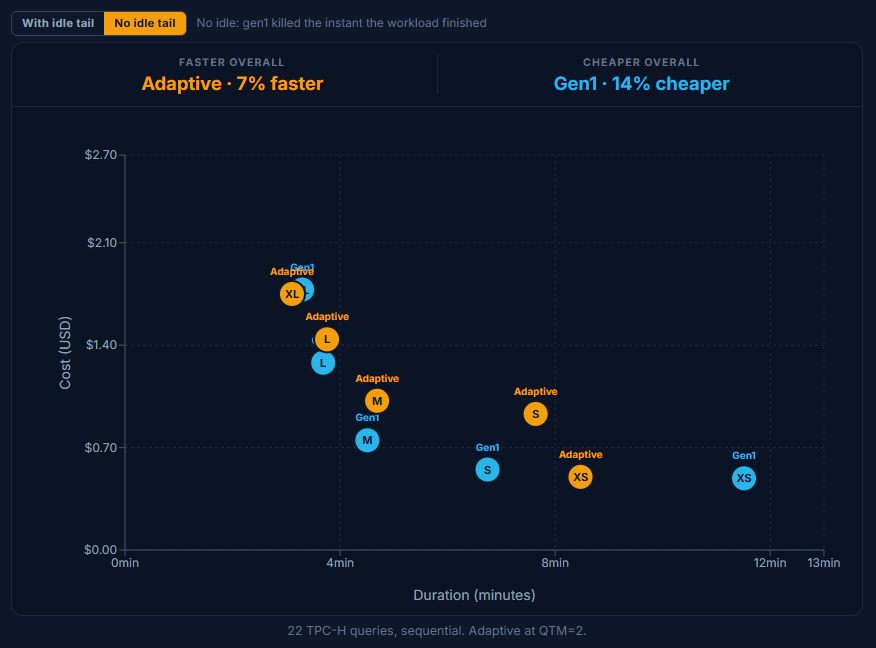
On raw speed the two are closer than you might expect, and Gen1 holds its own. Adaptive is dramatically faster only at the XS size (about 8.5 minutes vs 11.4); at Small, Medium and Large Gen1 actually finishes a touch sooner, and at XLarge they tie at roughly ~3.2 minutes. On cost Gen1 leads across most of the range and in aggregate.
Chart: 22 TPC-H queries, sequential. Adaptive at QTM=2.
💡Takeaway
On a continuously busy warehouse, Gen1 is the workhorse: speed comparable to Adaptive across most sizes, and cheaper from XSmall through Large. Adaptive earns its keep at the extremes, a large speed jump at the smallest size and a real cost saving only at XLarge. For steady, saturated workloads in the middle of the size range, a fixed Gen1 warehouse wins this scenario.
Concurrency: Adaptive is faster, cost depends on size
The goal: Fire 22 queries simultaneously: a BI tool, a dashboard refresh, a whole team hitting it together.
Gen1 absorbs a concurrency spike with multi-cluster scale-out, here capped at four clusters and billed per active cluster. Adaptive instead pools the queries into shared compute and bursts via the QTM dial: a higher QTM buys more parallel compute, and more credits. The idle-tail toggle moves only Gen1: dropping the warehouse the instant the burst ends ("no idle tail") trims its bill by roughly $0.10 to $0.20 per size; Adaptive has no idle concept and is unaffected.
At QTM=2 Adaptive clears the burst faster than Gen1 at every size. On cost it is mixed: Adaptive is cheaper at the small end (XSmall $0.17 vs $0.23, Small $0.23 vs $0.34) and again at XLarge ($0.83 vs $1.26), while Gen1's multi-cluster model is the cheaper way through the middle (Medium $0.39 vs $0.54, Large $0.69 vs $0.84).
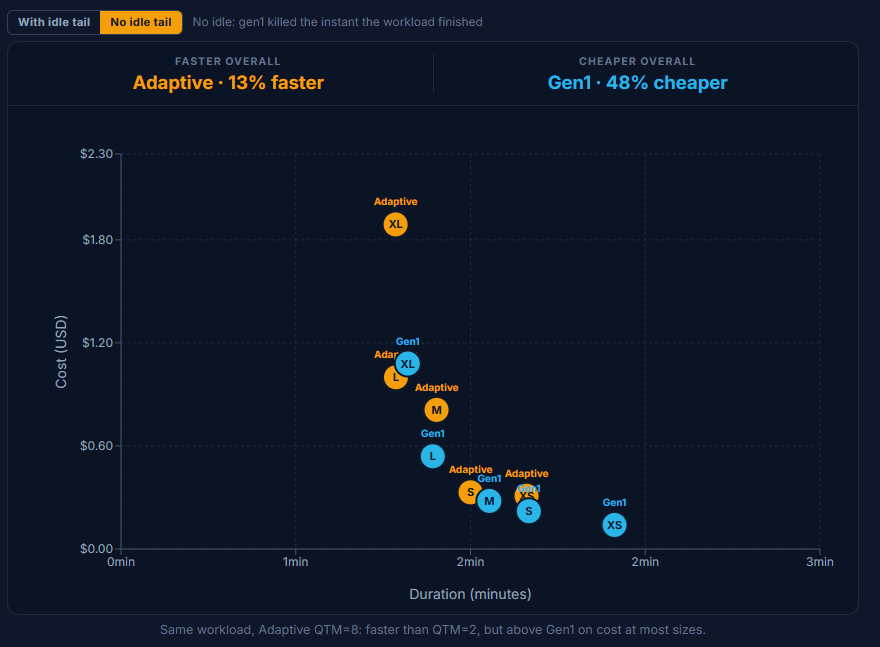
Pushing to QTM=8 is faster still, but you pay for it: it runs above Gen1 at most sizes (Medium $0.81 vs $0.39, XLarge $1.89 vs $1.26) and only draws level at Small. QTM=8 earns its keep only when latency clearly outranks the bill. (Most likely the queue got cleared faster and we just had to wait for the slowest query to finish).
Chart: 22 concurrent queries, Adaptive QTM=2 vs Gen1 multi-cluster (max 4).
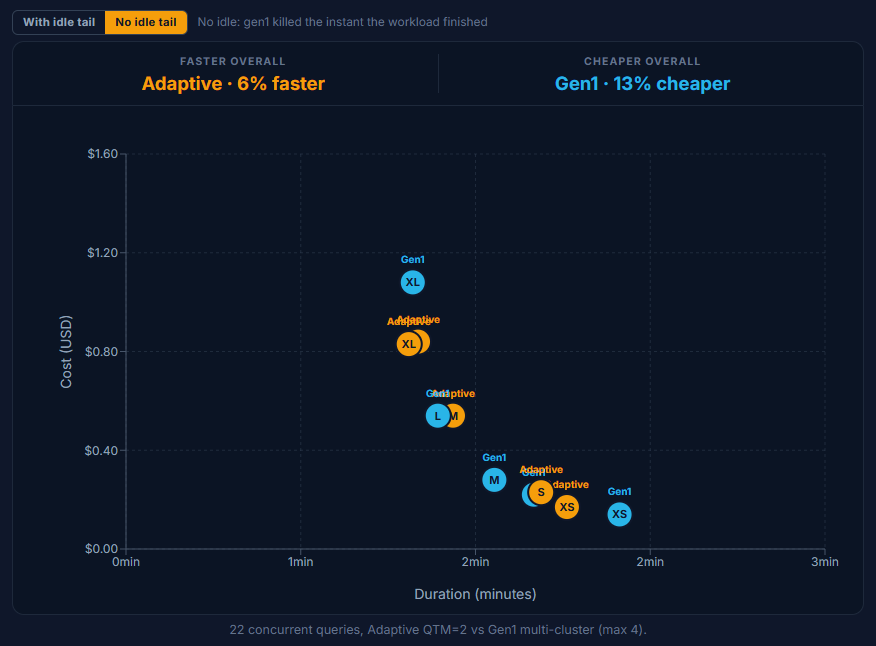
Chart: Same workload, Adaptive QTM=8, faster than QTM=2 but above Gen1 on cost at most sizes.
💡Takeaway
For concurrency, Adaptive is the faster engine at every size. The catch is the QTM dial. Pushing from QTM=2 to QTM=8 buys only a few seconds (Medium 84s to 81s, XLarge 73s to 71s) while the bill roughly doubles (Medium $0.54 to $0.81, XLarge $0.83 to $1.89). We set QTM too high for this workload: Snowflake did not need that headroom to clear the burst, but it still charged us for reserving it. Set a high QTM only when you need it.
A DML refresh: the ETL write job
The goal: A delete + insert refresh to mimic an typical Incremental job.
The job here is a realistic incremental refresh: delete one month of lineitem and re-insert it from source, about 1% of the rows in a ~600M-row table. The base table is large, but the change is not. Snowflake's micro-partition pruning targets exactly the partitions that month touches and skips the rest, so the engine can see up front that this is a small, surgical write, not a full-table rewrite. That is the key to everything below.
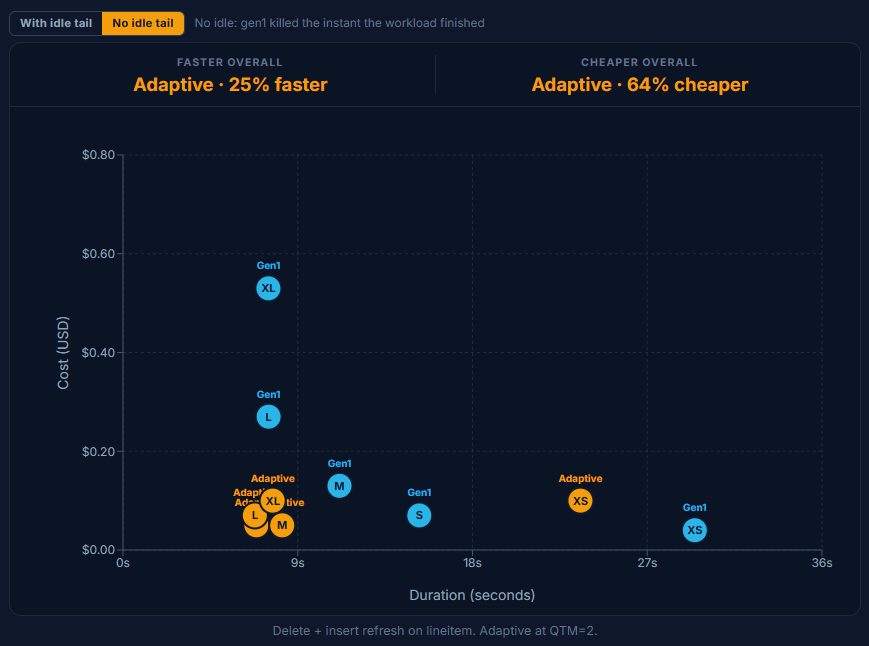
Gen1 makes you commit to a size up front and bills it against the minimum whether the burst needed that size or not. The delete plus insert finishes in seconds at Small and above, yet Gen1's price climbs straight up the dial: $0.05 at XSmall, $0.08 at Small, $0.15 at Medium, $0.29 at Large, $0.60 at XLarge. You are paying for the warehouse, not the work.
Adaptive tells the opposite story, and this is the chapter where it looks smartest. Notice how tightly Small, Medium, Large and XLarge cluster: $0.05, $0.05, $0.07, $0.09. They even arrive in clean price order, yet by XLarge the meter has barely moved off Small. A delete plus insert prunes to a narrow slice of partitions, and Snowflake clearly recognizes it can finish the job without throwing expensive compute at it; it declines to over-provision even when the size cap would let it. The bill tracks the work, not the dial.
The lone exception is XSmall, where Adaptive ($0.10) trails Gen1 ($0.05). With no oversized idle warehouse to reclaim, Adaptive's per-query premium has nothing to pay it back, exactly the pattern from Chapter 2.
Chart: Delete + insert refresh on lineitem. Adaptive at QTM=2.
💡Takeaway
This is Adaptive at its smartest. It reads the shape of the work, a tightly pruned 1% write against a huge table, and deliberately stays small instead of cashing in the size cap you handed it. Even when you point it at XLarge, it spends like a Small because that is all the job needs, so the bill tracks the resources used, not the dial you set. For incremental pipelines, this is exactly the behavior you want, and it removes the "guess the size" tax entirely.
Snowflake's billing is getting more complex, not less. If you're managing AI and ML workloads on top of it, the cost surface gets harder to read fast. We put together a practical guide covering how to actually control spend across Cortex, model serving, and the rest of the stack.
Get the Unofficial AI Cost Optimization Manual for Snowflake
CTAS: a heavy, scan-bound write
The goal: CREATE TABLE AS SELECT across five data shapes: a large read feeding a full table materialization.
Where the DML refresh was a surgical 1% write, CTAS is the opposite: five CREATE TABLE AS SELECT variants (narrow/tall, standard/tall, medium/wide, very wide, and a filtered shape) that scan and materialize in bulk. There is no idle warehouse to reclaim and no pruning shortcut, so the work is genuine compute — the cleanest place to read raw price-per-throughput across all three warehouse generations side by side.
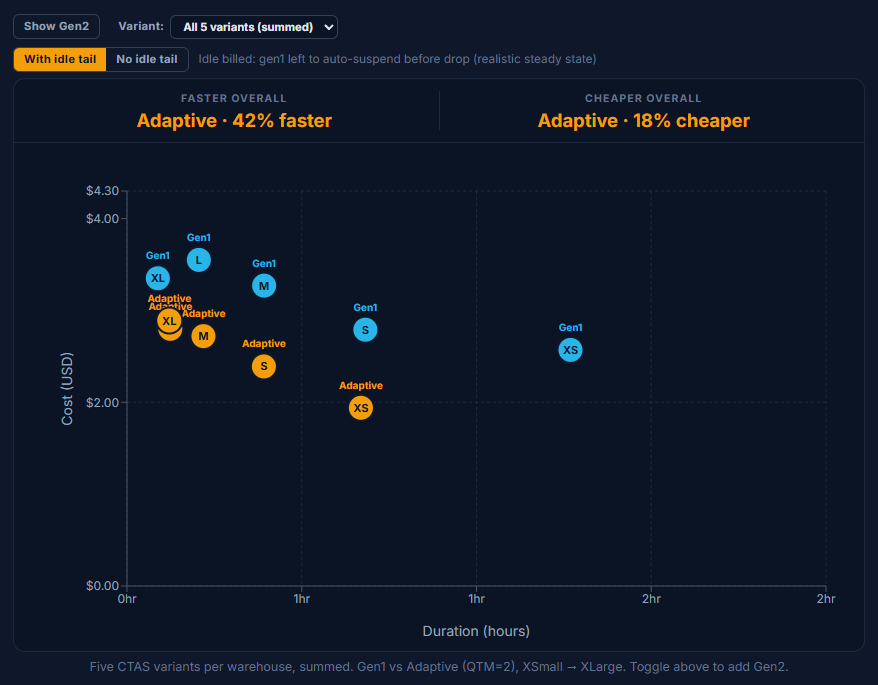
On cost, Adaptive is the cheapest mark at every size: $1.94 / $2.39 / $2.72 / $2.80 / $2.89 from XSmall through XLarge, sitting well under Gen1's $2.57 / $2.79 / $3.27 / $3.55 / $3.35. On speed Adaptive also leads Gen1 from XSmall through Large — but the order flips at XLarge.
That XLarge flip is one variant's fault. Adaptive at XLarge lands at 7.3 minutes, slower than Gen1's 5.3 minutes, because the very_wide variant stops scaling on Adaptive — about 6 minutes on its own at XLarge while the other four variants finish in seconds. Use the variant filter above to drop it (or drill into a single variant) and the anomaly disappears.
💡Takeaway
Adaptive is the cheapest mark from XSmall through XLarge, and also the fastest from XSmall through Large. The catch is XLarge, where one variant (very_wide) breaks Adaptive's scaling and the chart tips slower than Gen1. Use the variant filter above to exclude it or drill into a single query shape, and toggle Gen2 on to see how the newer standard warehouse stacks up.
Key Takeaways
Adaptive is not a drop-in cost reduction. This our biggest important takeaway from this benchmark, and it goes against what many customers we spoke with expected of the feature going into it. Across our five workload shapes, Adaptive was cheaper in some scenarios, more expensive in others, and roughly even in the rest. We don't recommend any customer suddenly switch all of their warehouses to Adaptive expecting their bill to go down — in reality, it would likely go up. Adaptive is optimized for performance, not cost. This is the through-line under most of the experiments we ran. Given a size cap or a QTM setting, Snowflake will generally reach for whatever ceiling you grant it to return the fastest answer it can. Chapter 1 showed this with MAX_QUERY_PERFORMANCE_LEVEL: XLarge costing ~4x versus the Small setting for a speedup you could barely measure. Chapter 3 showed it with QTM: going from QTM=2 to QTM=8 bought a few seconds and roughly doubled the bill. The clear exception is Chapter 4's DML refresh, where Adaptive read the shape of a tightly pruned 1% write and deliberately stayed small even when pointed at XLarge. So the engine can hold back, it just doesn't do so consistently across workload shapes. The takeaway is not that Adaptive is reckless; it is that the dials still need to be tuned and carefully configured.
You still have to think about your warehouse configuration. The pitch for Adaptive was that sizing decisions go away. In practice this benchmark shows the decisions just changed shape: instead of picking a fixed size, you are now picking a MAX_QUERY_PERFORMANCE_LEVEL (a spend ceiling) and a QTM (a concurrency/burst ceiling). Both materially change the bill. Set them too high "just in case" and you will pay for headroom you never needed.
You must benchmark your own workloads. Our results are specific to TPC-H SF1000 and the five workload shapes we ran. Your queries, data layout, pruning behavior, concurrency profile, and idle patterns will produce different numbers. The directional findings are useful as a starting hypothesis; they are not a substitute for testing Adaptive against your actual workload on your actual data. The benchmark repo is reproducible — fork it, swap in your queries, and measure before you migrate anything that matters.
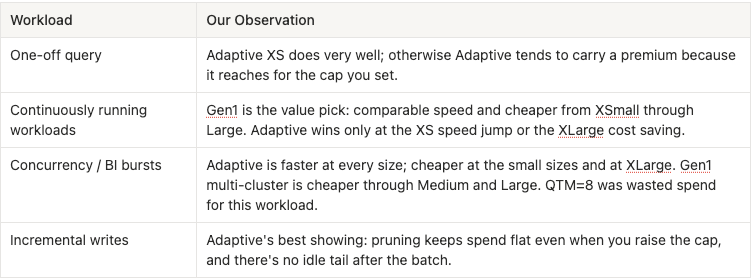
With that said, here are the observations we saw when benchmarking our own workloads:
Have you benchmarked Adaptive on your own workloads? We'd love to hear what you've seen! Drop us a note, we're always looking to sharpen our understanding of how it behaves in the wild.
FAQ
Does Adaptive Warehouse actually remove the need to think about sizing?
Not entirely. The pitch is that you stop choosing a fixed warehouse size and let Snowflake allocate what each query needs. That holds for DML workloads, where pruning lets Snowflake stay small even when the size cap would allow more. But for single queries and concurrency bursts, Snowflake reaches for the full ceiling you give it. Set MAX_QUERY_PERFORMANCE_LEVEL too high on a simple query and you pay for resources the query didn't need. Set QTM too high on a concurrency burst and the bill goes up without a meaningful speed gain. You still need to match the cap to the job.
How does Adaptive Warehouse billing work, and how transparent is it?
Adaptive charges based on the compute and software resources each query actually consumes, rather than billing for a fixed warehouse reservation by the second. Credits aggregate at the warehouse level and show up under COMPUTE in WAREHOUSE_METERING_HISTORY, so existing chargeback structures still work. What's not available yet: per-query credit attribution. During Public Preview, QUERY_HISTORY shows timing and performance but not what each individual query cost. Snowflake has indicated per-query cost breakdown is planned for GA. For now, you set your dials, run your workload, and read the aggregate bill.
When does Gen1 still make more sense than Adaptive?
For sequential workloads that keep the warehouse continuously busy, Gen1 is competitive on both speed and cost across most of the size range. We saw Adaptive pull ahead meaningfully at XSmall (8.5 minutes vs. 11.4 for sequential runs) and at XLarge on cost, but in the middle of the range, Gen1 finished faster and cheaper. For mid-range concurrency, Gen1's multi-cluster model also came out ahead on cost at Medium and Large, where Adaptive at QTM=2 ran higher without a proportional speed advantage. If your workload is steady and saturated rather than bursty, a fixed Gen1 warehouse is still worth considering.
Jeff is a Data and Analytics Consultant with 15+ years experience in automating insights and using data to control business processes. From a technology standpoint, he specializes in Snowflake + dbt + Tableau. From a business topic standpoint, he has experience in Public Utility, Clinical Trials, Publishing, CPG, and Manufacturing. Reach out any time, [email protected].
Want to hear about our latest data cloud learnings?Subscribe to get notified.
Get up and running in less than 15 minutes
Connect your Snowflake, Databricks, or BigQuery account and instantly understand your savings potential.