

You can reduce Databricks Serverless SQL Warehouse cost by matching each workload problem to the right control. Auto-stop reduces inactive runtime, warehouse size affects single-query performance, and max clusters controls how much concurrency the warehouse can absorb.
The challenge is that those signals often get mixed together. A warehouse that stays active between short jobs does not need more horsepower. Workloads waiting for capacity may need more clusters rather than a larger warehouse. Power BI DirectQuery can also keep generating Databricks SQL activity even when the SQL itself is already well optimized.
This article shows you how to tell those cases apart, compare Serverless with Pro and Classic using total cost rather than DBU price alone, and choose the setting that matches the behavior you are actually seeing. These warehouse-level decisions sit inside the full Databricks cost optimization framework, where sizing, utilization, attribution, and automation work together.
TL;DR
- Auto-stop reduces idle windows between bursts of SQL work.
- Warehouse size controls the compute available to individual queries.
- Max clusters controls how much concurrent demand the warehouse can serve.
- Serverless, Pro, and Classic need to be compared on total workload cost, not DBU price alone.
- Power BI connection mode can materially change SQL Warehouse activity when
DirectQueryis used for freshness the business does not need.
Why startups and idle time drive Databricks SQL Warehouse cost
Your SQL Warehouse bill can grow faster than query runtime suggests because short jobs still create startups and active windows. Scheduled alerts make the problem easy to miss: several sub-minute queries on separate schedules can keep a Databricks Serverless SQL Warehouse active far longer than the SQL itself runs. Configuration can make that gap worse. One documented bundle deployment omitted auto_stop_mins and ended up with a 120-minute value, even though current Databricks Declarative Automation Bundles documentation lists a 10-minute Serverless default.
Our read is that a hidden configuration mistake can do more damage than one slow query because it repeats across every run. How much of your SQL Warehouse bill comes from expensive queries, and how much comes from settings nobody has revisited? The same pattern appears in the five habits that move a Databricks bill and the full cost optimization framework.
Databricks SQL warehouse types: Serverless vs. Pro vs. Classic
Across the main SQL warehouse types, Serverless has the highest visible Databricks Unit (DBU) rate because its price includes the underlying infrastructure. A Pro SQL warehouse has a lower DBU rate, and Classic the lowest, but both charge for cloud infrastructure separately. With serverless compute, Databricks manages the underlying infrastructure rather than exposing a separate cloud infrastructure charge for you to manage.
For example, published AWS Premium list rates in US East put Serverless at about $0.70 per DBU, a Pro SQL warehouse at $0.55, and Classic at $0.22 as of 2026. Actual rates can vary by cloud, region, edition, and contract. Those figures apply to one regional pricing example, but they show why the DBU rate alone does not tell you which option costs less overall.
| Type | Relative DBU rate | Infrastructure billing | Cold start | Best fit |
|---|---|---|---|---|
| Serverless | Highest | Included | Typically seconds | Bursty, interactive BI and DirectQuery workloads |
| Pro | Mid-range | Billed separately | Typically minutes | Predictable BI workloads that need Pro features |
| Classic | Lowest | Billed separately | Typically minutes | Predictable scheduled workloads |
Serverless SQL warehouses are better suited to bursty demand because they can start within seconds and respond quickly as demand changes. Databricks SQL Serverless also uses Intelligent Workload Management (IWM) to predict query resource needs and manage capacity as demand changes. That reduces the need to keep compute warm just to avoid a long startup delay.
Pro SQL warehouses and Classic SQL warehouses are more relevant when demand is predictable. Databricks recommends these SQL warehouses for scheduled Import or Extract jobs where demand is easier to plan and rapid startup matters less. A Pro SQL warehouse adds capabilities beyond Classic SQL, which remains the lower-DBU option for simpler use cases.
The useful comparison is the total cost of running the workload, including infrastructure, startup behavior, and how long the warehouse needs to stay active. Looking only at the DBU rate creates the same half-bill mistake and can make Serverless look more expensive than it really is.
If you want to compare those costs at the warehouse level, SELECT for Databricks can help you see where SQL Warehouse spend, sizing, and utilization are coming from before you change the configuration.
SQL warehouse auto-stop: The UI and API floors differ
Serverless SQL warehouses give you more room to shorten auto-stop than Pro or Classic SQL warehouses. In the Databricks UI, the minimum for Serverless is five minutes, while the API and Declarative Automation Bundles can take auto_stop_mins down to one minute. Pro and Classic have a 10-minute minimum.
The shortest setting is not always the right one. A one-minute auto-stop can suit isolated scheduled jobs, while interactive DirectQuery workloads may benefit from staying warm longer. Our SQL Warehouse auto-stop guidance recommends roughly 10 minutes for general SQL use.
You can set a Serverless warehouse to a one-minute auto-stop with the Databricks CLI:
databricks warehouses edit <WAREHOUSE_ID> \ --auto-stop-mins 1Defaults also depend on how you create SQL warehouses. The Databricks UI defaults Serverless to 10 minutes and Pro or Classic to 45 minutes, while Declarative Automation Bundles use 10 minutes for Serverless and 120 minutes for Pro or Classic. Set auto_stop_mins explicitly so the deployment does not depend on the default for that configuration path.
Sizing a SQL warehouse: Size vs. Clusters
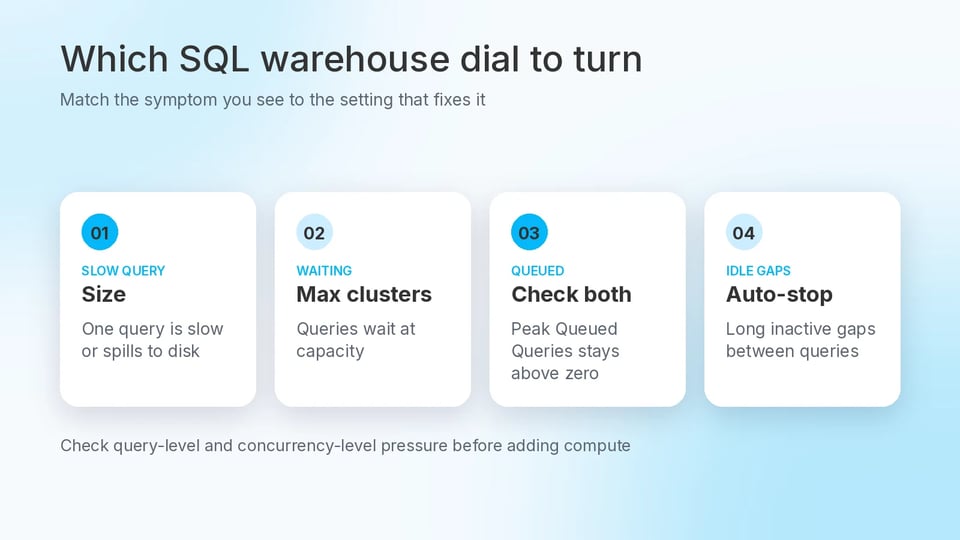
In Databricks SQL, warehouse size and max clusters solve different performance problems. Size controls the compute available to individual queries, while max clusters controls how much concurrent demand the warehouse can serve. Serverless also uses Intelligent Workload Management to handle part of the resource allocation automatically.
Use query and queue signals to decide which control to adjust:
| Symptom | Dial to turn |
|---|---|
| A single query is slow or spills heavily to disk | Increase warehouse size |
| Queries spend significant time waiting at capacity | Increase max clusters |
| Peak Queued Queries stays above zero | Check both warehouse size and max clusters |
| Long inactive gaps between queries | Lower auto-stop |
Peak Queued Queries does not identify the exact fix on its own. High waiting_at_capacity_duration_ms points to capacity pressure, while slow or heavily spilling queries point more toward warehouse size. Our preference is to confirm whether the pressure is query-level or concurrency-level before adding more compute.
Idle time points to a different problem. When capacity is sufficient during query execution but the warehouse stays active between jobs, auto-stop is the setting to inspect.
When Power BI DirectQuery changes the serverless cost equation
Power BI DirectQuery can generate far more warehouse activity than the dashboard itself seems to justify because every interaction can send another query to Databricks. Databricks recommends Serverless SQL Warehouses for DirectQuery and LiveQuery, with a 15 to 30-minute auto-stop window for interactive workloads.
When the business only needs updates every few minutes, Import or Hybrid models can reduce Databricks SQL activity by serving more report interactions from Power BI itself. Materialized views can also precompute repeated SQL work, although their refreshes still use separate serverless compute.
Our view is that DirectQuery should be one of the first places you investigate when Serverless cost feels disconnected from dashboard complexity. Before blaming Serverless pricing, check whether the BI connection mode is creating more activity than the freshness requirement actually needs.
Turning these dials into a setting
Keeping SQL Warehouse cost under control requires ongoing visibility into sizing, idle time, and capacity pressure. Our SQL Warehouse cost view brings those signals together so you can see where configuration deserves another look.
Our Automated Savings can adjust supported worker-count and autoscaling settings for SQL Warehouses as demand changes. Auto-stop remains a separate control, so you should still review auto_stop_mins after deployments and audit BI connection modes when activity no longer matches the business freshness requirement.
The next tier of savings is turning those checks into an operating habit. The decision is whether reviewing size, max clusters, auto-stop, and BI modes by hand is still a defensible trade-off, or whether that recurring work is starting to compound.
Databricks Serverless SQL Warehouse cost: What to adjust first
Match the setting to the signal you are seeing: idle windows point to auto-stop, queue pressure to capacity, slow individual queries to warehouse size, and unexpected BI activity to the connection mode. Compare Serverless, Pro, and Classic on total cost rather than DBU price alone.
Review the evidence before changing configuration. Our Databricks cost view brings SQL Warehouse cost, sizing, idle compute, and utilization together so you can see which setting deserves attention first.