

TL;DR
- Container runtime is my default for hosting Streamlit in Snowflake. Dashboards stay warm, offering the best user experience.
- A container runtime node costs 0.11 credits per hour, compared to 1 credit per hour for an XS warehouse. At $3 per credit, that is about $238 a month if always on. One node hosts three dashboards. The fourth one starts a new node.
- To save even more, suspend the compute pool with a nightly task. The trade-off is that the first viewer of each dashboard or app each morning waits about 45 seconds.
- After a suspend, only the dashboards people actually open resume billing. You pay for what gets used, not what is deployed.
- For the price of 100 Power BI Premium Per User seats ($2,400 a month), Snowflake can host about 81 actively viewed Streamlit apps with the nightly suspend.
Intro
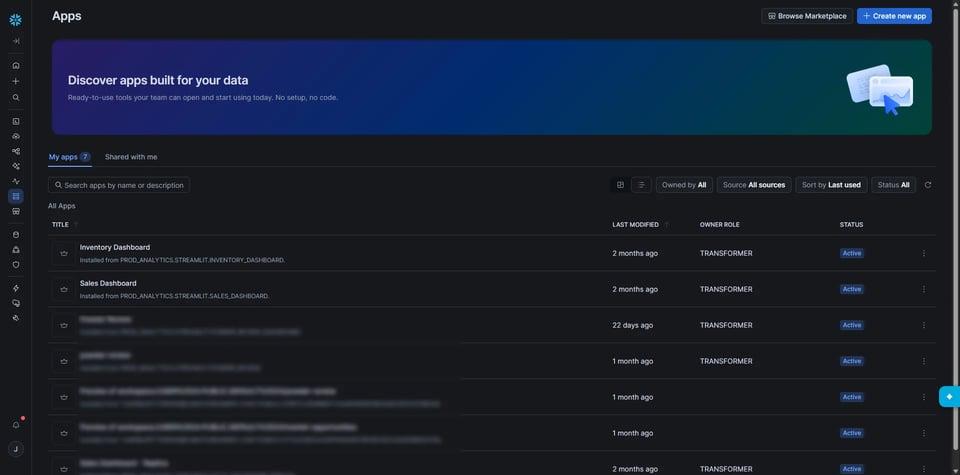
Streamlit is an open source Python library for creating data centric web apps or dashboards. You write Python, and you get charts, filters, buttons, modals, and interactivity without touching HTML or JavaScript. The Python-only approach to web apps has made Streamlit a very popular tool for data teams to ship internal tools.
Snowflake bought Streamlit in 2022, and Streamlit in Snowflake is the result. Your app runs inside your Snowflake account, right next to your data. There is no server to host, no separate login system, and no copying data out to somewhere else. Access follows the same roles you already manage.
There are now two ways to run a Streamlit app in Snowflake, and they charge you in very different ways. Pick the wrong one, or leave the right one running all night, and you pay for it.
This post covers how each option is billed, an auto-suspend gotcha that cost me real credits, how to suspend nightly, what that does to your bill (more than you would guess), and where the break-even sits against Power BI.
Two ways to run Streamlit in Snowflake
Warehouse runtime
The app runs on a virtual warehouse. You are billed for the time that warehouse is active. Each time a viewer connects, a new Streamlit server process starts in it, and a websocket keeps the warehouse awake until about 15 minutes after the viewer's last activity. The timeout is configurable so you can easily set it to time out after 5 minutes of inactivity. An XS warehouse burns 1 credit per hour while awake. Your SQL could run on a separate query warehouse, so you may have two warehouses consuming credits.
Container runtime
The app runs on a node in a compute pool that Snowflake manages for you. The Streamlit server runs continuously on that node, so pages load fast and every viewer shares the same server. This is truly the best user experience, as few users ever hit cold starts.
Snowflake supports both, and it is making container runtime the default for new apps.
My take: Using a warehouse runtime with a strict 5 minute timeout to save money is a poor user experience, as almost every visitor is getting a cold start. I’m using container runtime for all of my Streamlit apps so the dashboards are pre-warmed and cached after the first user views the page.
Same Streamlit code. Very different bill.
Choose the smallest compute possible to run the Streamlit process
Whether you choose the Warehouse runtime or the new default Container runtime, the Streamlit process itself does not need much horsepower. An Extra Small Gen 1 warehouse is enough to run any Streamlit app I’ve come across. The queries themselves can use a bigger warehouse, but don’t waste credits on the Streamlit process.
If you can develop the dashboard on your laptop, you can host it on an Extra Small or the default compute pool which runs CPU_X64_S.
How container runtime is billed
One node is one billing unit. On the default system CPU pool, Snowflake packs three dashboards onto one node. When a fourth dashboard is running, it spins up a second node. A seventh spins up a third. The pool grows in steps of three. (See Cost Scenarios section below for more examples.)
The smallest node costs about 0.11 credits per hour. That works out to:
- 2.64 credits per day
- about 79 credits per month
- $7.92 per day or $237.6 per month at $3 per credit, if auto-suspend never kicks in.
Your credit price will differ, so swap in your own. I use $3 for every example below.
A few things to notice:
- It is the same price for 1 viewer or 100 viewers. The node does not care. (Comparison to PowerBI Per User license pricing below!). This is a refreshing pricing model; I’m so tired of cost per user BI licensing.
- A node is about 9x cheaper per hour than an XS warehouse. The catch is that the node stays on, and the warehouse does not. If one code warehouse would be awake more than about 2.6 hours a day, the node wins. If your dashboard gets opened twice a week, the warehouse wins.
- A dashboard nobody has opened costs nothing. The app's service starts on its first view. Deploying 25 dashboards does not rent 9 nodes. Only the ones that get opened do.
- Container runtime does not remove your query costs. The SQL still runs on a warehouse. This post only covers the cost of hosting the app.
I’ve had a great experience using Container Runtime for Streamlit with Adaptive Warehouses for the query execution. Per Snowflakes docs, Adaptive Warehouses are faster than Gen 2 warehouses.
How many nodes is my Streamlit Compute Pool running?
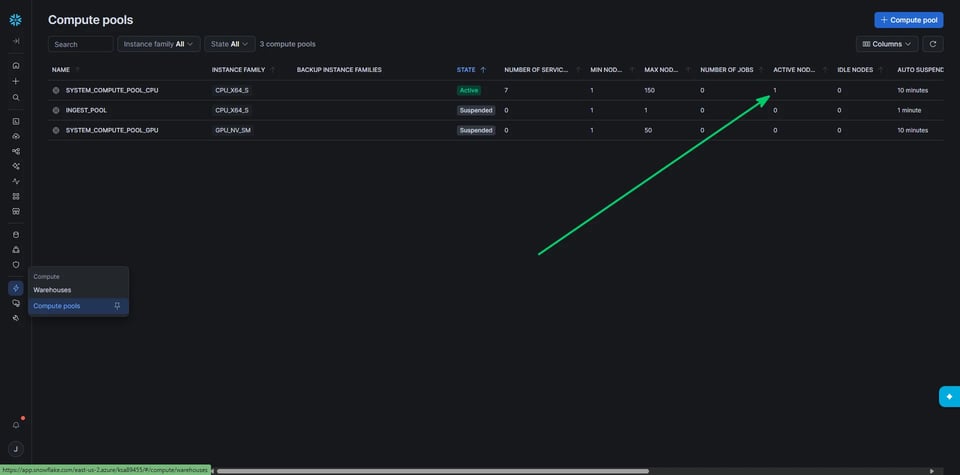
Streamlit apps are deployed to the default compute pool, system_compute_pool_cpu. You can check how many nodes are running in the UI, under Compute in the sidebar, then compute pools.
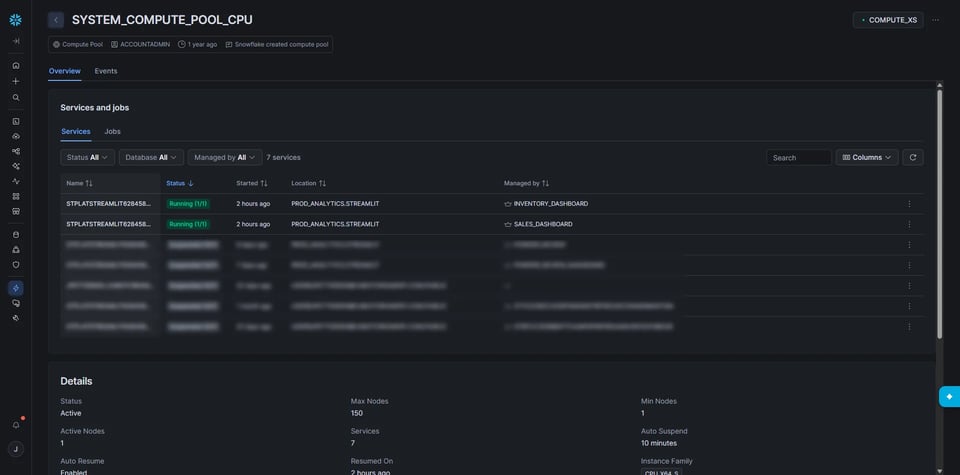
If you click into that row, it brings you to a details page where you can see what apps are running:
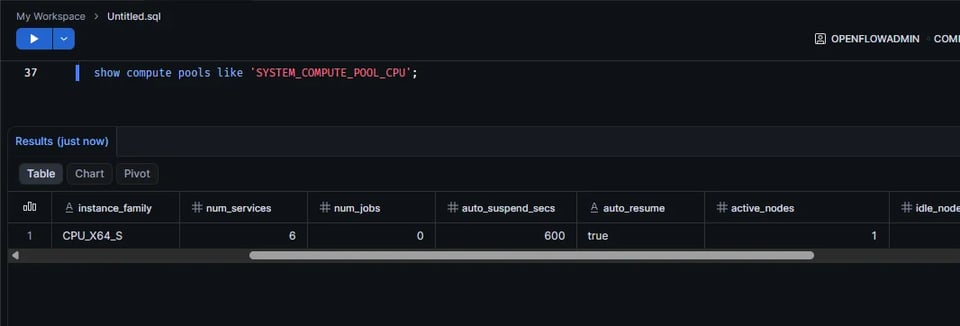
If you prefer code, you can run:
show compute pools like 'SYSTEM_COMPUTE_POOL_CPU';Then check the active_nodes column.
The auto-suspend gotcha
Here is what the docs say. After three days of viewer inactivity, the Streamlit server process ends. Then the compute pool suspends according to its own AUTO_SUSPEND value.
Two problems with that.
First, the three days is not configurable, yet. You cannot make it one day or one hour. Three days of an idle node is about 8 credits, or $24. Not a disaster on its own. But it adds up across a pool, and across every environment you deploy to.
Second, the pool's own AUTO_SUSPEND only starts counting when no services are running on it. The Streamlit service sits there until the three days are up, so the pool timer never gets a chance to help you.
As of October 15, 2026, auto-suspend does not reliably fire: I watched a service and its container run past day 3 and still be spending money on day 4, and Snowflake support told me the cause is browser tabs left open that keep retrying the websocket (even rejected 401 reconnects reset the idle timer on the backend). Snowflake is working on a fix, so by the time you read this it may already be solved.
There is a private preview feature that adds idle_auto_shutdown_time_seconds at the app level, like the warehouse runtime has. You may have seen the property show up when you describe a Streamlit app. Once you are enrolled, you can set it to a shorter value. Ask your Snowflake account team. I would love to be able to set this to a few hours for each app and have the leanest setup possible!
Until then, do not count on the three day timer. Suspend it yourself if you want to save. Let’s discuss this more.
Suspend nightly and let users wake it up
The simplest cost saving is a scheduled task that suspends the pool every evening:
CREATE OR REPLACE TASK suspend_streamlit_pool SCHEDULE = 'USING CRON 30 18 * * * America/New_York'AS ALTER COMPUTE POOL SYSTEM_COMPUTE_POOL_CPU SUSPEND;The role that owns the task needs OPERATE on the pool. If you run it as a serverless task, it also needs EXECUTE MANAGED TASK.
In the morning, nobody has to do anything. The first person to open a dashboard wakes it up. In my experience that first load is about a 45 second cold start. After that, it is fast for everyone else.
The part people miss and where savings stack up
When you suspend the pool at night, every dashboard gets shut down. In the morning, only the ones people open come back, and only those start billing again.
Say you have 25 dashboards. If you leave everything running, you pay for 9 nodes, because over time someone opens every one of them. If you suspend at night and people only open 4 dashboards the next day, you pay for 2 nodes. The other 21 dashboards cost nothing that day.
That makes the nightly suspend a much more powerful trick than just saving the nightly hours you suspended for. You also stop paying for the dashboards nobody looks at. Month end reports, the quarterly review, the stale dashboard someone built for a project months ago: they only cost money on the days someone actually views them.
Your bill now follows how many dashboards get opened per day, not how many you have deployed.
Pros
- Predictable bill. You know the worst case.
- It works even while the auto-suspend bug exists.
- One statement suspends every node in the pool, whether you have 3 dashboards or 30.
- Rarely used dashboards stop costing money.
- Nothing to remember. No one has to log in and stop things.
Cons
- The first viewer of each dashboard each day waits about 45 seconds. My users are fine with this.
- Anyone working late or on a weekend hits the same cold start.
- Suspending drops every node on the pool. Anyone mid-session will suddenly hit a reboot page, so pick a time when people have gone home. In my opinion the risk is low and the refresh is quick enough to make it worth it.
If 45 seconds is too long for the people who open the dashboards first thing in the morning, you can send an authenticated request to those apps' endpoints a few minutes before they arrive. It worked for me, but it needs OAuth set up, which adds complexity. Warm only the few that matter, or you give back the savings on dashboards no one reads. To me, pre-warming the dashboards is more complicated than it is worth (due to needing OAuth flow), but the option is there.
Cost scenarios
Assumptions: $3 per credit, 25 dashboards deployed, three dashboards per node. "Suspended" means the nodes run 12 hours a day on weekdays only (22 days a month). That is an upper bound, because a dashboard opened at 2pm does not bill for the morning.
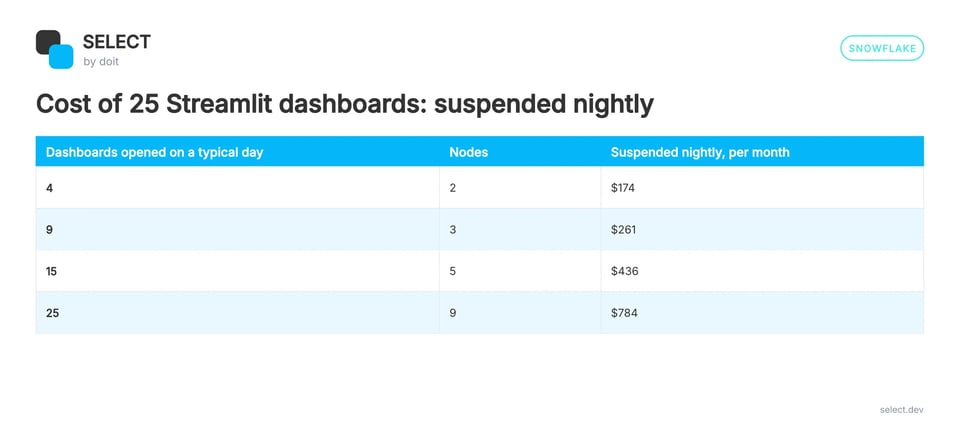
Now compare that to leaving all 25 running around the clock. Over time every dashboard gets opened, so you pay for 9 nodes, all month: $2,138. If only 4 dashboards get used on a typical day, the nightly suspend takes you from $2,138 to $174.
Pack your nodes. Dashboard number 4 costs you the same as dashboard number 6, so if you are going to pay for a second node, fill it.
Break-even vs Power BI
Power BI Pro is billed per user. At the $14 per user per month list price, every person who views a report needs a seat. Streamlit in Snowflake is billed per node. There is no platform fee and no seat fee.
So start from your headcount. Here is what Power BI costs at $24 per user per month (Premium), and how many dashboards the same money runs in Snowflake with the nightly suspend:
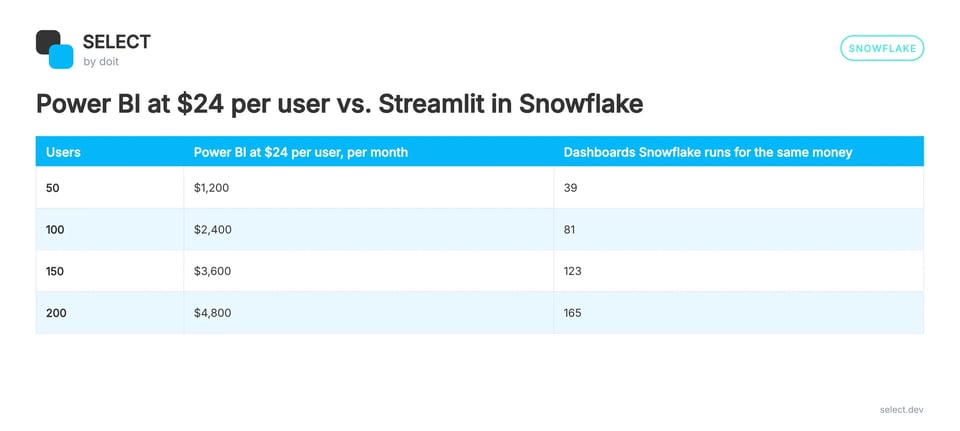
Read it like this. If 4 dashboards get used by 50 people, Power BI Pro is about $700 a month and Snowflake is $174. If 25 dashboards all get used by 40 people, Power BI is about $560 and Snowflake is $784, or $2,138 if you never suspend. The more people per dashboard, the better Snowflake looks. The more dashboards per person, the better Power BI looks.
Two honest caveats:
- Streamlit is code. Power BI is drag and drop. If your analysts cannot write Python (or are not fully AI enabled), the hosting savings may not matter.
- Power BI Premium Per User is $24 per user per month, and Fabric capacity removes the viewer seat for large deployments, but it starts around $5,000 a month. Check current prices before you build the business case.
Takeaways
- Use container runtime for dashboards people open frequently. Container runtime is my new default, as I prefer the cheaper per hour cost and I don’t want to comingle it with my Warehouse usage. I also like the user experience of fewer cold starts compared to Warehouses which you aggressively auto-suspend.
- Three dashboards per node. The fourth one starts a new node.
- The smallest node is about 0.11 credits per hour, 2.64 per day, about $238 a month at $3 per credit. Yes, the smallest node can host your dashboards, no problem. Data size does not matter; queries still run on Virtual Warehouses.
- Do not rely on the three day auto-suspend. Suspend the pool on a schedule.
- After a suspend, only the dashboards people open start billing again. You pay for what gets used, not what is deployed.
- Budget for a 45 second cold start, and tell your users about it.
- Past a few dozen viewers, per node billing beats per seat billing.
If you want help sizing a Streamlit setup or finding where your Snowflake credits are going, we’d love to hear from you. Please reach out!