

TL;DR
Databricks split Genie into three tools plus the automated layer underneath them: Genie One (ask questions), Genie Agents (encode business context), Genie Code (build and debug), and Genie Ontology, the automated context layer that powers all three. Genie One, Genie Agents, and Genie Code are generally available. Genie Ontology is in public preview. Here's what each one actually does, which to reach for first, and what the whole family costs to run.
Ask five people on your data team what "Genie" means in Databricks right now, and you'll probably get five different answers. That's not a training gap. Databricks renamed and restructured Genie more than once through 2025 and 2026, and the pace hasn't slowed. What used to be one conversational assistant is now four separate products, each covering a different piece of working with data through natural language instead of hand-written SQL: getting an answer, building something, or grounding the other two in real business context. Here's what each one does, how they fit together, and which one to use first.
Why did Databricks split Genie into four products?
Genie started in 2025 as a single feature: a chat box for asking data questions in plain English, part of what Databricks called AI/BI Genie. Databricks kept building around it from there. The simplified business-user interface, Databricks One, became Genie One. The assistant that lived in your notebooks, Databricks Assistant, became Genie Code. The workspace where teams defined reusable questions, Genie Spaces, became Genie Agents. By June 2026, all three reached general availability under one brand: Genie.
The timing isn't a coincidence. Gartner expects 40% of enterprise applications to carry task-specific AI agents by the end of 2026, up from less than 5% in 2025. Every vendor is racing to attach an agent to its product. The harder problem, the one most vendors skip past, is getting that agent to actually know your business. That's what the four-way split is really about: separating the interface (Genie One), the business context (Genie Agents), the build tooling (Genie Code), and the knowledge layer underneath all of it (Genie Ontology). All four work the same way whether your workspace runs on AWS, Azure, or Google Cloud.
What does Genie One do?
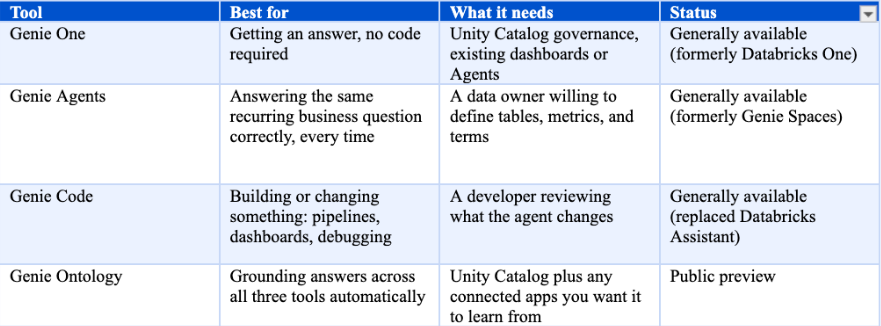
Genie One is the front door. It's a chat interface, available on the web, in Slack, in Microsoft Teams, and on mobile, where anyone can ask a question about governed data in plain language and get a chart, a dashboard, or a written answer back. Databricks built it for business users first, but nothing stops a data engineer from using it too.
Genie One handles more than basic lookups. Ask something like "why are duplicates showing up in this table," and it investigates instead of just running a query. It draws on your existing dashboards, saved queries, and any Genie Agents you've built. Databricks called it Databricks One before folding it into the Genie brand.
What do Genie Agents do?
Genie Agents hold the business knowledge Genie One doesn't have on its own. An agent defines which tables to trust, what your company means by terms like "active customer" or "net revenue," and which example queries count as correct answers. Once someone builds that agent, anyone can chat with it and get a consistent answer, with no SQL and no ticket filed against the data team.
We tested this ourselves with a simple stock portfolio: $100 in Apple and $200 in Microsoft, bought in November 2024. The stock price history already existed in Unity Catalog. The portfolio itself didn't. Asked directly, Genie One correctly flagged what was missing instead of guessing, and offered to assume an equal split between the two stocks. Only after we built a Genie Agent that defined the actual holdings, the share counts, and the value formulas did the same question return a real answer: a $387.61 portfolio value against the original $300, a 29.2% gain, with the full calculation shown. The data hadn't changed. The context had.
What does Genie Code do?
Genie Code is the developer side of the family, and it replaced Databricks Assistant in 2026. It writes and runs code, builds pipelines and dashboards, debugs errors, and works directly with Unity Catalog tables, columns, and lineage.
The real difference from the old Assistant is that Genie Code is agentic. Give it a task, and it plans the steps, finds the right tables, writes the code, runs it, and checks its own output, closer to Claude Code or GitHub Copilot than a one-shot autocomplete. That also means it can execute code and modify or drop resources on its own. By default, it asks permission before each action. You can switch that to "always allow." Don't do that near production. One wrong step can delete something you won't be able to trace back afterward.
What does Genie Ontology do?
Genie Ontology sits underneath all three products, and it's still in public preview. It builds an automatic knowledge graph of your business: metrics, definitions, and the relationships between your data and the concepts your company actually uses, pulled from Unity Catalog plus more than 50 connected apps.
The goal is grounding. If someone asks for "net revenue," Genie shouldn't have to guess what that means. It should find the definition your organization already settled on and answer with that, not a plausible-sounding invention. That's the difference between a useful answer and a confident wrong one.
Which Genie tool should you use?
The choice is simpler than the naming suggests. Start by asking Genie One. If it answers reliably, you're done. If the question needs business context Genie doesn't have yet, that's your signal to build a Genie Agent. If the request is about building or changing something rather than asking about it, Genie One will say so and point you to Genie Code.
How much does Genie actually cost to run?
Genie has two separate bills, and only one of them is easy to see.
The first is LLM usage, measured in Databricks Units (DBUs). Every identified user gets 150 free DBUs of Genie Code usage each month. Genie One and Genie Agents stay free for user interactions through January 31, 2027. Usage beyond the free allowance bills pay-as-you-go. Service principals get none of this. Their usage bills from the first request, which is exactly where automated Genie usage tends to produce a surprise bill.
The second cost is compute. Genie's answers still have to run somewhere, usually a SQL warehouse or serverless compute. That bill is entirely separate from the Genie allowance and shows up as ordinary Databricks usage, with no line item that says "Genie" anywhere on it. Nearly every FinOps team now treats this kind of AI spend as part of the job: 98% manage some form of AI cost today, up from 31% just two years ago. Genie is a new version of a problem FinOps practitioners are already living with.
If you're already tracking Databricks spend closely, fold Genie into that process now, before usage scales past a handful of pilot users. A platform like SELECT for Databricks, which already reconciles DBU charges against the underlying cloud infrastructure cost, is a natural place to track Genie's compute footprint instead of treating it as a separate project. For the mechanics of how Databricks bills compute more broadly, see our breakdown of Databricks DBU pricing and tiers.
Pricing current as of August 2026. Genie's billing model has changed more than once this year. Check the Databricks pricing page before budgeting against these numbers.
What should you actually do first?
A few starting points, in order.
Ask before you build. If Genie One answers the question reliably today, you don't need an Agent for it. Build Genie Agents where the same business question comes up repeatedly and the answer depends on context that lives in someone's head, not in a table. Use Genie Code for actual build work: pipelines, dashboards, debugging, and multi-step changes. Keep permission prompts turned on anywhere near production.
Set a Genie budget in Unity AI Gateway before usage grows past a handful of people, and tag it databricks-product: genie. Additional tags are safe to add on top, since Genie budget tags are additive: they only make your reporting more granular, not less accurate. Watch the compute Genie triggers as closely as the LLM usage. McKinsey found that in any given business function, no more than 10% of organizations report they're actually scaling AI agents, and unclear cost and unclear value are a big part of why the rest stay stuck piloting.
Genie's advantage isn't the chat interface. It's the context sitting underneath it, and how well you feed that context matters more than which button you click first. We cover the full four-tool breakdown, the real cost test we ran ourselves, and how to keep Genie's compute attributable in our ebook, Databricks Genie Explained.
Frequently asked questions
What is Databricks Genie?
Databricks Genie is a family of four tools: Genie One for asking questions in plain language, Genie Agents for encoding the business context behind those answers, Genie Code for building and debugging, and Genie Ontology for grounding all three in your actual data.
Is Genie One the same thing as Databricks Assistant?
No. Genie One replaced Databricks One, the business-user interface for asking questions. Databricks Assistant became Genie Code, the developer tool. They serve different people and different jobs.
Is Databricks Genie free to use?
Partly. Genie One and Genie Agents stay free for user interactions through January 31, 2027. Genie Code gives each user 150 free DBUs of LLM usage a month, then bills pay-as-you-go. None of this covers the SQL warehouse or serverless compute Genie triggers, which bills separately at normal Databricks rates.
What does Genie Ontology actually do?
Genie Ontology builds an automatic knowledge graph of your business, its metrics, definitions, and the relationships between them, pulled from Unity Catalog and more than 50 connected apps, so Genie's answers ground in definitions your company already uses instead of a guess.
What happened to the original Databricks Genie?
The original AI/BI Genie, launched in 2025, evolved into what Databricks now calls Genie Agents by way of an interim product called Genie Spaces. "Genie" now refers to the whole product family, not just that one original feature.